
Still getting accounts linked after changing the UA in an anti-detect browser? This article explains three technical approaches to browser fingerprint modification and why changing isolated parameters without keeping them consistent is easy to detect, helping you judge how deeply your environment is configured.
Many people using anti-detect browsers have the same question: how does the tool actually help me “change my fingerprint”? Is the change deep enough, and can platform risk-control systems still detect it? If you have ever changed the UA, cleared the cache, and still found accounts being linked, this article is worth reading to the end. It is not just about how to fill in a single parameter; it explains the different technical approaches anti-detect browsers use to reduce cross-account linking.
First understand this: a browser fingerprint is a set of signals that can be cross-checked
A browser fingerprint is not one single value. It is a profile assembled from information exposed by the browser: operating system and kernel, User-Agent, screen resolution, language, time zone, fonts, Canvas rendering results, WebGL and GPU parameters, audio context, CPU and memory, and media devices such as microphones and cameras. Platforms combine these signals to judge whether activity comes from the same device or the same person.
The key point is that these signals are related to one another. For example, a browser with a Beijing time zone and English system language, combined with a 1366×768 screen and a WebGL renderer associated with a particular graphics card, may look inconsistent when a professional risk-control system cross-checks the values. So changing only one or two parameters is often not a case of “not changing enough”; the problem is that the changed values do not match the rest of the environment.
Three ways anti-detect browsers implement fingerprint changes, with very different levels of depth
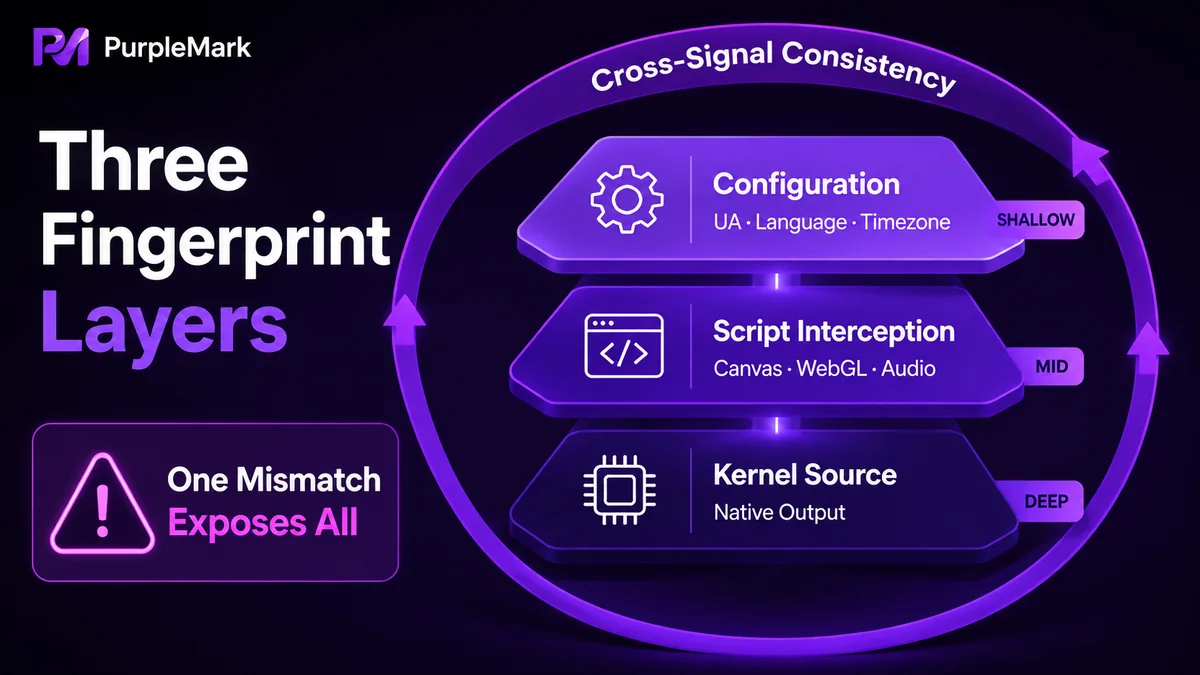
Most anti-detect browsers can be roughly grouped into three technical approaches. Understanding the difference helps you see where the “depth” of an environment comes from.
Approach one: change configuration parameters only. This modifies basic fields that the browser actively exposes, such as UA, resolution, language, and time zone. It is relatively easy to implement and was effective in earlier stages. The drawback is that these fields are interconnected. If you change only the UA to iPhone while the remaining signals still look like desktop Windows, cross-checking can reveal the mismatch.
Approach two: intercept returned values at the script layer. Scripts are injected to rewrite data returned to webpages by interfaces such as Canvas, WebGL, and AudioContext, so the platform reads a processed fingerprint. This goes deeper than basic configuration changes and covers more collection points. The trade-off is that the injection itself may leave detectable traces, and some risk-control systems check for abnormal script behavior.
Approach three: replace fingerprint sources consistently at a lower layer. Fingerprint-related data is handled closer to the browser-engine level, so the environment returns information whose source resembles a real browser instead of adding another script layer at runtime. Because the data behaves more natively, the environment is more consistent with normal browser behavior and is harder for routine checks to distinguish.
A reminder is important here: implementation depth is only one part of the picture. Even a deeply modified fingerprint is only one component of multi-account environment management. IP location, whether time zone and language match, whether WebRTC leaks the real IP, whether Cookie and account data are actually isolated, and whether operating behavior is consistent all contribute to the overall credibility of an environment.
To judge whether an environment is “deep enough,” check these dimensions
Instead of relying only on marketing claims, check whether your environment tool can configure the following signals in a coordinated way:
- Can basic information be linked together as one profile? Can the operating system, kernel version, UA, language, time zone, and geolocation be configured together in one environment instead of changing only the UA? Geolocation should typically support options such as “follow IP,” “use real value,” or “custom.”
- Can high-distinctiveness fingerprints be covered? Can commonly used identification signals such as Canvas, WebGL rendering information, WebGPU, WebRTC, audio context, and font lists be configured independently?
- Can hardware signals be managed? Can hardware-related information such as CPU core count, memory size, device name, and MAC address be set per environment to avoid contradictions such as a mobile environment reporting desktop CPU characteristics?
- Are sessions and data truly isolated? Does each environment maintain its own Cookie and local data without mixing them, so the login state of account A does not leak into account B?
If a tool exposes all of these dimensions for configuration and lets you manage them in one place, it gives you more room to build an internally consistent environment rather than a collection of unrelated parameter changes.
Use PurpleMark to configure a self-consistent fingerprint profile
For coordinated configuration, PurpleMark brings parameter relationships into the normal workflow. When you create a browser environment, most fingerprint-related signals are available on one settings page: operating system, Chromium engine version, User-Agent, resolution, browser and interface language, time zone and geolocation (follow IP, use real value, or custom), plus font lists, WebGL metadata, WebGPU, WebRTC, CPU, memory, device name, MAC address, and more granular controls for Canvas, WebGLImage, AudioContext, media devices, ClientRects, and speech.
The value of keeping these settings together is that when you create an environment for a business region in PurpleMark, you can configure the system, engine, language, time zone, geolocation, and rendering-related signals in the same place so they match the target region. You do not need to piece together parameters scattered across different pages only to have them contradict one another later.
When operating multiple accounts or markets, you can create separate environments by platform, store, client, or region. Each environment can use an independent parameter set, Cookie, and local data, while grouping and account binding help you quickly find the correct environment. When a new environment needs to reuse a proven configuration, PurpleMark global settings can also save common preferences as workspace defaults, reducing repetitive setup.
If you are new to this, open the PurpleMark web app and create an environment. Start by configuring region and language, which have a strong effect on consistency, so you can see the difference between coordinated parameters and a randomly assembled profile. When you need local browser capabilities, install the client from the download page and return to your workspace.
Frequently asked questions
Can changing only the User-Agent prevent accounts from being linked? Only to a limited extent. UA is just one of many signals a platform can collect. If the operating system, resolution, language, time zone, rendering results, and other signals are not adjusted together, cross-checking can make inconsistencies more obvious. For a credible environment, related parameters should be configured together and kept consistent.
Is a fingerprint always safer when it is modified at a “lower level”? Implementation depth can make a difference, but safety is not determined by one layer alone. Whether the IP matches the region, whether WebRTC leaks information, whether Cookie data is isolated, and whether operating behavior is consistent all affect the credibility of an environment. When choosing a tool, look at whether it can manage environment parameters, network settings, sessions, and day-to-day operations together rather than comparing only how “deep” the fingerprint modification is.


