
Canvas fingerprinting is one of the most common browser fingerprinting techniques. Websites use it to identify devices and track users. This guide explains how Canvas fingerprints work, how they differ from other fingerprints, how to detect them, and how ordinary users can protect their privacy.
Every click you make while browsing, every mouse movement, your device model, and your operating system version can be combined by a website into a unique identifier—this is known as a browser fingerprint. Among the many fingerprinting techniques, Canvas fingerprinting is one of the most common and stable. It is invisible to users, yet websites have long used it to identify visitors.
What Is Canvas?
Canvas is a drawing element provided by HTML5, essentially a blank drawing surface embedded in a web page. Developers can use JavaScript to draw graphics, text, and images on it, enabling charts, games, image processing, and many other visual effects. Canvas is behind many of the interactive effects you encounter on modern websites.
How Is a Canvas Fingerprint Created?
Even when different devices are asked to “draw the same graphic,” the results are not perfectly identical. That is because the rendering process depends on both hardware and software:
- Graphics card and drivers: Graphics are rendered by the GPU, and different GPUs and drivers handle anti-aliasing, gradients, and colors slightly differently;
- Operating system: Windows, macOS, and Linux differ in font rendering and graphics interface implementations;
- Browser and engine: Different browsers implement the Canvas API differently;
- Display and color settings: Color gamut, gamma, and related settings can also affect the final output.
A website typically asks the visitor's browser, via a script, to draw the same content on a Canvas—usually a combination of graphics and text. It then converts the canvas content into image data and calculates a hash. Because rendering results vary by device, that hash becomes a relatively stable “device fingerprint.”
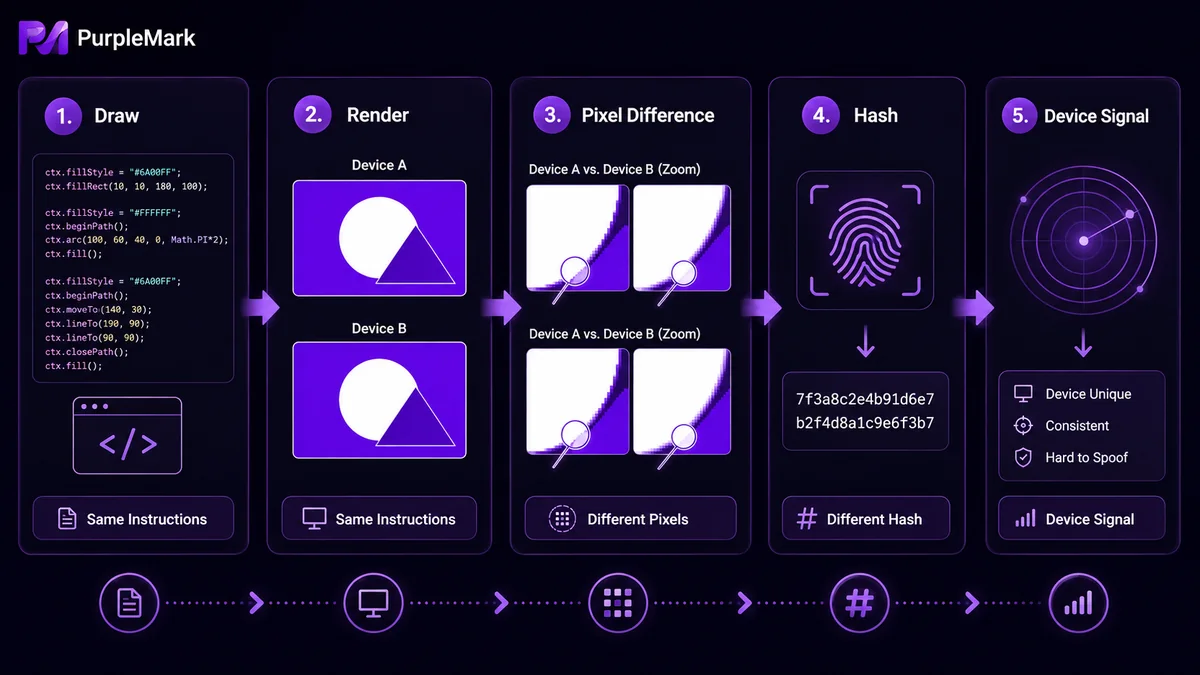
To understand how subtle the differences can be: the same graphic rendered on two devices may differ only by a few anti-aliased edge pixels, yet the resulting hashes can be completely different—enough to distinguish one device from another.
What Can Canvas Fingerprinting Be Used For?
- Identification and tracking: A website can remember your device through its Canvas fingerprint even when you are not signed in, linking your activity across pages and sometimes across sites;
- Anti-fraud and risk control: E-commerce, payment, and social platforms may use Canvas fingerprints as one risk signal to help identify unusual behavior such as bulk registrations or account sharing;
- Ad targeting: Some advertising networks use it to build cross-site behavioral profiles.
It is important to note that a Canvas fingerprint usually cannot determine “who you are” on its own. It is typically one signal among many. When combined with information such as IP address, User-Agent, time zone, and installed fonts, its identification capability becomes much stronger.
Differences Between Canvas, WebGL, and Font Fingerprints
All three belong to the broader category of fingerprints based on device rendering differences, but they come from different sources:
- Canvas fingerprint: Derived from differences in 2D Canvas rendering results;
- WebGL fingerprint: Derived from 3D graphics rendering. Websites may read graphics rendering parameters, such as the WebGL vendor and renderer strings, to identify devices;
- Font fingerprint: Detects the list of fonts installed on the system to infer the operating system and device.
They are often used together as “device environment characteristics” within website risk-control systems.
How Can You Check Your Own Canvas Fingerprint?
You can test it with public fingerprint-checking websites such as BrowserScan or PixelScan. Searching for “browser fingerprint test” will also reveal similar tools. These sites typically display information about your Canvas, WebGL, fonts, time zone, and other fingerprints. If the result says a Canvas fingerprint exists or shows a stable hash, it means your device can be marked in this way. Keep in mind that results from third-party testing sites are only references and do not represent the official determination of any platform.
How Can Ordinary Users Protect Themselves?
Completely eliminating Canvas fingerprinting is difficult because Canvas is a normal browser feature. However, you can reduce tracking exposure:
- Use a privacy-focused browser or enable your browser's privacy/strict tracking-protection mode;
- Install fingerprint-blocking extensions that block Canvas reads or inject noise;
- Regularly clear cookies and site data to reduce long-term links between fingerprints and account activity;
- Keep your operating system and browser updated, as newer browsers include more built-in restrictions against fingerprint tracking.
What If You Need to Manage Multiple Business Environments?
For cross-border operations and multi-account management, the issue is different. The goal is not to “hide yourself,” but to let each business account run in a stable, controllable environment and reduce false positives caused by device characteristics interfering with one another.
PurpleMark allows Canvas, WebGL, fonts, and other fingerprint parameters to be configured when creating a browser environment, so different environments can present different device characteristics while keeping those parameters consistent within each environment. This helps each store or account maintain a stable “device profile” over long-term operation instead of changing every time it is opened. It is important to emphasize that fingerprint parameters are an environment-configuration capability. Actual business compliance still depends on whether you follow the policies of the platforms you use—environment management tools cannot and should not be used to impersonate identities or bypass platform rules.
Frequently Asked Questions
Can a Canvas fingerprint uniquely identify a person? Rarely by itself. It is usually one signal in a larger combination, and identification becomes stronger when it is combined with IP address, system information, and behavioral data.
Can disabling JavaScript prevent Canvas fingerprinting? It can stop most websites from collecting it, but it also prevents many websites from working normally. Privacy-focused browsers and fingerprint-blocking extensions are usually a more balanced option.
Is Canvas fingerprinting a virus? No. It is a normal website scripting technique, not malware, although it does involve privacy tracking, which is why it is controversial.
Does an abnormal result on a fingerprint-testing website mean there is something wrong with my device? Not necessarily. Different testing tools use different algorithms and reference databases, so their results are only for reference. What matters most is the actual status of your account on the platform you use.


