
Do newly registered Facebook accounts keep getting restricted or even disabled? This guide explains how to prepare your environment and profile, then follows a four-step rhythm—build a normal user profile, increase interactions, develop social connections, and only then begin operations—plus environment-management advice for multiple accounts.
For cross-border e-commerce, independent websites, and overseas social media operations, Facebook remains an important customer-acquisition channel. But many new accounts run into the same problem: they are restricted soon after registration, disabled before formal operations even begin, or repeatedly asked to verify their identity.
There is no “quick trick” to nurturing a Facebook account. The key is to build a stable, authentic usage history. From the login environment and daily actions to social behavior, every step can affect how much the platform trusts the account.
What Is Account Nurturing and Why Does It Matter?
Account nurturing means using an account in a relatively stable device and network environment while continuously performing normal browsing, interaction, and social activities, so the account gradually builds an activity history and becomes more stable.
Newly registered accounts tend to attract more platform scrutiny. Adding large numbers of friends immediately after registration, posting promotional content right away, or frequently changing login environments can trigger risk controls. In contrast, accounts with a longer usage history, a stable login environment, and natural interaction patterns are more likely to gain platform trust.
A stable Facebook account can be used to create and manage Business Manager (BM), operate brand Pages, use Marketplace, participate in Groups, and continuously drive traffic to independent websites and stores.
What Should You Prepare Before Nurturing a Facebook Account?
Many accounts are restricted not because they operate too frequently, but because device, network, or profile issues are present from the very beginning. Preparing the following items in advance can make the nurturing process smoother.
1. Use a stable and independent login environment
The device environment is an important signal Facebook uses to judge whether an account is behaving normally. If you manage only a small number of accounts, it is best to keep using the same computer or phone for each account rather than switching devices frequently.
When logging in on a computer, you can create separate browser profiles for different accounts to prevent Cookies, cache, and local data from affecting one another. Long-term use of the same browser environment for multiple accounts may increase the risk that the accounts are associated.
2. Keep the network environment stable
Facebook records the login IPs used by an account over time. If an account frequently switches logins between different countries or regions, or changes IP addresses repeatedly within a short period, the system may treat the activity as unusual.
Try to log in from a consistent region and network route. If a proxy is needed, prioritize a static residential IP / ISP residential IP, and keep parameters such as the browser environment’s time zone and language consistent with the IP location.
3. Complete the basic account profile
Do not rush into marketing immediately after creating the account. First take time to complete the profile: use a clear, authentic profile photo, a name that fits local conventions, a linked email address and phone number, information such as hometown and school, and a simple bio. The more complete the profile, the more credible the account appears and the easier later identity verification may be.
4. Enable account security settings
Link an email address you regularly use, enable two-factor authentication (2FA), and save recovery information. These settings improve account security and make recovery more efficient when unusual logins or identity-verification requests occur.
A Four-Step Facebook Account Nurturing Process
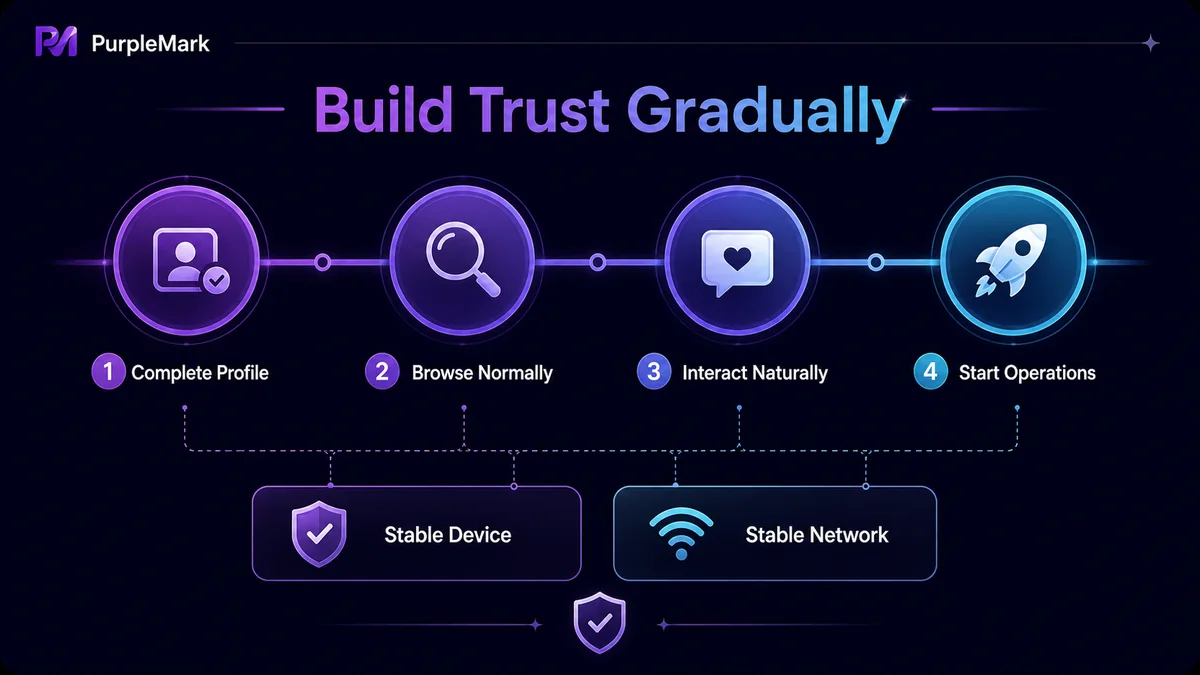
Step 1: Build a normal user profile first
After registration, first let the account behave like an ordinary user. Focus on browsing content: view the home feed, read topics you are interested in, watch short videos, follow a few Pages, and complete the profile photo and bio. The goal at this stage is to let Facebook record normal browsing behavior rather than rushing into promotion.
Step 2: Gradually increase interactions
Once the account can log in consistently and no longer receives frequent verification prompts, gradually add interactions: like and comment on interesting posts, follow industry-related Pages, share everyday content, reply to comments, and join interest Groups. Keep all actions natural. Do not like or comment dozens of times in a row, and do not use exactly the same wording for every interaction.
Step 3: Build your own social connections
Facebook is fundamentally a social platform, so an account with genuine social relationships better matches the platform’s expectations of a normal user. You can add friends in moderation, but prioritize people you know or users with similar interests instead of sending a large number of friend requests at once. After joining Groups, take part in normal conversations first and gradually build an activity history.
Step 4: Then begin commercial operations
After the account has accumulated some usage history, gradually begin marketing activities: create a Page, publish brand content, manage Business Manager, and respond to customer inquiries. Even after formal operations begin, keep the pace controlled. Avoid suddenly posting or sending private messages in large volumes, and maintain a usage frequency close to that of a normal user. Stable long-term operation is healthier for the account than short-term high-frequency activity.
How Can You Improve Management and Nurturing Efficiency for Multiple Accounts?
As the number of accounts grows, logging in and switching accounts one by one in an ordinary browser becomes cumbersome. Mistaken logins, mixed Cookies, or inconsistent environments can also increase association risk. The core of multi-account operations is to give each account an independent and stable operating environment.
Using the web version of PurpleMark as an example, you can do the following:
- One account, one environment: Create an independent browser environment for each Facebook account. Cookies, cache, and fingerprints are not shared between environments, making them appear as separate devices to the platform;
- Bind a stable proxy: Configure a static proxy in the corresponding region for each account, and keep the environment’s time zone and language consistent with the IP region. Maintaining proxies and environments separately also makes checks easier;
- Reduce repetitive work with batch operations: During the cold-start stage, basic actions such as browsing and liking can be performed across multiple environments using window synchronization, improving efficiency while maintaining a natural rhythm;
- Automate routine maintenance: Teams can arrange repetitive workflows such as scheduled logins, browsing the home feed, and watching videos as RPA tasks, reducing manual workload while keeping accounts continuously active;
- Share environments with an audit trail: When multiple team members collaborate, shared environments, member permissions, and operation logs can clarify who manages which accounts.
It is important to emphasize that the purpose of account nurturing is not to evade platform rules. It is to build trust gradually through continuous, authentic, and natural use. Independent environments are intended to support compliant management of accounts you own; whether operating multiple accounts is permitted should be determined by Facebook’s Terms of Service.
Frequently Asked Questions
How long does Facebook account nurturing take?
There is no fixed duration. In general, a new account can first maintain normal browsing and light interaction for 1–2 weeks, then gradually increase social activity before beginning operations. The key is to progress step by step rather than follow a rigid countdown.
What should I do if a new Facebook account is restricted?
First complete identity verification according to the platform’s prompts and make sure the profile information is authentic and complete. In daily use, reduce activity frequency and keep the device and network environment stable; this can usually reduce the chance of triggering restrictions again.
Can I add friends during the nurturing period?
Yes, but control the pace. Prioritize people you know or users with mutual friends, and avoid sending a large number of friend requests at once so the behavior is not judged as unusual.
Does account nurturing require a fixed IP?
Frequently changing regions and IP addresses is not recommended. Logging in over the long term from the same region through a stable network makes the account less likely to be treated as an unusual login from another location. If you need a proxy, choose a stable residential IP.
Can multiple accounts being nurtured together become associated?
If multiple accounts share the same browser environment, Cookies, or IP, there is a risk that they may be associated. A more reliable approach is to give each account an independent browser environment and network configuration.


