
For teams managing multiple Facebook Pages across different brands or markets, the hardest part is not creating content but keeping content, followers, and account data organized. This guide breaks down the key actions for multi-Page operations, from content planning to account management.
Almost everyone in foreign trade and cross-border e-commerce uses Facebook. Its large audience and precise targeting make it a direct way to reach overseas customers. But for many teams, the real challenge is not “how to publish a post” — it is how to run several Pages at the same time without creating confusion or problems.
This article covers a few operational steps that are easy to overlook when managing multiple Pages.
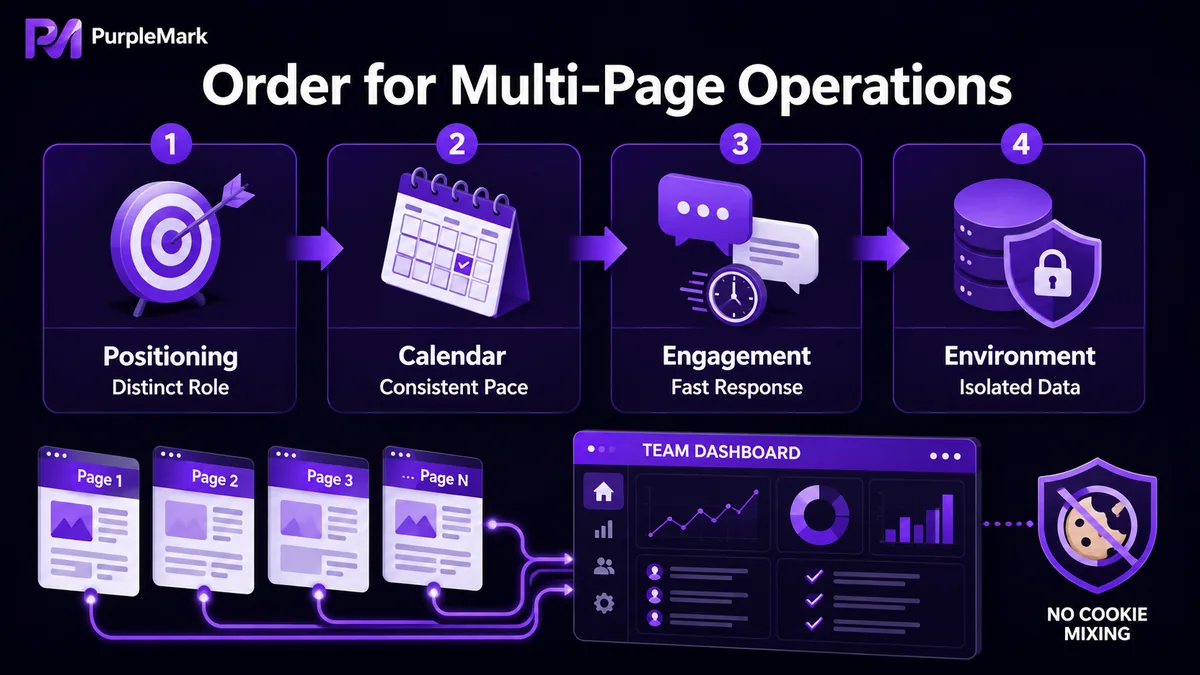
Define a role and schedule for each Page instead of posting at random
You can be more spontaneous with a single Page, but multiple Pages quickly become messy if they are not clearly differentiated. Before operating them, clarify two things:
- Positioning for each Page: Is it a brand Page, an industry-news Page, or mainly for product recommendations? Keep the identity and content focus of each Page distinct. Repeatedly pushing the same material across several Pages can weaken credibility instead of strengthening it.
- Content calendar: Plan the posting rhythm in advance and schedule posts around the active hours of each target market. Consistent output is better for building stable exposure than occasional bursts of intensive posting.
Make content useful instead of filling the Page with hard-sell ads
A common reason Pages fail is that “everything is a product ad.” Constant hard selling can tire users and may also make the account look overly promotional, which can reduce reach.
A more effective approach is to diversify content types:
- Cover trending topics and industry news your target customers care about;
- Share high-quality third-party content when appropriate and add your own point of view;
- Mix images, videos, and Q&A so the Page feels like an account that is genuinely being managed rather than an advertising machine.
Followers need ongoing engagement, and fast responses matter
The size of a Page’s follower base affects how far its content can spread, but followers do not appear on their own:
- Build attention through high-quality content, campaigns, and appropriate interactions with people and other Pages;
- When users comment or send a private message, responding promptly is especially important. If interested users do not receive a reply, they may turn to a competitor, and poor responsiveness can also hurt the Page’s engagement performance.
Publish more content with real-world context to strengthen the Page
Adding location and context tags where appropriate can guide online attention toward a physical store or event and also make the account feel more authentic and actively operated. It is a small but useful way to improve Page credibility.
The biggest multi-Page risk: mixed account data
Everything above is about improving content. But what often causes real trouble when running multiple Pages is confusion at the account-data level.
Many teams use the same computer and the same browser to switch back and forth between several Pages. The problem is that login sessions, Cookies, and browser fingerprints for different Pages can overlap in the same environment. Facebook has its own systems for identifying relationships between accounts, and if several Pages are considered abnormally linked, restrictions may affect more than one of them at the same time.
If you manage multiple Facebook Pages, especially a matrix for different entities or brands, you can learn about PurpleMark. It can create a separate browser fingerprint, Cookie set, and local-storage environment for each Page account, keeping accounts, proxies, and operating spaces separated by account. That lets different Pages remain independently logged in on one device. With account grouping and team permissions, multi-person management can also be clearer and more traceable.
Reminder: Follow Facebook’s platform policies. Isolating environments for multiple Pages is intended to keep account data organized and team responsibilities clear, not to create accounts or bypass rules that Facebook does not allow. Overseas customer development and marketing should always stay within a compliant framework.
Conclusion
Successful multi-Page operations are not about “volume” but about “order” — clear content positioning, a steady publishing rhythm, active follower engagement, and clean separation of account data. Get these fundamentals right and each Page can build its own value instead of creating extra work and cross-account complications.


