
If you do not want to expose your real primary email address everywhere, Gmail’s dot handling, plus addressing, and googlemail.com domain can be used as aliases to separate different purposes. This guide explains how these three alias mechanisms work, what they can and cannot do, and compliant ways to use them for privacy protection and business separation.
Sometimes you may not want to expose your real primary email address everywhere—for example, when signing up for a one-off service, running a test, or simply separating messages for different purposes to reduce spam and privacy exposure. Gmail has a built-in “alias” mechanism that lets you create multiple addresses that look different without creating new accounts. This guide explains how it works, how to use it, and its limits.
What is a Gmail alias
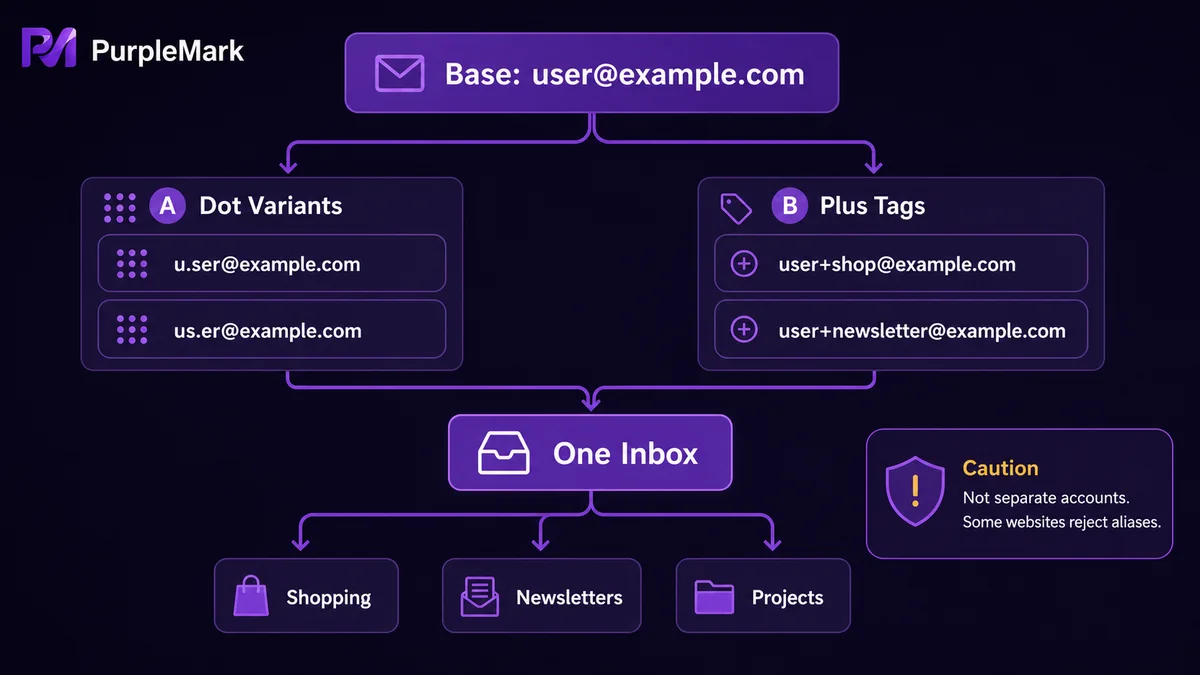
A Gmail alias is not a separate email account. It is a “variant address” of the same primary mailbox. No matter how many aliases you create, messages ultimately arrive in the same inbox. Aliases are useful for separating purposes and protecting privacy, not for creating a genuinely independent mailbox.
Three ways to create aliases
1. Dots are ignored
Gmail ignores dots in the username. In other words, your.name@gmail.com and yourname@gmail.com point to the same inbox. You can add or remove dots in different positions, such as you.rname@gmail.com.
2. Plus suffixes
Add + followed by any characters after the username, such as yourname+shop@gmail.com or yourname+news@gmail.com. Messages sent to these addresses will also arrive at yourname@gmail.com. This is especially useful for “tagging” addresses by business line or purpose so Gmail filters can sort them automatically.
3. Switch the domain
Google supports both gmail.com and googlemail.com. For example, yourname@googlemail.com also corresponds to the same account.
4. Combine the methods
The methods above can be combined. For example, your.name+shop@googlemail.com creates another variation.
What these aliases are useful for
- Separate different business uses: Use addresses with
+tags for websites, promotions, memberships, delivery confirmations, and other purposes, then classify them automatically with Gmail filters to reduce noise in the main inbox. - Privacy protection: When you do not want to expose your real primary address, you can provide an alias and still receive mail normally.
- Testing and temporary use: When registering for a one-off service or running a limited test, use a dedicated alias and stop using it afterward, making activity easier to track.
Limits you should understand first
An alias is ultimately just a variation of the same Gmail account, not a separate identity. Therefore:
- It should not be used to “register multiple independent accounts” on the same platform, because the inbox is still the same and the service may still identify the registrations as belonging to the same account holder;
- It is not suitable for bypassing a platform’s “one person, one account” requirement, which may violate platform rules;
- If an alias has been exposed publicly, it can still receive spam. Aliases cannot completely prevent unwanted messages.
How to keep multiple business email logins organized
If you legitimately own multiple independently registered email addresses or business accounts and need to switch among platforms, repeatedly signing in and out within the same browser can become confusing. In that case, a browser environment management tool such as PurpleMark can be used to create a separate browser environment for each business, bind the corresponding account to that environment, and organize them into groups. You can then open the environment for the business you need, reducing the risk of using the wrong account or sending and receiving from the wrong mailbox. For cross-border e-commerce and multi-platform teams, this also makes it easier to assign member permissions by business line and retain operation records. When needed, you can open the PurpleMark web version and first organize each business account environment into groups.
Summary
Gmail’s dot, plus, and domain aliases are practical tools for separating purposes and protecting privacy. Combined with filters, they can make an inbox much easier to manage. But remember: aliases are variations of the same account. They are suitable for distinguishing use cases and protecting privacy, not for creating multiple independent accounts or bypassing platform rules. When managing multiple independent business accounts, keeping each account’s login environment separate is a more reliable approach.
Frequently asked questions
Are Gmail aliases safe to use? Yes, when used for compliant purposes such as separating use cases, protecting privacy, or testing. Do not use them to register platform accounts that require separate identities or explicitly prohibit duplicate registrations.
Where do emails sent to an alias appear? They all appear in the inbox of the primary Gmail account. With filters or labels, messages sent to different aliases can be categorized automatically for easier separation.
Can aliases receive spam? Yes. If an alias has been shared publicly, it may receive spam. Aliases are mainly useful for filtering and separation; they cannot completely eliminate unwanted messages.


