
Was your new Instagram account banned right after registration, or did an active account suddenly get restricted? This guide explains 6 common reasons for Instagram bans, how to handle temporary blocks, shadow bans, and permanent bans, and compliant ways to reduce risk when managing multiple accounts.
Instagram applies strict account-management controls, and many users have encountered situations where an account is “banned right after registration” or suddenly becomes restricted during normal use. The reasons for an account ban are not exactly the same as those for a temporary restriction. This guide first explains the most common causes, then covers how to respond to different types of bans.
Common Reasons Instagram Accounts Get Banned
1. Too many actions in a short period
Instagram uses automated detection systems to identify automated or bot-like behavior. Following, liking, or commenting excessively within a short period may cause an account to be flagged as spam, resulting in restrictions or a ban.
2. Abnormal activity on a new account
Newly registered accounts are monitored more closely. If a new account becomes overly active before gradually building trust—for example, following many users or posting frequently—it may be treated as suspicious. This is one of the main reasons an account can be “banned right after registration.” New accounts should build activity gradually and increase usage step by step.
3. User reports
Instagram allows users to report suspicious or rule-breaking behavior. If an account receives a large number of reports, the platform may take enforcement action, including a ban.
4. Copyright or intellectual-property infringement
Using other people’s images, music, or other copyrighted material without permission may lead to a ban for copyright or intellectual-property infringement.
5. Posting inappropriate content
Sharing violence, hate speech, or other content that violates Instagram’s Community Guidelines can trigger enforcement. Instagram monitors content through a combination of automated systems and human review.
6. Logging in from multiple IPs or devices
Logging into the same account from multiple IP addresses or devices can trigger security alerts. Because this pattern is often associated with account theft or fraud, Instagram may block the login or impose a temporary restriction.
Types of Instagram Bans and How to Handle Them
Temporary block
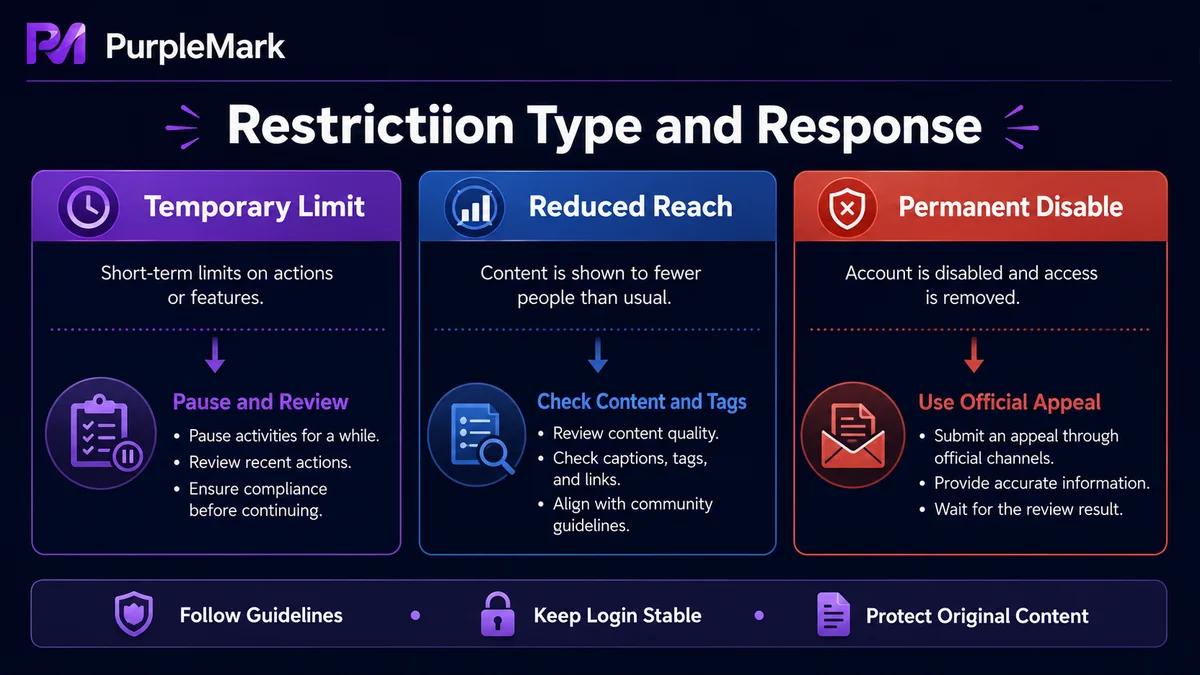
If you perform too many actions in a short period—such as following, liking, or commenting—Instagram may temporarily restrict those features. A single piece of content that violates the rules may also be removed with a warning. Temporary blocks are often lifted automatically within a few days. During that period, avoid unnecessary actions, review your account content for compliance with the Community Guidelines, and avoid behavior that could be interpreted as automation.
Shadow ban
After a shadow ban, posts may mainly be visible to existing followers and may no longer appear on public hashtag or location pages, sharply reducing visibility. If you suspect a shadow ban, try using fewer hashtags, remove hashtags that may be considered abusive, pause posting for a period, and use “Report a Problem” in Settings to contact Instagram. The restriction may be lifted automatically after some time.
Permanent ban
Repeated or serious violations can result in a permanent ban, making all content, followers, and account data inaccessible. If you believe the ban was applied by mistake, you can submit an appeal through the Instagram Help Center, provide accurate information and a clear explanation, and wait for platform review and identity verification.
Compliant Operations: Ways to Reduce the Risk of a Ban
- Follow the Community Guidelines: Do not post prohibited content or infringe intellectual property. This is the most important rule for avoiding bans;
- Keep a reasonable action pace: Avoid following, liking, or commenting excessively in a short period, and keep activity patterns natural;
- Build up new accounts gradually: Let newly registered accounts establish normal activity before starting intensive marketing;
- Keep the login environment stable: Avoid frequently changing IPs and devices for the same account, especially rapid switching across regions;
- Separate multiple accounts: If you legitimately manage multiple accounts, avoid having every account share the same IP and device environment.
How to Manage Multiple Accounts More Reliably
For teams that need to manage multiple IG accounts, account-environment management is just as important as content and engagement strategy. When multiple accounts repeatedly log in from the same device and the same IP, they may be identified as related accounts or automated activity.
A more controlled approach is to give each account an independent browser environment. Using the web version of PurpleMark as an example:
- Create a separate browser environment for each Instagram account so fingerprints, Cookies, and cache are not shared between environments;
- Configure a corresponding proxy IP for each account to avoid multiple accounts sharing the same outbound IP;
- Group accounts by business purpose and use member permissions and activity logs to make it clear who manages each account.
Independent environments are intended to support compliant management of multiple accounts you legitimately control, helping prevent mixed environments and operational mistakes. Having multiple Instagram accounts is not inherently against the rules, but you should follow the platform’s Community Guidelines and Terms of Service and avoid prohibited behavior.
Frequently Asked Questions
Will having multiple Instagram accounts get me banned?
Having multiple accounts by itself does not cause a ban, but poor management—such as every account sharing the same IP or engaging in spam-like behavior—may trigger restrictions. Using multiple accounts reasonably and in compliance with the rules is generally acceptable.
How can I avoid system blocks when managing multiple IG accounts?
Avoid behavior that looks automated or spammy. Do not mass-like, comment, or follow within a short period; respect the platform’s activity limits; keep each account’s behavior natural; and, where practical, give different accounts separate devices or environments.
What is a browser profile?
A browser profile stores a user’s personalized settings and data, such as history, extensions, Cookies, and cache. In an anti-detect browser, each profile corresponds to an independent environment and fingerprint, helping each account operate in a separate context and reducing accidental environment mix-ups when managing multiple accounts.
How long does a temporary Instagram block usually last?
It is often lifted automatically within a few days, though the exact duration depends on the severity of the violation and the platform’s assessment. During the restriction, it is best to stop unnecessary activity and remove any content that may violate the rules.
Can a permanently banned account be recovered?
You can try appealing through the Instagram Help Center. Provide accurate information and a reasonable explanation, complete any identity verification required by the platform, and wait for Instagram to decide whether the appeal is approved.


