
TikTok account registration usually fails because of network issues, a phone number or email that is already linked, verification codes not arriving, or incorrect registration details. This guide walks through the most common causes step by step so you can identify where the signup process is getting stuck.
If you get stuck at a certain step while creating a TikTok account, it is easy to assume the platform itself is having problems. In practice, most failures come from a few specific issues. This guide helps you troubleshoot in the order “network → phone number/email → verification code → registration details,” which usually makes it easier to find the cause.
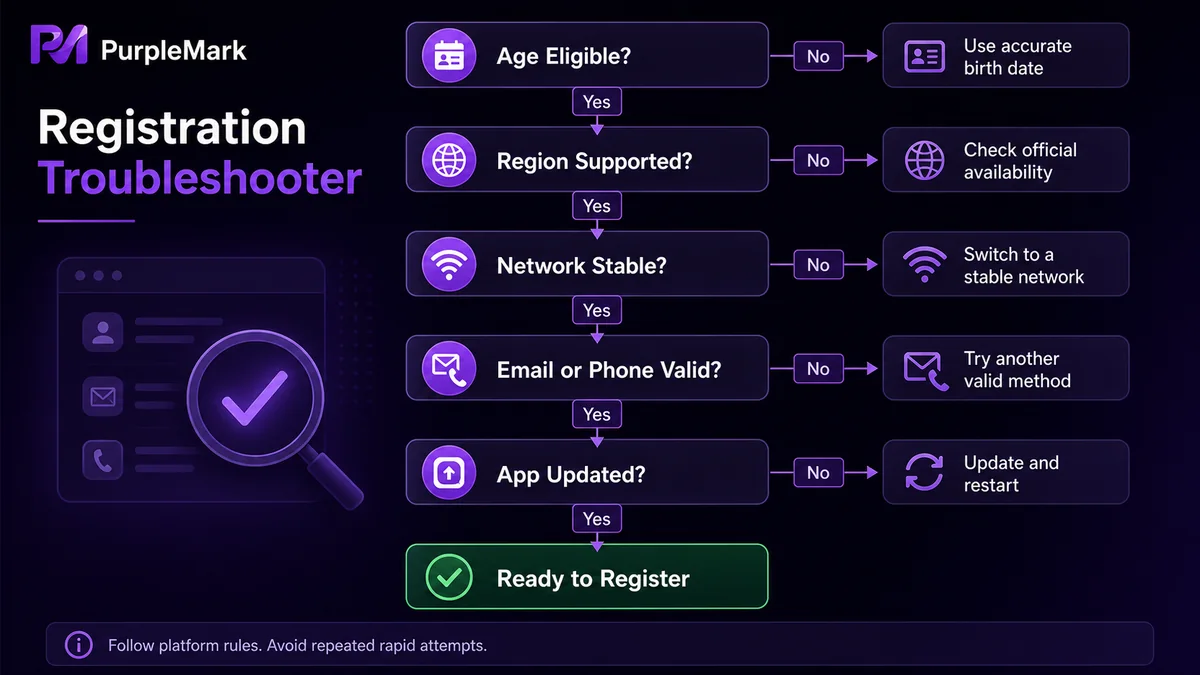
First confirm: Is TikTok supported in your region?
TikTok availability varies by region, and the service cannot be registered for or used normally in every country or territory. If TikTok is not available where you are located, you may be unable to complete registration. This is the first thing to establish before troubleshooting anything else. If you are clearly in an unsupported region, checking the network or device is unlikely to help, so first confirm the app’s actual availability in your location.
Unstable network connection
Registration requires continuous data transmission and delivery of verification codes. If the network signal is weak, slow, or frequently interrupted, registration requests may time out or verification codes may fail to arrive, interrupting the process. Try switching to a stable connection, such as reliable home broadband or a stable mobile network, and then register again.
The phone number or email has already been used
- Phone number: A phone number can generally be linked to only one TikTok account. If the number you enter has already been registered, the system may reject it even if the number belongs to you.
- Email: Verification emails may be mistakenly classified as spam or blocked by security filters, so they do not appear in your inbox. Check the spam folder first and add TikTok emails to your allowlist.
Incorrect registration details
- Date of birth: TikTok has age requirements. If the birthday entered during registration makes the user younger than the platform’s minimum age, registration cannot continue. Make sure the birthday is accurate.
- Password: The password must meet the platform’s complexity requirements, typically including letters, numbers, and special characters with a minimum length. A password that is too simple or does not meet the rules can cause registration to fail.
One-step troubleshooting checklist
- Confirm that TikTok is available in your current region;
- Switch to a stable network and try registering again;
- Use a phone number or email address that has not previously been registered with TikTok;
- Check the email spam folder to see whether the verification message arrived;
- Verify that the birthday is correct and the age meets the requirement;
- Set a strong password that meets the complexity rules;
- If registration still fails, follow the registration and account guidance in TikTok’s official Help Center.
Summary
Most TikTok registration failures fall into a few categories: regional availability, network issues, a phone number or email already in use, verification codes not arriving, or incorrect registration details. Check them in the order above and you can usually identify and resolve the issue quickly. When a rule is unclear, rely on TikTok’s official help documentation rather than unverified “registration bypass” tutorials, which may be unreliable and create account or information security risks.
Frequently asked questions
Why does TikTok say my phone number is already registered when I have never registered it? The number may have been used by someone else before, or you may previously have linked it through another sign-in method, such as a third-party account. Try another unused number or use TikTok’s official recovery options to access the account associated with that number.
What should I do if I cannot receive a TikTok registration verification code? First check whether your network is stable and your mobile signal is working. For email verification, check the spam folder and add the sender to your allowlist. If the code still does not arrive, try again later or use another available verification method.
Why does TikTok keep saying my age or password does not meet the requirements? Make sure the birthday you entered results in an age that meets the platform’s minimum requirement. Your password should include letters, numbers, and special characters and be long enough, then submit the registration again.


