
The real cost of moving to a new tool often appears only after migration begins. Account mappings, environment configuration, network egress, team permissions, and whether the old environment stays available determine whether the move is smooth or turns into rework.
Switching environment management tools looks simple on the surface: install the software and export some data.
What really takes time are the details that usually receive little attention: Can the mapping between dozens of accounts and environments be carried over? Do environment settings need to be rebuilt from scratch? Will the team's existing operating habits still apply? Can the old environment really be shut down on the same day? If these questions are not settled during the decision stage, the migration can quickly become a rework project.
First, confirm that accounts and environments can still be matched correctly
What needs to move is not the account credentials themselves, but the full mapping of which account runs in which environment and which network egress is bound to that environment. If this mapping cannot be exported, the migration effectively becomes a manual rebuild. Once the number of accounts reaches the dozens or hundreds, mistakes are almost inevitable.
The check is straightforward: open the export function in the old tool and see whether the exported fields include environment identifiers and network settings. If it can export only accounts and passwords, that is effectively not enough.
Rebuild environment configuration instead of copying it
Fingerprint parameters, time zone and language, and the bound egress are core parts of an environment. But parameter systems are not universal across tools. Trying to move every parameter one by one often results in an incomplete or mismatched setup.
A more practical approach is to export the configuration intent, such as a U.S. region, Windows, and a certain hardware tier, then recreate the environment in the new tool according to that intent. The goal is a coherent and usable environment, not one that is identical to the old environment.
Cookies and login state
For accounts that need to stay signed in, whether session state can be transferred determines whether every account must log in again after migration. One easy-to-miss point is that dozens of accounts logging in again on the same day is itself an unusual signal. The pace should be spread out rather than completing the cutover all at once.
Is the network egress binding compatible?
If the egress is bound through the environment, confirm that the new tool supports the same protocol and binding method. If it does not, the entire network configuration has to be rebuilt, and that workload should be included in the plan in advance.
Will the team's working habits be disrupted?
Is the permission model consistent? Can team members work without handing over passwords? Are operation logs still available? These three points determine how much relearning the team will need. The larger the team, the more expensive this becomes.
Should the old environment stay around for a while?
A migration does not have to happen in one step. Keeping the old environment for a few extra weeks can be more useful than expected: it provides a reference against the new environment, gives you a place to handle accounts that run into issues mid-migration, and offers a fallback if the new tool develops unexpected problems.
How to schedule the transition
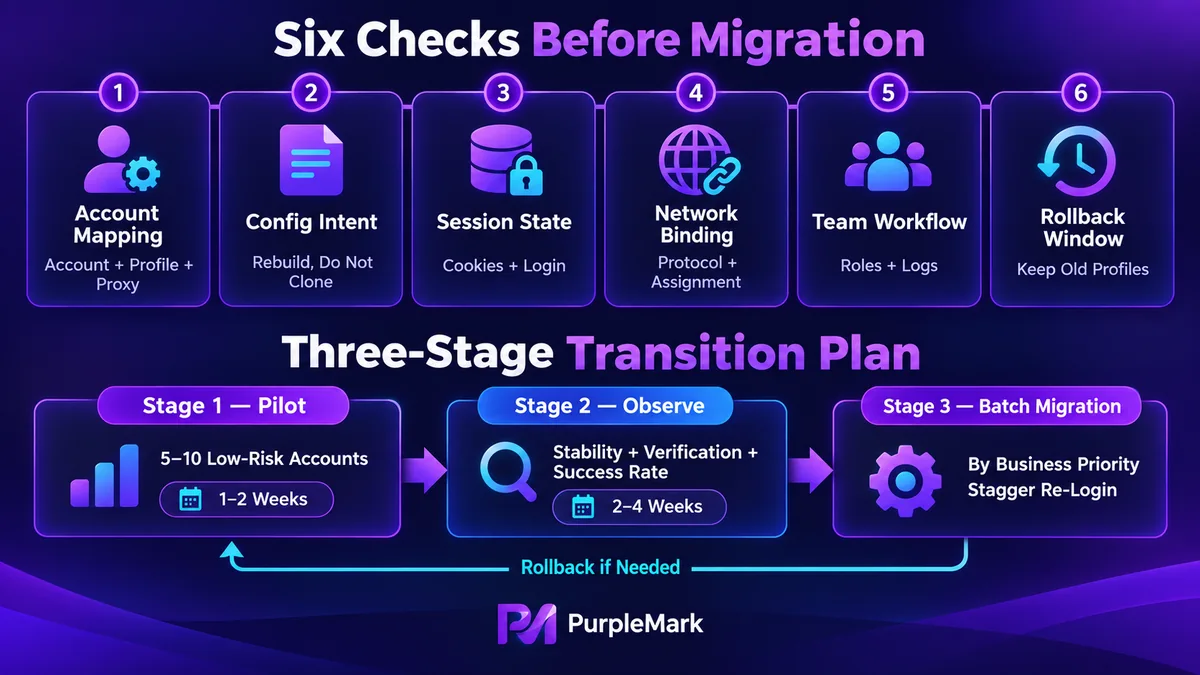
For the first one to two weeks, run a small pilot with five to ten less critical accounts and take the full business workflow through the new tool. The purpose is to verify that the tool can handle real operations, not to count how many features are on its list.
Next comes a two- to four-week observation period. Keep operating procedures close to the previous approach and compare account stability, verification-trigger frequency, and task success rates on both sides. If the new environment is clearly worse at this point, the cost of rolling back is still low.
Finally, migrate in batches according to business importance. Do not bunch all re-logins for the same batch into the same moment. During migration, also avoid changing other variables at the same time, such as the content strategy, because otherwise it will be difficult to tell what caused a problem.
Several common judgment errors
Deciding to migrate based only on software price treats visible cost as the total cost. Labor, business volatility during the transition, and possible account losses often add up to much more than the savings on software.
Another mistake is migrating for the sake of migrating. If the current tool already meets the need, switching just because a new tool has more features is hard to justify. First list the specific situations where the current tool falls short, then determine whether the new tool can actually solve those problems.
The most dangerous approach is moving every account at once. That compresses all risk into a single point in time. If something goes wrong, there is no fallback left.
Answer three questions before deciding
What exactly is wrong with the current tool? Be specific about scenarios rather than saying it simply feels hard to use. Can the new tool definitely solve those problems, ideally proven during the pilot? If the migration fails, what is the cost, can you roll back, and how long would a rollback take?
Move forward only after all three questions have clear answers.


