
2FA adds a dynamic verification code on top of your account password. This guide explains how 2FA works, why authenticator apps are safer than SMS, and how to register and manage TOTP secrets efficiently when you handle many accounts.
More and more platforms now ask you to enter an additional 6-digit dynamic code when signing in. Many people first think, “another extra step,” without realizing that this is an important layer of account security. This guide explains how 2FA (two-factor authentication) works, why authenticator apps are generally recommended over SMS, and how to manage verification codes efficiently when you have many accounts.
What exactly is 2FA?
2FA (Two-Factor Authentication), also called two-step verification, adds a second layer of proof to your login. Your account and password are the first lock, while the dynamic verification code is the second. Even if your password is exposed, an attacker still cannot sign in without the second factor, which significantly improves account security.
The most common form of 2FA is a 6-digit dynamic code that usually refreshes every 30 seconds. You must enter it before it expires, which is why it is also called a time-based one-time password (TOTP). SMS codes and security keys (hardware keys) are other forms of two-factor authentication.
Why are authenticator apps safer than SMS?
Several mainstream 2FA methods are commonly used today:
- Authenticator apps: Apps such as Google Authenticator generate dynamic codes locally from the account secret. They do not depend on a network connection and offer strong security, so platforms such as Facebook, Instagram, Amazon, and Google commonly recommend them;
- SMS verification codes: Convenient, but dependent on a phone number and vulnerable to interception or number theft, so they are generally less secure than authenticator apps;
- Security keys: Hardware devices that offer the highest level of security, but require an additional purchase and are less convenient for some users.
For most individuals and teams, authenticator apps offer the best balance of security and convenience, and they are also one of the most common requirements when signing in to cross-border platforms.
Why does 2FA become troublesome when you have many accounts?
Using a mobile authenticator for one account is usually easy. The challenge appears when you manage many accounts. Cross-border sellers often maintain accounts on Facebook, Instagram, TikTok, Amazon, Google, and other platforms at the same time. If every verification code requires switching back and forth between a phone and a computer, it is easy to run into inefficient situations such as “I can’t find the code for this account” or “the code expired while I was copying it.”
The real question is not whether to enable 2FA, but how to make code retrieval scale with the number of accounts.
A practical approach to managing 2FA for multiple accounts
To improve efficiency without sacrificing security, start with these steps:
1. Enable 2FA on each platform and obtain the secret
Using Instagram as an example (other platforms are similar): go to Profile → Settings and privacy → Password and security → Two-factor authentication, choose the account, and follow the verification flow. You will then be able to view or copy the account’s 2FA secret (a TOTP secret). The exact menu path varies by platform, but the idea is the same: after enabling 2FA, the platform gives you a secret that can be used to restore or generate verification codes. Store it carefully.
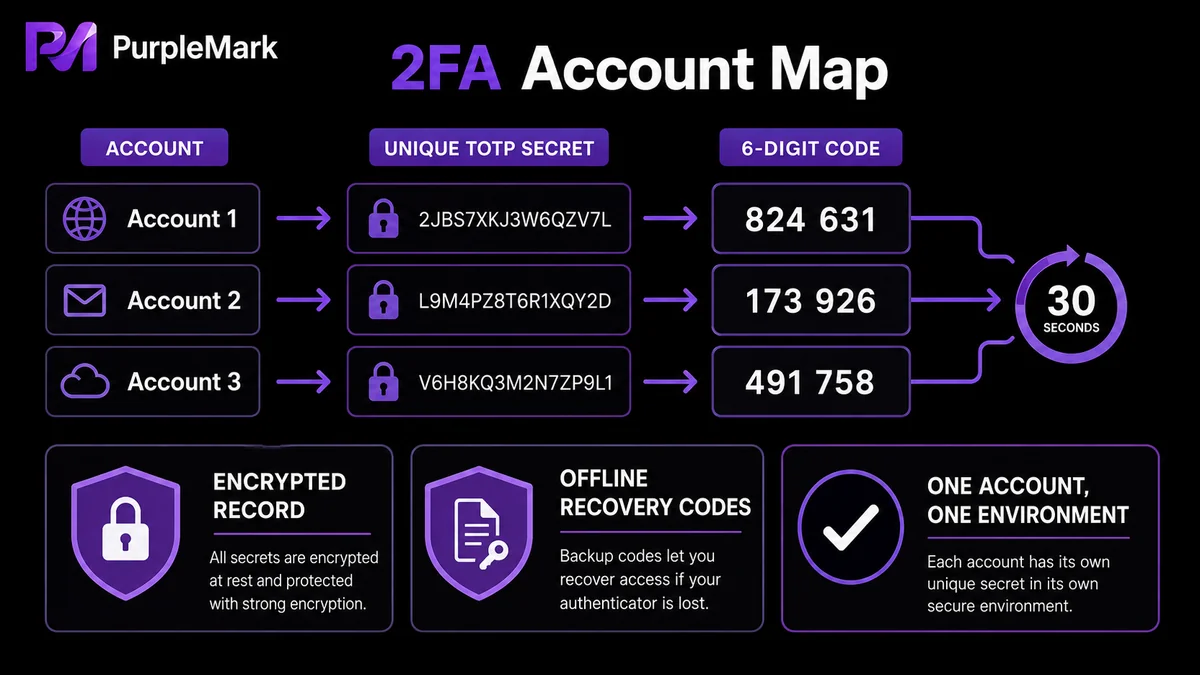
2. Register each secret together with its corresponding account
Do not leave secrets scattered in different places. Use a protected spreadsheet or record to map “platform + account name + 2FA secret” for every account. This makes it easy to locate the correct secret whenever an account needs verification. The record itself should be encrypted or securely stored, because anyone who has the secret can generate login codes.
3. Generate dynamic codes when needed instead of copying them manually again and again
Once you have the secret, you can generate the currently valid 6-digit code at any time using the TOTP algorithm. When managing many accounts, keeping the secret together with the account lets you retrieve the code directly during verification, avoiding searches across dozens of entries and reducing the number of times you have to restart because a code expired.
4. Give each account an independent login environment
Another frequently overlooked point is that when multiple accounts share the same browser environment—such as the same Cookies, cache, and device fingerprint—a platform can more easily associate those accounts. If a security check is triggered, resolving it can become difficult. A more stable approach is to run different business accounts in separate browser environments, so their login sessions, Cookies, and security states do not interfere with one another. Open the environment that corresponds to the business you need, and the ownership of each verification code remains clear. This is exactly the kind of capability offered by environment-management platforms such as PurpleMark: create a separate environment for each account in the web workspace, bind the account to it, and open the matching environment when signing in to reduce environment mixing and repeated secondary verification.
Note: Enable 2FA only for accounts that belong to the real entity you control. Do not mix in secrets from other people’s accounts, and do not use tools to bypass platform security reviews.
Frequently asked questions
Is more 2FA always better? Not necessarily. The important point is to enable it on every critical account that should be protected. Prioritize payment, collection, finance, and privacy-related platform accounts.
What if I lose my authenticator app? When you enable 2FA, platforms usually provide recovery codes or backup secrets. Save them in advance. If the authenticator device is lost, you can use a recovery code to sign in and bind a new authenticator.
Are SMS codes much worse than authenticator apps? SMS depends on a phone number, is somewhat less secure than an authenticator app, and may fail when you change numbers or roam internationally. If an authenticator app is available, it is usually the better choice.
Can verification codes for multiple accounts get mixed up? Not if you map each account to its secret one-to-one. Problems are more likely when secrets are not organized and are scattered across different places.


