
Want to start exporting but not sure how to log in to or register on Alibaba.com? This guide covers account login, business eligibility, onboarding steps, cost components, and practical operating methods for product optimization, storefront design, and P4P advertising to help new sellers get started.
If you want to expand your overseas wholesale business, Alibaba.com is usually one of the platforms you cannot ignore. It is one of the world's largest B2B e-commerce platforms: buyers use it to find factories, compare prices, and place bulk orders, while suppliers use it to reach overseas customers. For new sellers, the main questions are straightforward: How do you log in and register an account? What requirements must a company meet to join? Roughly how much does it cost? And after joining, where should you start with operations?
This article answers those questions in a practical order so you can follow the steps from account access to store-launch preparation.
1. How to Log In to Alibaba.com
There are two situations: if you already have an account, log in directly; if not, register first.
Existing account: log in directly
- Open the official Alibaba.com website at
www.alibaba.com. - Find the login entry in the upper-right corner of the homepage and click “Sign In”.
- Enter the email address or member ID and password used during registration. The page also supports quick login with third-party accounts such as Google, Facebook, and LinkedIn.
- After logging in, go to Seller Center, where daily tasks such as product management, orders, and buyer inquiries are handled.
If foreign trade is your main line of work, it is a good idea to keep your account login information saved on your regular device so you do not have to recover your password repeatedly.
No account: register first
- Open the official website and click “Sign Up” in the upper-right corner.
- Fill in the required information, such as company name, company address, email address, login password, and mobile phone number.
- Read and accept the relevant terms, submit the form, and activate the account to log in.
Alibaba.com is designed for business buyers and sellers, so providing real and complete company information during registration will make later onboarding and verification smoother.
2. Requirements for Sellers to Join Alibaba.com
Individuals and service-only businesses cannot directly join as sellers. The platform has clear qualification requirements:
- You must be a legally registered business: In general, the company must be officially registered and able to provide physical products. Both manufacturers and trading companies can qualify.
- Service-only businesses are currently not eligible: Companies that only provide logistics, testing and certification, management services, or similar services cannot currently join as sellers.
- Offshore companies and individuals cannot apply: If you do not currently have an eligible domestically registered company entity, you need to resolve the business qualification issue before considering onboarding.
Before applying, compare your company type and business scope with the platform requirements to avoid repeated rejection after submission.
3. What Is the Onboarding Process?
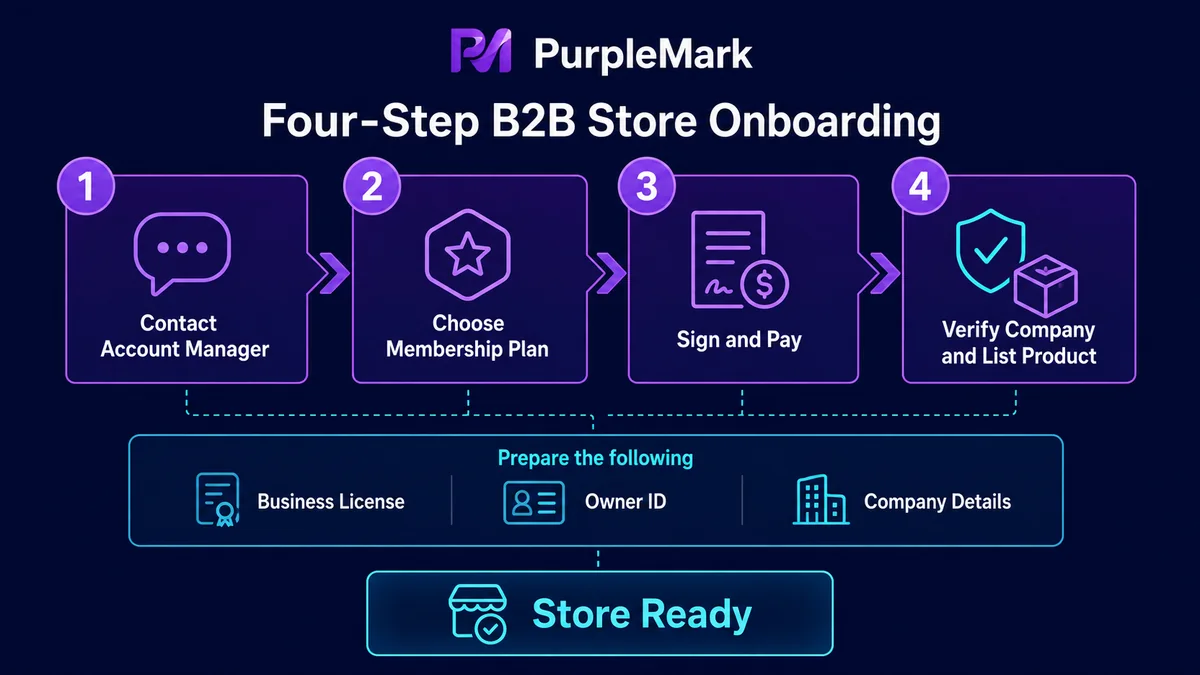
Alibaba.com completes seller onboarding with follow-up from an account manager. The process generally has four steps:
- Book an account manager consultation: Contact the Alibaba account manager responsible for your region and arrange an in-person or online discussion.
- Choose an onboarding plan: Confirm your business goals with the account manager and select the membership plan that fits you, such as a basic or premium membership.
- Sign the agreement and pay the fees: Sign the contract for the selected plan and complete payment.
- Activate the account and go live: After payment, complete company verification, publish your first product, and pass the review. You can then start building your storefront and begin formal operations.
The more complete your company documentation is, the faster the activation process tends to be. If you already have export qualifications or experience with export tax rebates, prepare materials such as the business license and legal representative information in advance.
4. How Much Does It Cost to Open a Store?
The cost consists of several parts. The actual amount should be based on the latest quotation from your account manager:
- Annual membership fee: The platform offers basic and premium membership tiers. Different tiers include different benefits and services, with significant price differences for different types of businesses.
- Advertising costs: In addition to membership, companies can choose paid promotion products such as showcase placements, premium exposure products, top display placements, and P4P according to their needs, with flexible budget control.
- Transaction service fees: When online orders are completed through the platform's Trade Assurance system, a certain percentage of transaction service fees may apply.
The “minimum onboarding cost” figures circulating online are usually references from a particular period, while platform policies and prices can change. Ask your account manager for the current plan quotation and then compare it with your product margins and expected order volume to judge whether the investment makes sense.
5. How to Operate After Joining: Three Core Areas
Opening the store is only the beginning. Whether you receive inquiries depends heavily on operations. New sellers should prioritize the following three areas.
1. Optimize product detail pages
The product page is often the first place where buyers judge whether you are professional. Focus on these areas:
- Featured products on the homepage: Set up 3–5 of your most popular product categories on the store homepage and place competitive products in prominent positions.
- Make selling points clear: State the product's core advantages directly. For example, for a backpack made from eco-friendly materials, highlight sustainability and environmental certifications while also emphasizing quality assurance to build trust.
- High-quality images and videos: Use high-resolution images and contextual videos to show details, such as how a portable coffee cup performs in different usage scenarios.
- Complete product specifications: Include dimensions, weight, materials, colors, and other specifications as completely as possible to reduce repetitive buyer questions and speed up decision-making.
- Related products and FAQ: Add links to related products and common questions on the detail page to increase browsing time and address buyer concerns.
2. Storefront design
Your storefront is the brand-facing entrance for overseas buyers. It does not need to be flashy, but it should match your product positioning:
- Consistent theme: A store selling high-end jewelry should convey a premium feel, while an outdoor equipment store can communicate durability and adventure.
- Clear navigation: Place product categories prominently at the top of the store so buyers can quickly find what they need.
- Display promotions: Put best-selling products and limited-time offers in central homepage positions to encourage orders.
3. P4P advertising
P4P is Alibaba.com's paid advertising tool. Its basic logic is to bid on keyword rankings in exchange for exposure and inquiries. New sellers can start by getting four things right:
- Choose the right products to promote: Prioritize flagship products or products with high inquiry rates instead of putting every product into campaigns.
- Use focused keywords, not too many: Use platform tools to review search volume and competition, then choose highly relevant keywords with moderate competition.
- Control bids and daily budgets: Set a reasonable daily budget to avoid exhausting it too quickly, then adjust bids based on performance data.
- Review regularly: Lower bids on or replace low-converting keywords and move budget toward better-performing terms.
Treat P4P as an investment that requires continuous optimization rather than a one-time expense; this is usually more effective than spending blindly.
6. How to Manage the Environment When Operating Multiple Stores
Many sellers operate several Alibaba.com stores at the same time to cover different markets or product lines. Multiple stores can expand customer reach, but they also create a practical problem: each store needs to be operated in its own login session. If all stores are crowded into the same browser, cookies and login states can become mixed, the wrong store environment may be opened, or messages may be sent from the wrong account. This hurts efficiency and may also trigger platform risk controls because of abnormal operations.
A more stable approach is to give each store an independent and consistent operating environment and keep it fixed over time. PurpleMark is designed around this idea: in its web workspace, you can create a separate browser environment for each store, configure proxy, Cookie, language, and login information independently, and then use groups and store names to organize accounts by market or product line.
When multiple stores need to be operated at the same time, PurpleMark's window synchronization can copy actions from the main environment to other open environments. Repetitive tasks such as updating product prices in batches or sending similar replies to inquiries can therefore be synchronized with one action. For team collaboration, member permissions and operation logs can also make it clear who is responsible for each store and who performed each action, reducing the need to pass account credentials between team members.
If you are just getting started with multiple stores, you can first open the PurpleMark web app and create your first store environment, configure the login information and proxy, and then gradually migrate your other stores.
Frequently Asked Questions
Can individual sellers join Alibaba.com?
No. The platform requires the seller entity to be a registered business. Individuals and offshore companies currently cannot apply for seller accounts. To open a store, you first need an eligible company entity.
What is the difference between Alibaba.com and 1688?
Alibaba.com serves overseas buyers and mainly focuses on cross-border wholesale trade, while 1688 mainly serves the domestic Chinese market. Their onboarding entities, transaction rules, languages, and supplier systems are different.
How soon can I start receiving orders after joining?
You can begin operating after completing verification, listing products, and passing review. Inquiry volume depends on product competitiveness, store completeness, and advertising investment, and it usually takes ongoing optimization before results become stable.
Can one business license be used to open multiple Alibaba.com stores?
The platform has rules governing how many stores can be opened under the same entity. The exact policy should be confirmed with your account manager and the latest platform rules. If you genuinely need to operate multiple stores, prepare an independent environment and login session for each store and operate in compliance with platform rules.


