
When managing multiple Apple Developer accounts for different companies, clients, or business lines, how can you reduce the risk of them being treated as associated? This guide explains the signals Apple may use, common causes of account issues, and compliant ways to isolate environments.
For iOS development or taking apps global, Apple Developer and App Store Connect are essential for testing, publishing, updating, and operating apps. As the number of projects grows, many development studios maintain separate developer accounts for different legal entities, client projects, or business lines. At that point, account association becomes an important risk to watch: Apple applies strict risk controls to developer accounts, and if multiple accounts are considered related, the impact can extend across the development process. This guide explains how Apple may assess account associations and how to manage multiple accounts in a compliant, structured way.
Why would a team have multiple Apple Developer accounts?
Applying for separate developer accounts for different legal entities, client projects, or business lines is not inherently against the rules. This is common in international app operations and outsourced development: a team may serve several clients at once, or a company may publish different product lines independently. Keeping apps from different entities separated makes permissions and data easier to isolate and can also limit the impact if one entity's account encounters a problem.
How does Apple determine whether accounts are associated?
Apple combines automated risk controls with human review and may evaluate multiple signals together:
- IP address: If multiple developer accounts use the same IP for long periods, or accounts are frequently switched within the same network environment, the likelihood of association analysis may increase;
- Device and browser environment: Repeatedly mixing browser fingerprints, Cookies, Local Storage, cache, and similar data across accounts can increase environment overlap;
- Account behavior: Highly similar login frequency, app release cadence, and backend operating patterns may trigger further risk assessment;
- Account information: Extensive sharing of registration details, payment methods, or contact information can also increase association risk.
The key point is that Apple does not rely on only one factor; it evaluates signals in combination. That is why simply changing a proxy IP while continuing to use the same browser environment is often insufficient.
High-risk behaviors that can cause developer account problems
For stable long-term operation, it is best to avoid behaviors that can trigger additional risk checks:
- Uploading apps too soon on a new account: Submitting many apps or low-quality apps immediately after activation can trigger risk controls. A new account should first complete its information, become familiar with the console, and then submit apps at a normal pace;
- Using devices or environments associated with a banned account: If a new account logs in from a device or browser environment previously used by a banned account, an association may be established;
- Inviting team members with problematic account history: Inviting members who previously belonged to a banned account, or reusing risky team configurations, can increase the chance of review;
- Violating the App Store Review Guidelines: Duplicate apps, misleading content, intellectual-property infringement, and false feature descriptions are common violation scenarios;
- Reusing a banned account's payment method: Continuing to use a credit card or payment account tied to a banned developer account can significantly increase association risk.
How to manage multiple developer accounts properly
The strongest physical separation is one dedicated Mac per account, but that can be expensive and difficult for collaboration. A more practical and cost-effective approach is to give each account its own independent, stable login environment while still supporting team workflows.
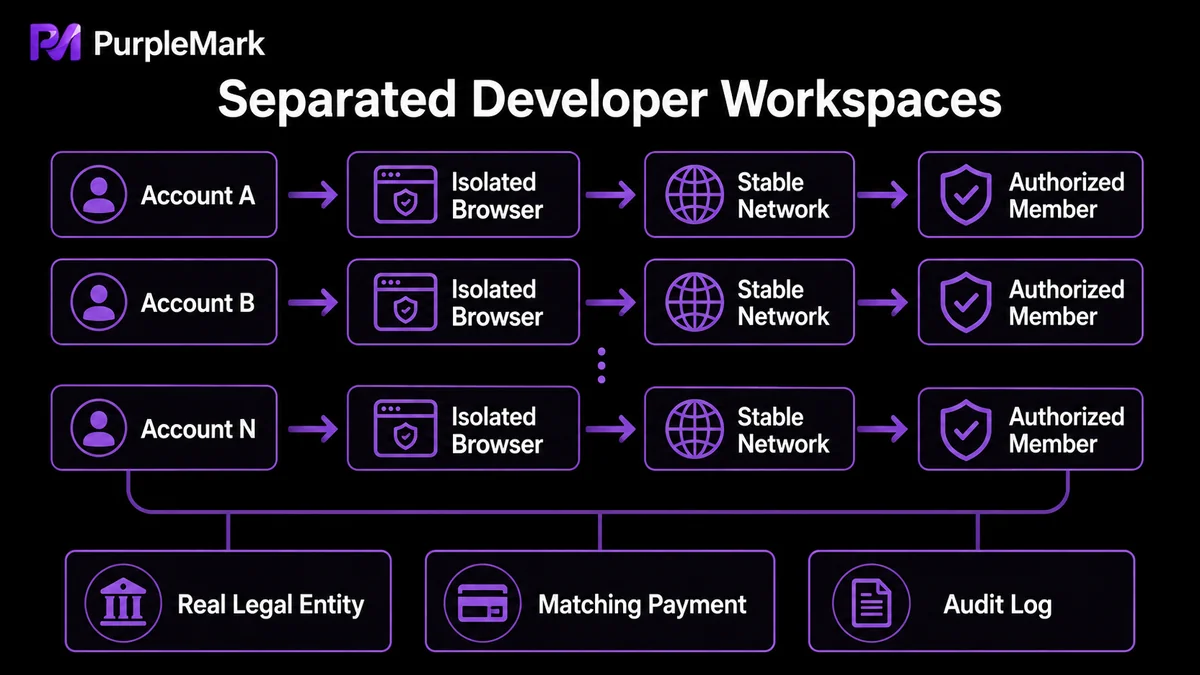
- Independent login environment: Give each Apple ID / developer account a separate browser environment that stores its own Cookies, Local Storage, sessions, cache, fingerprint, and login state. No browsing data should be shared between accounts. For routine App Store Connect access, open the matching environment instead of repeatedly signing in and out or clearing cache, reducing environment mixing at the source;
- Stable, independent network egress: Bind each environment to a stable and reputable network exit (preferably residential or static ISP connectivity rather than unknown public proxies), and keep the exit location consistent with the account's real usage scenario over time;
- Authorized team collaboration: Team members do not need to share passwords. Authorized members can open the same configured environment from their own computers while browser fingerprint, login state, and settings remain consistent, and the team can record who performed each action.
For app studios serving multiple clients, this unified “account–environment–network–member” model is especially useful. Developer accounts for different clients or entities can be placed in isolated but centrally organized workspaces, and the team opens the corresponding environment when it needs to maintain a specific app. This is the environment-management model provided by PurpleMark: create and maintain an independent browser environment for each developer account in the web workspace, bind network egress, and use grouping and permissions so team members can access only what they are authorized to use while actions remain traceable.
Compliance reminder: Apple's rule is one developer account per entity. The multiple-account scenarios discussed here apply only when different legal entities, different client projects, or different business lines are independently registered by their genuine entities. Do not fabricate or mass-register multiple accounts for the same entity, and do not use tools to bypass review, manipulate ratings, or game rankings.
Frequently asked questions
Can one developer have multiple Apple Developer accounts? Separate accounts can be created for different legal entities, client projects, or business lines. The key is that each account corresponds to a genuine, independent entity rather than multiple fabricated accounts for the same entity.
Does an Apple Developer account cost money? Joining the Apple Developer Program requires an annual fee. The standard fee for an individual account is currently US$99 per year (subject to Apple's latest official pricing), and membership is required to submit apps to the App Store.
Is it risky to use multiple accounts on the same computer? There is some risk, but the key issue is not simply using the same computer; it is whether the accounts share the same browser environment. If several accounts are used in the same browser over time, Cookies, Local Storage, and other data may remain even after signing out, causing environments to mix. The proper approach is to use an independent environment for each account and keep login and network settings stable.
How can a newly registered account reduce the chance of extra review? Complete account information at a normal pace and become familiar with the developer console before submitting many apps. Keep the environment and network stable and separate, and avoid reusing devices, environments, or payment methods associated with banned accounts.


