
If you need to manage multiple accounts while reducing environment linkage, an antidetect browser is a common option. This guide explains how fingerprint browsers work, reviews the characteristics of mainstream antidetect browsers in 2026, and suggests what to compare for different business scenarios.
If you manage multiple cross-border e-commerce stores, social media accounts, or advertising accounts, you will usually encounter the same problem: logging in to multiple accounts on the same computer can make their environments easy to associate. In mild cases, a platform may impose restrictions; in serious cases, accounts may be suspended. Fingerprint browsers, also called antidetect browsers, are tools designed to address this problem.
What really determines whether a fingerprint browser is useful is not “how many fingerprint parameters it can change,” but whether environments are cleanly isolated, whether proxies and local data work together properly, and whether multi-account management, automation, and team collaboration are convenient. This article uses those criteria to help you build a practical selection framework.
What Is a Fingerprint Browser and How Does It Work?
A fingerprint browser is essentially a tool for managing multiple browser environments. It lets you create multiple isolated browser environments, each with its own Cookie, local storage, cache, proxy configuration, and set of browser fingerprint parameters.
A normal browser usually has one main environment, so a lot of local data is shared when you log in to different websites. A fingerprint browser separates these environments so different accounts can run in independent profiles.
A browser fingerprint is a set of signals websites use to identify a browsing environment, such as the operating system, browser version, screen parameters, Canvas, WebGL, fonts, time zone, language, and hardware information. An IP address is not itself part of the browser fingerprint, but websites often evaluate the network environment together with browser fingerprint signals to determine whether access looks unusual.
So the core problem a fingerprint browser solves is environment isolation and environment management, not simply changing the IP address.
What Capabilities Should You Compare When Choosing a Fingerprint Browser?
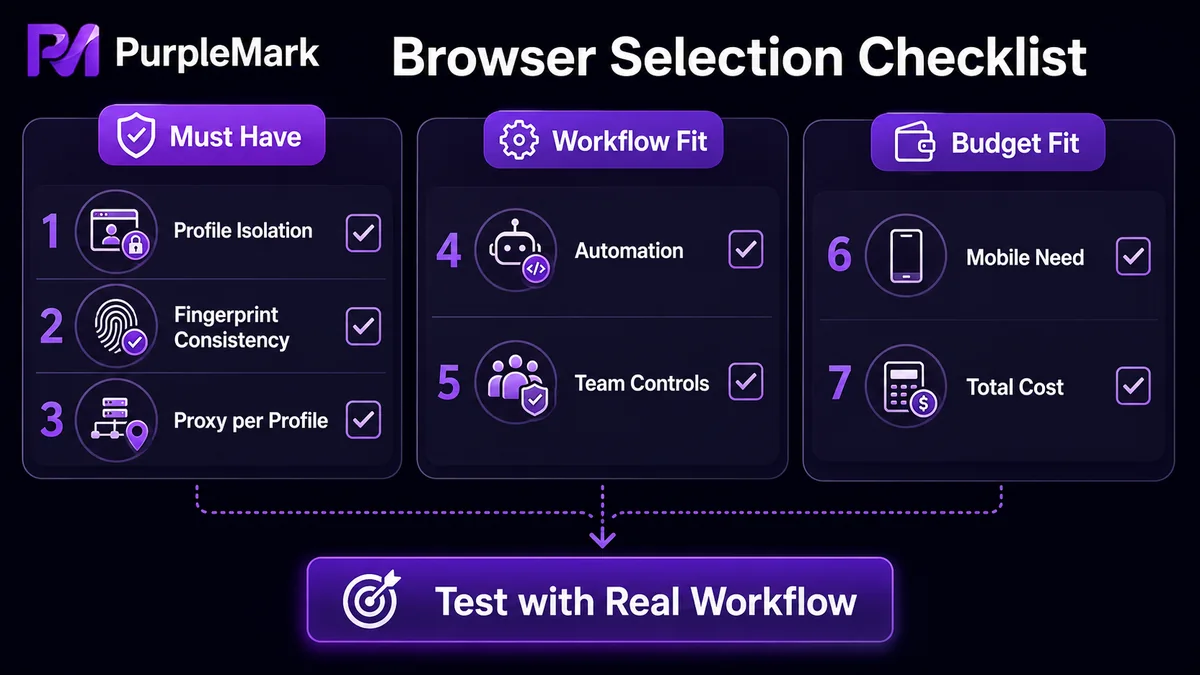
The main differences between products usually appear in the following areas:
- Environment isolation: Are different Profiles truly independent, and can you create and manage them in batches?
- Fingerprint consistency: Are modified fingerprint parameters complete and stable, without contradictions between sessions?
- Proxy configuration: Can each environment use its own proxy, and are proxy resources easy to manage centrally?
- Automation: Does it support RPA, window synchronization, APIs, or other features that reduce repetitive manual work?
- Team collaboration: Can environments be shared, member permissions assigned, and operation logs reviewed?
- Mobile capabilities: Do you need Android or other mobile browser environments?
- Pricing and free plans: Do the number of environments in the free plan and paid costs fit your current scale?
Overview of Mainstream Fingerprint Browsers in 2026
Below is a scenario-based overview of several mainstream products to help you form an initial impression. Product features and pricing can change, so check the latest information on each official website before choosing.
PurpleMark
PurpleMark is a multi-account browser environment management platform for individual operators and teams. Its web workspace lets you centrally create and manage browser environments, configure proxies, Cookies, fixed webpages, and browser fingerprint parameters for different accounts, and organize day-to-day operations through grouping, sharing, transfer, member permissions, operation logs, window synchronization, RPA, and Local API.
It is particularly suitable for users who need to maintain multiple accounts or regional environments over the long term. Accounts, environments, network configurations, and team responsibilities can be managed in one workspace, reducing repeated setup, opening the wrong environment, mixing Cookies, and scattering proxy information across different places. Teams can move relatively smoothly from individual use to multi-person collaboration.
Multilogin
One of the earlier products in the antidetect browser market, Multilogin provides both browser environments and cloud-phone environments. It supports bulk operations, environment cloning, automation APIs, and team collaboration, with a feature set geared more toward professional and scaled operations. Pricing is tiered by the number of environments, so very small account setups may not need higher-tier plans.
GoLogin
GoLogin stands out for strong cross-platform support. It supports Windows, macOS, and Linux and also offers native Android-oriented capabilities, with a straightforward environment-management workflow. It provides a permanently free plan and paid plans, making it suitable for individuals, small teams, and users who work across operating systems.
Dolphin Anty
Dolphin Anty is well known among international affiliate marketers and advertising users. Its core approach is also to manage different accounts in separate environments, with support for proxy configuration, Cookie management, and team collaboration. It is worth comparing if your work centers on advertising accounts and affiliate marketing.
Kameleo
Kameleo places greater emphasis on fingerprint control, mobile browser environments, and developer automation. It is more developer-friendly for users who need to control browser environments through Selenium, Puppeteer, or Playwright. Ordinary multi-account users may not need some of its more technical capabilities.
Octo Browser
Octo Browser is a mature browser environment management tool built around fingerprint control, proxies, and team workflows, with multiple plan options. It is suitable for users who need to manage a large number of environments and care about batch operations and team collaboration.
Incogniton
Incogniton has a relatively low barrier to entry, with a free plan and comparatively affordable paid tiers. It supports Selenium, Puppeteer, and API access. It is suitable for individuals who are just starting multi-account management and have a limited budget.
BitBrowser
BitBrowser is aimed at cross-border e-commerce, social media operations, and multi-store management. It creates independent Profiles for different accounts and lets you configure Cookies, proxies, and fingerprint parameters separately, with support for automation and coordinated windows.
Nstbrowser
Nstbrowser is more focused on developers and automation use cases. It supports Profile management, fingerprints, proxies, and APIs, making it suitable for development teams that need many browser instances for web automation, data collection, and similar tasks.
ixBrowser
ixBrowser is positioned around low cost. Its free plan offers an unlimited number of environments but limits how many can be created and opened per day, while paid tiers start at a relatively low monthly price. It is suitable for users who want to try a fingerprint browser at low cost.
Which Products Should You Compare for Different Business Scenarios?
No fingerprint browser is ideal for everyone. Narrowing the field by business scenario is usually more efficient.
Cross-border e-commerce with multiple stores
When managing stores on Amazon, Shopee, TikTok Shop, Shopify, and similar platforms, the main concerns are usually Profile isolation, proxy management, bulk operations, and team collaboration. Products worth comparing include PurpleMark, Multilogin, GoLogin, Octo Browser, and BitBrowser.
Multiple social media accounts on Facebook, Instagram, TikTok, etc.
These workflows often involve many social media Profiles and may require RPA, window synchronization, or team collaboration. Products worth comparing include PurpleMark, Dolphin Anty, GoLogin, and Multilogin.
International advertising and affiliate marketing
In addition to environment isolation, team collaboration and automation efficiency matter. Products worth comparing include Dolphin Anty, PurpleMark, Multilogin, Octo Browser, and GoLogin.
Web automation and data collection
If your workflow mainly uses APIs, Playwright, Selenium, Puppeteer, or similar automation tools, developer capabilities matter more than the interface. Products worth comparing include Nstbrowser, Kameleo, PurpleMark, and Multilogin.
How Can You Verify Whether a Fingerprint Browser Fits Your Needs?
Instead of relying only on rankings, run a small test based on your real workflow:
- Verify environment isolation: Create two environments, log in to different platform accounts, and confirm that Cookies, cache, and login states do not interfere with each other.
- Check fingerprint and network consistency: Configure proxies for the relevant regions and verify that the exit IP, browser language, and time zone are consistent.
- Run a real workflow: Use your own account for a normal day-to-day task and check whether bulk creation, team sharing, and related processes feel convenient.
- Evaluate automation needs: If you repeatedly perform actions such as liking or publishing, confirm whether the product offers window synchronization, RPA, or similar features, and review how tasks are configured and how results are checked.
Using PurpleMark as an example, you can first open the web version, create an independent browser environment for one account, bind a proxy, and run through the core flow of “create environment → configure network → log in to account → manage by group.” Then decide whether you need window synchronization, RPA, or team permission features based on the number of accounts you manage.
Keep in mind that fingerprint browsers are tools for managing and isolating browser environments; they cannot guarantee that accounts will never be suspended. Account status is still affected by factors such as IP quality, account history, login behavior, and platform rules.
Frequently Asked Questions
What Is an Antidetect Browser?
An antidetect browser, also commonly called a fingerprint browser, creates isolated browser Profiles so different accounts can have their own Cookies, stored data, proxies, and browser environments.
What Is the Difference Between a Fingerprint Browser and a Normal Browser?
A normal browser typically operates around a single user environment, while a fingerprint browser can create multiple independent Profiles. For people who need to manage several accounts at the same time, Profile isolation is the most obvious difference.
Does a Fingerprint Browser Need to Be Used with a Proxy IP?
It is not mandatory, but in multi-account and cross-region operations, many users configure separate proxies for different Profiles so the browser environment and network exit can be managed together.
Can a Fingerprint Browser Log In to Multiple Accounts at the Same Time?
Yes. One of the main purposes of a fingerprint browser is to create multiple independent Profiles so different accounts can run in their own browser environments.
Can a Fingerprint Browser Guarantee That an Account Will Not Be Banned?
No. A fingerprint browser helps manage and isolate browser environments, but it cannot bypass every platform risk-control mechanism. Account status is still influenced by IP quality, account history, login behavior, and platform rules.
Are There Free Plans?
Most mainstream products provide a free or limited free plan, but the differences can be substantial. Limits may apply to the number of Profiles, creation frequency, automation, and team features, so compare plan details carefully before choosing.


