
Email is one of the main channels for international trade communication, and choosing the wrong service can hurt deliverability and customer trust. This guide compares common email options for exporters from the perspectives of deliverability, security, international recognition, and business stage.
Email is the most basic and formal communication channel in international trade: quotations, order confirmations, logistics follow-ups, and after-sales communication all rely on it. Your choice of email service directly affects two outcomes—whether customers can receive your messages and whether they trust you after receiving them.
This article first explains the key criteria for choosing an email service for international trade, then reviews several common options used by exporters.
Key factors when choosing an email service for international trade
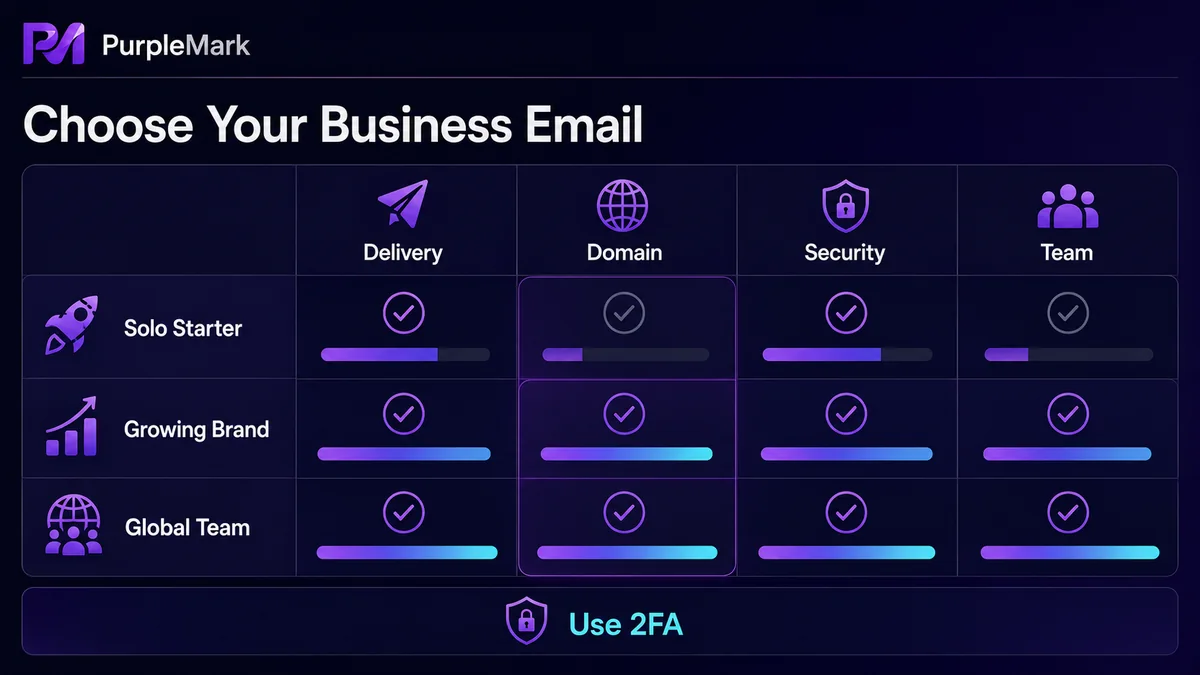
To decide whether an email service is suitable for international trade, focus on four points:
- International deliverability: Whether messages sent overseas are likely to be mistakenly classified as spam by the recipient's email provider;
- Stability and security: Whether two-factor authentication is supported and whether accounts are vulnerable to theft or interception;
- Customer acceptance: Customers in Europe, the United States, Russia, Southeast Asia, and other markets have different levels of familiarity with email brands;
- Management and scaling costs: Costs vary greatly depending on whether the account is for an individual or a team and whether a custom-domain mailbox is required.
Which email services are commonly used by exporters?
1. Gmail
Gmail is one of the world's most widely used free email services. It is well accepted in the U.S. and European markets, and emails sent overseas are generally less likely to be mistaken for spam. It includes calendar, cloud storage, and Google's productivity suite, and can also be linked with tools such as Google Ads and Analytics.
Best for: Exporters who frequently communicate with overseas customers by email and also use tools in the Google ecosystem.
2. Outlook / Microsoft email
Outlook (formerly Hotmail) is Microsoft's email service and has a strong presence in the corporate market. Many overseas companies use Outlook as their official email platform. It integrates calendar, contacts, tasks, and other functions and works well with Microsoft Office applications.
Best for: International trade teams communicating with European and U.S. business customers and already accustomed to the Microsoft productivity suite.
3. Custom-domain business email (most recommended)
A business email account uses your company's own domain, such as name@yourcompany.com, and can be set up through services such as Zoho Mail, Google Workspace, or Microsoft 365. Compared with free email services, a custom-domain mailbox looks more professional. Customers see your brand domain instead of a personal email suffix, which can significantly improve trust.
Best for: Teams with an independent website or corporate website. Recommended as the main long-term business email solution.
4. Yandex.Mail
Yandex is Russia's largest internet company, and Yandex.Mail is widely used in Russian-speaking markets. If most of your customers are in Russia or CIS countries, communicating through Yandex can be more convenient and also works well with other services in the Yandex ecosystem.
Best for: International trade businesses focused on Russia and neighboring markets.
5. ProtonMail
ProtonMail focuses on encryption and privacy. It provides end-to-end email encryption and two-factor authentication, making it suitable for communications involving trade secrets or situations with high data-security requirements. The free plan has limited storage and features, while team use requires a paid plan.
Best for: International trade scenarios where email confidentiality matters and sensitive files need to be transmitted securely.
6. Alternatives such as GMX / AOL / FastMail
GMX is known for stability and anti-spam capabilities and has a user base in Europe; AOL Mail offers unlimited free storage; FastMail emphasizes speed, stability, and a customizable interface. These services can be used as supplementary or backup accounts, but they are generally not the primary choice for international trade communication.
What should you choose at different business stages?
| Business stage | Recommended option |
|---|---|
| Individual startup, small number of customers | Gmail or Outlook: low cost and easy to get started |
| Focus on the Russian market | Use Yandex.Mail as an additional option |
| Have a corporate website / independent site | Custom-domain business email (Google Workspace / Microsoft 365 / Zoho) |
| Transfer confidential files | Encrypted email such as ProtonMail |
| Multi-person team collaboration | Custom-domain business email + centralized admin console |
Three practical tips for using business email well
- Create a dedicated business email account: Keep business communication separate from personal email so important messages are not buried and handovers are easier;
- Enable two-factor authentication: International trade mailboxes often contain quotations, contracts, and payment information, so two-factor authentication is essential to reduce account-theft risk;
- Control sending frequency: Do not start sending large volumes of cold outreach from a new mailbox immediately. It can easily be flagged as a spam source, so first establish a normal history of email communication.
Frequently asked questions
Is a free email account enough for international trade?
It is sufficient in the individual startup stage, but upgrading to a custom-domain business email is recommended as soon as possible. A domain-based mailbox improves your professional image and can also strengthen deliverability and customer trust.
What email service is best for international trade outreach?
Gmail or a custom-domain business email is recommended. They offer strong deliverability and are familiar to customers. Combined with a professional email signature and controlled sending frequency, they can effectively reduce the chance of messages landing in spam.
Can one email service be used for every market?
Yes, but regional habits matter. Yandex.Mail can be added for the Russian market, while Gmail and Outlook are more widely accepted in Europe and the U.S. For your primary mailbox, a custom-domain business email is recommended to maintain a consistent brand image.
What should I do if my emails keep going to customers' spam folders?
Check whether you are using a custom-domain business email, control bulk-sending frequency, configure email authentication such as SPF/DKIM, and avoid excessive marketing language or suspicious links in your messages.
How should an international trade team manage customer emails centrally?
Team members can use business email accounts under the same domain, with accounts and aliases managed centrally in the admin console. For teams operating multiple business mailbox accounts, it is advisable to assign each account an independent, fixed login environment to avoid account mix-ups and accidental sending.


