
Browser extensions are convenient, but the more you install and the broader their permissions, the greater the potential risk—especially for cross-border sellers managing multiple accounts. This article explains why extensions can become part of a browser fingerprint, the main risks involved, and how to choose and use extensions safely while using environment isolation instead of blindly piling on more add-ons.
To block ads, translate pages automatically, manage passwords, or research keywords, many cross-border sellers install a long list of browser extensions. Extensions are convenient, but there is another side that is easy to overlook: every extension you install can quietly change how your browser behaves and appears, become part of your browser fingerprint, and even create account-security risks. This article explains the risks of browser extensions and how to use them properly.
Why extensions can cause problems
Browser extensions are essentially small programs installed in a browser to add extra features. The more they can do, the more data they may come into contact with. For ordinary users, this may mainly be a privacy concern, but for cross-border sellers who need to manage multiple accounts at the same time, the issue becomes more concrete.
The key point is this: browser extensions can contribute to your browser fingerprint. Websites identify users by collecting different pieces of information about their devices and browsers, and installed extensions can be one of those signals. Every additional extension can make your browser configuration a little more distinctive. For example, if you use a particular ad blocker, that fact itself may help a website build a more specific fingerprint. So trying to rely on extensions for "anti-fingerprinting" can sometimes have the opposite effect.
Beyond fingerprinting, extensions can create more direct risks:
- Privacy leaks: Some extensions request access to your browsing history and Cookie data. Although this may be presented as necessary for personalization, the data could potentially be collected or even sold, creating risks for e-commerce activity.
- Malicious code: Some seemingly normal extensions may contain malicious scripts inserted by bad actors. They can monitor your actions, steal account information, or even cause financial loss through your e-commerce accounts. Some popular extensions have also been found to include tracking scripts or silently set tracking Cookies.
Why multi-account operators need to be extra careful
If your work requires logging in to and managing accounts across multiple platforms or stores, extension-related risks become larger. First, the more extensions you install, the easier it may be for your browser fingerprint to stand out and for accounts to be linked. Second, if one extension is compromised or steals data, the impact may reach all of your accounts rather than just one.
Trying to use a pile of privacy extensions to make every account "unrelated to the others" is often complicated and unreliable. Extensions may also conflict with each other or slow the browser down. Instead of forcing one browser to handle everything through add-ons, a cleaner approach is to give different accounts separate, isolated browser environments.
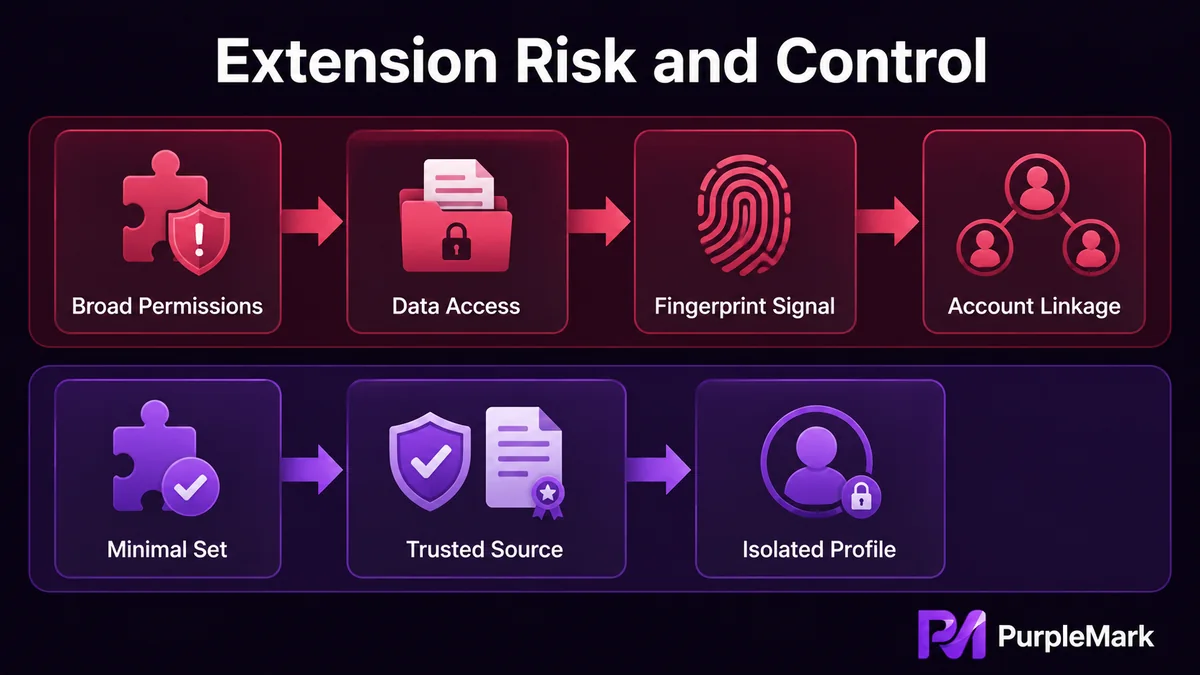
Many teams that manage multiple accounts work this way: they create an independent browser environment for each business account, with separate Cookies, local data, and browser parameters, then use different network exits as needed. This helps keep account environments separate so that accounts do not share the same extensions or local data. Translation, dictionary, or similar extensions are installed only in the workspace that actually needs them, keeping each environment lean.
If you still need extensions, remember these points
Not all extensions are bad. The key is to choose them carefully and install them with restraint:
- Install only what you need: Keep the number of extensions low and retain only those that are genuinely useful. Avoid collecting add-ons you do not use or that duplicate the same function.
- Download from trusted sources: Prefer official browser extension stores and reputable developers. Avoid downloading extension packages from unfamiliar websites.
- Check permissions: Before installation, review what the extension is asking to access. Be especially cautious with extensions that request broad permissions such as "read and change your data on all websites."
- Read user reviews: Ratings and reviews can help show whether an extension is reliable. Check them before installing.
- Keep extensions updated: Use the latest versions so that known security vulnerabilities can be patched.
Summary
Browser extensions are a double-edged sword: used well, they can improve efficiency; used poorly, they can leak private information, introduce malicious code, and make a multi-account setup more distinctive without you noticing. For cross-border sellers, it is better to control the number and permissions of extensions first, then keep different accounts separated with independent browser environments rather than trying to solve everything by stacking more add-ons. Tools should serve the business—not turn convenience into risk.


