
As browser vendors tighten privacy protections, User-Agent is being reduced and frozen, while Client Hints are becoming a new source of high-entropy fingerprint signals. This guide explains UA Reduction, how Client Hints work, why fingerprint consistency matters, and how multi-account environment management keeps UA, CH, and system parameters coherent.
Over the past few years, major browsers have steadily tightened privacy protections: Safari introduced ITP, Firefox rolled out Total Cookie Protection, and Chrome formally moved ahead with User-Agent freezing (UA Reduction). Many people still think changing the UA is enough to disguise a device, without realizing that UA data has already been greatly simplified and is gradually losing detailed information. The signal taking its place in device identification is Client Hints (CH).
This article does not teach any method for “bypassing detection.” It focuses only on the technical principles behind three questions: Why is the UA being frozen? What exactly are Client Hints, and why are they considered high-entropy fingerprint signals? Why is so-called “fingerprint consistency” the real key? Understanding these points helps explain why modern browser environment management—especially for multi-account isolation—needs to treat parameters as one coherent system rather than a handful of disconnected fields.
1. Why Is the UA String No Longer Enough?
For a long time, User-Agent was the main signal websites used to identify browsers and devices. It exposed details such as browser brand and version, operating system, and device architecture. But UA strings were long and stable, making them useful for fingerprinting users. Chrome therefore explicitly moved toward gradually reducing the UA, keeping only basic major-version information while moving more detailed capabilities into a newer mechanism: Client Hints.
The direct consequence of UA freezing is that spoofing only the UA is no longer convincing. Systems no longer trust the UA alone; they also check whether other fields agree with it. The most obvious signs of a mismatch are contradictory parameters, for example:
- The UA says macOS 14, but the platform-version field says macOS 13;
- The UA claims a mobile device, but the mobile flag is still
?0; - The hardware architecture reports arm64, while values such as
navigator.hardwareConcurrencylook more like x86.
In a device-identification system, inconsistencies like these can quickly suggest that the profile does not represent a real device. Once you understand this, it becomes clear why “changing only the UA” is no longer enough in the age of UA freezing.
2. What Are Client Hints, and Why Are They High-Entropy Fingerprints?
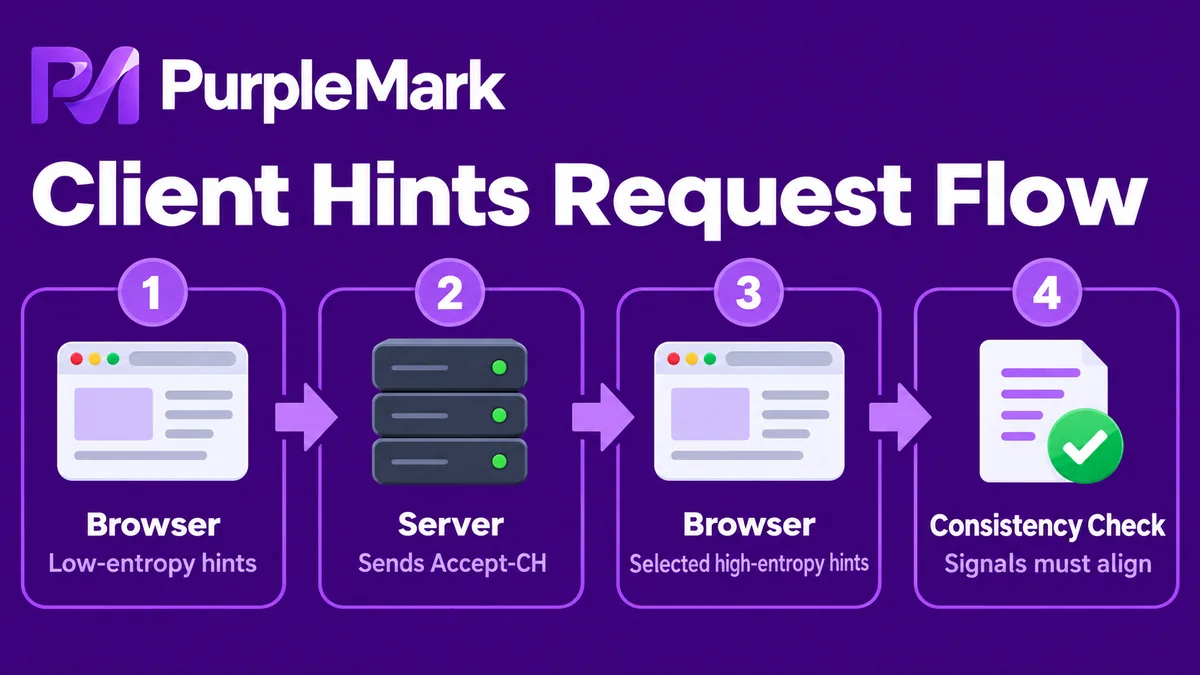
Client Hints (CH) are a set of device-capability signals that a browser can disclose to a server on demand through HTTP requests or the JavaScript environment. They differ from the UA in two major ways:
-
They include high-entropy fields (High Entropy Values). “High entropy” means that combinations of these values can be highly distinctive and hard to guess—for example, the exact platform version, a complete brand-and-version list, and device architecture. Real browsers return these values on demand rather than exposing everything at once.
-
CH is not evaluated in isolation; it is cross-checked with other fingerprints. Real device-identification systems often examine whether CH matches the UA, whether CH and transport-layer fingerprints such as TLS fingerprints JA3/JA4 are consistent with the same browser family, whether CH agrees with JavaScript properties such as
navigator.platform, concurrency, and device pixel ratio (DPR), and whether CH matches operating-system platform characteristics.
This leads to an important concept: the hard part is not spoofing one field, but making every field look as though it came from the same real device. Almost any single field can be changed in isolation. The real challenge is making brand, platform version, UA, DPR, memory, architecture, TLS fingerprint, and other signals form one coherent device profile. That is also why many setups that appear to “fill in every field” can still look obviously inconsistent.
3. What Are Common Fingerprint Consistency Errors?
Once you understand that consistency is the key, it becomes much easier to see why many parameter configurations fail. Common mistakes include:
- CH does not match the UA (the most common): the UA reports macOS 14.1, while CH returns a platform version that does not actually exist;
- A mobile UA with a mobile flag of
?0: a real mobile device should normally return?1here; - Incorrect full-version derivation: for example, the browser major version is 120, but the full-version characteristics look like an older 115 release;
- DPR, memory, or similar values conflict with the real device class: for example, an Apple device shows an unusually low pixel ratio, or an ordinary Windows machine reports only 1 GB of memory;
- Browser-specific differences are ignored: for example, forcing a field into a browser that does not support it, or returning a field that a particular browser engine would never expose.
These inconsistencies are conspicuous in device-identification systems. In essence, they all come from failing to treat the environment as one coherent whole.
4. What Does “Correct Configuration” Actually Mean?
Rather than thinking of the task as “filling in fields,” it is better to think of it as maintaining a coherent environment profile. That usually means doing the following:
- Bind CH to the UA: derive the corresponding CH values (brand, platform, and version) according to the browser engine and version’s real behavior, rather than assembling arbitrary values;
- Follow the real return strategy for high-entropy fields: expose low-entropy information by default, return high-entropy values only when requested as a real browser would, and do not return fields the current browser does not support;
- Keep JavaScript properties, HTTP headers, and system characteristics consistent: DPR should make sense for the screen resolution, memory should fit the platform type, the mobile flag should agree with the UA, and architecture should fit the rest of the system profile;
- Coordinate with transport-layer fingerprints: characteristics such as TLS/JA3/JA4 should also align with the declared browser version.
In one sentence: the real difficulty is making CH, UA, the JavaScript environment, and system characteristics form a coherent browser-behavior profile—not maximizing the number of populated fields.
5. What Does This Have to Do with Multi-Account Environment Management?
People working in cross-border e-commerce, social-media advertising, or independent-store operations may ask what these technical principles have to do with “creating separate browser environments for different business accounts.” The connection is simple: environment management only works when each environment is internally coherent.
- When there are many accounts and regions, manually assembling UA, operating system, resolution, and other parameters for every environment creates unnecessary inconsistencies. A better approach is to let the tool generate a set of mutually aligned parameters automatically based on the selected system and browser-engine version, reducing rework caused by changing one field here and another there.
- Business accounts for different regions and platforms should have independent environments whose parameters are internally coherent, instead of all accounts sharing one set of template-like settings that makes them look unusually similar at the device level.
- When switching proxies between regions, keeping the system version, device model, and other characteristics internally consistent with the environment is closer to the way a real device behaves than “changing only the IP while leaving every other parameter untouched.”
These are the consistency problems that multi-account browser environment management tools are designed to address. When creating an environment, PurpleMark provides a unified configuration entry point for operating system, Chromium engine version, User-Agent, resolution, time zone, language, CPU/memory, Canvas, WebGL, TLS, and other fingerprint and device parameters. Once you choose a region and account purpose, you can generate an environment from one coherent scheme instead of assembling parameters manually each time you log in. What it really manages is the overall consistency and reusability of the account, browser environment, and network configuration in a single workspace—not techniques for defeating a particular detection mechanism.
6. Summary
UA freezing marks a new stage in browser fingerprinting: what matters is no longer simply which fields exist, but whether the fields are mutually consistent. As Client Hints take over from the UA as high-entropy fingerprint signals, understanding how CH relates to UA, system characteristics, and transport-layer fingerprints is more important than memorizing a long list of field names.
If you are simply maintaining a few legitimate business accounts, there is no need to focus on fighting detection. A more practical approach is to use an environment-management tool such as PurpleMark to keep each account’s region, system, and browser parameters clear, coherent, and reusable, reducing problems caused by contradictory environment settings at the source.
(Note: This article is provided only as an educational explanation of browser-fingerprinting technology. Always operate in compliance with each platform’s terms of service and use legitimate accounts.)


