
You have spent the ad budget, but reach and conversions still are not improving. Many people first blame the platform or the network environment. In reality, most poor results come from settings before launch and impatience after launch. This guide walks through the full process from marketing goals and budget to copy, A/B testing, and optimization.
Facebook ads are a common off-site traffic channel for cross-border sellers, but many people run into the same problem: the ads are running, yet there is little reach and no conversion. When this happens, do not rush to blame the platform or the network environment—most “poor performance” issues actually come from pre-launch setup and post-launch pacing.
This article walks through the full advertising flow and helps you recheck seven key stages.
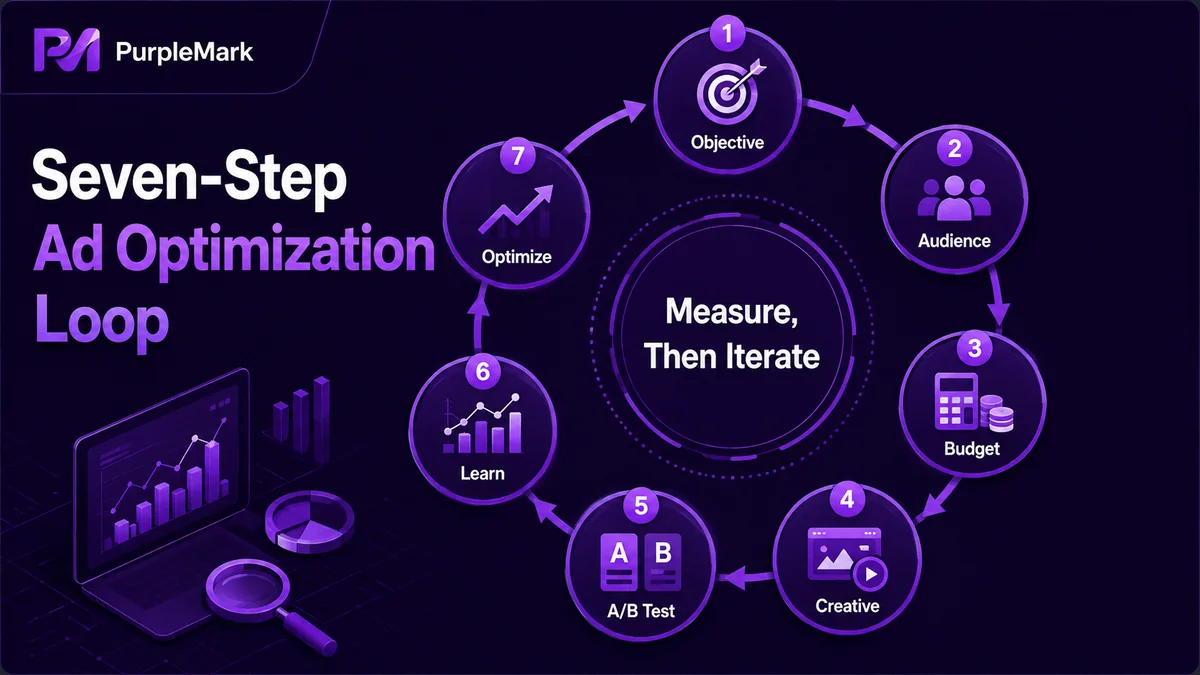
Step 1: Clarify the “marketing goal” first
Advertising is not about pushing harder; it is about aiming at the result you need right now. The same ad spend can serve very different goals:
- Help more people recognize the brand (reach and awareness);
- Encourage users to consider buying (clicks, add-to-cart actions, landing-page views);
- Drive users to complete a conversion (place an order);
- Or even support repeat purchases (remarketing to existing customers).
Different goals require different audiences, copy, creatives, and budget allocation. Define what this campaign needs to achieve before building the plan, and you will usually get much better efficiency. Otherwise, you may end up spending the budget without knowing which metric you were actually paying for.
Step 2: Define the target audience instead of “casting a wide net”
Facebook ads essentially use signals and labels to find people. You can combine audience attributes around the product itself, the type of users who need it, and the interests they care about.
The benefit is twofold: relevant users are more likely to see the ad, which can improve clicks and conversions; meanwhile, fewer irrelevant users receive the ad, which saves budget and reduces negative reactions toward the brand.
Tip: Do not make the audience too narrow or too broad. If it is too narrow, you may not collect enough data; if it is too broad, relevance can drop. Leave some room for testing in the initial targeting.
Step 3: Choose the budget method
Before launch, check the estimated audience size and expected spend in the backend, then choose a budget method. Facebook mainly offers two approaches:
- Daily budget: set a fixed amount to spend each day. This works well when the budget is limited and you want a longer testing period, while keeping later adjustments flexible;
- Lifetime budget: set a total amount for the entire campaign period. This is suitable when you have a clear time window and want to control overall spend.
When funds are limited, it is usually better to start with a daily budget. Spreading a limited budget across a longer period lets you observe the data and adjust as you go, which is more stable than committing everything at once.
Step 4: Create content that catches attention
The core of ad creative is to “make the point clear in the shortest possible time”:
- Keep the headline simple and attractive instead of overly long;
- Use a question or pain point to quickly surface what the user cares about and encourage a click;
- Avoid cramming too many elements into the image or using too much text. White space and one clear visual focus often work better.
A common mistake is treating an ad like a product manual and trying to explain everything. The result is that users swipe past it within 3 seconds.
Step 5: Use A/B testing instead of guessing
Even a carefully designed setup cannot guarantee that the creative will appeal to users. Facebook’s A/B testing not only helps identify which version performs better, it also has an underrated benefit—reducing ad fatigue.
Imagine the same ad appearing in front of the same people every two days. If it failed to spark interest the first time, later impressions are likely to be wasted as well. Splitting variables through A/B testing helps reduce this ineffective repetition and makes each round of delivery more targeted.
Step 6: Give the system time to learn
Ad delivery becomes more accurate as it runs—the platform needs time to collect data and optimize its delivery model. One of the most common beginner mistakes is being too impatient: after only one or two days with no obvious results, they delete the campaign and start over, missing the window in which the system is still learning.
A common recommendation is to allow at least 4~5 days so the system can accumulate enough signals before you make a judgment. This does not mean ignoring the campaign; it means finding a balance between “giving it time” and “watching the data.”
Step 7: Let the data decide and cut poor performers
After the ads have run long enough, you should be able to tell which ones work and which ones are simply taking up budget. At this point, be decisive:
- Keep ads with clearly stronger data and allocate more budget to them;
- Turn off ads that perform poorly over time to avoid continued waste.
Advertising is dynamic. Being willing to remove what does not work is just as important as being willing to add more to what does.
For multi-person, multi-account advertising, do not overlook the operating environment
Even when the advertising method is right, one practical layer is easy to overlook—if your team has multiple operators, multiple ad accounts, or multiple Pages running at the same time, mixed login environments between accounts can affect account stability and indirectly disrupt the pace of advertising.
This kind of “mixing” often happens when multiple accounts are repeatedly switched on the same computer and in the same browser, causing browser fingerprints, Cookie data, and local data to overlap. A more disciplined approach is to give every account an independent, clean operating environment so login states remain isolated from one another.
If you need multi-person, multi-account collaboration, you can learn about the PurpleMark anti-detect browser. It can create separate browser fingerprints, Cookie data, and local storage environments for each account, while managing accounts, proxies, and workspaces separately. Combined with account grouping, team permissions, and operation logs, this can make campaign operations more organized and easier to trace.
Reminder: The creation and use of ad accounts must comply with Facebook’s platform policies. Do not register multiple accounts that the policy does not allow to coexist simply to increase ad volume. A “clean” environment is for compliant operations, not for bypassing rules.
Conclusion
When Facebook ads “do not work,” there is rarely just one cause. More often, the goals are unclear, targeting is too broad, the creative lacks appeal, or the system has not been given enough learning time. Rechecking the seven stages above will usually help you find the bottleneck. Advertising is ultimately a game of thinking one step further—goals, budget, creative, testing, and iteration. If you think a little more carefully at each step, the results will naturally differ.


