
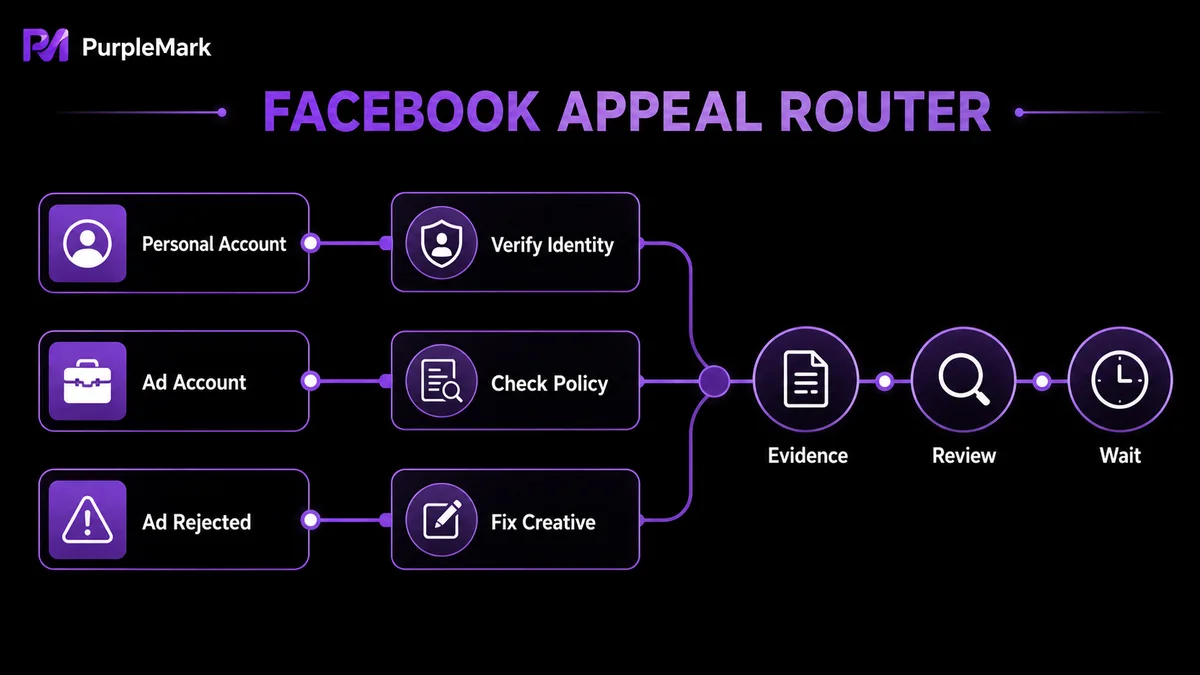
If your Facebook account is disabled or your ad account is banned, first identify the type and cause of the restriction, then use the official appeal channel. This guide covers appeal steps, official entry points, and risk-reduction practices for personal accounts, ad accounts, and rejected ads.
If you suddenly cannot log in to Facebook or see a message saying “Your account has been disabled,” do not keep retrying immediately. In many cases, an account may be restored if you use the correct official appeal channel and provide sufficient information. This guide explains the appeal process for three common scenarios: a disabled personal account, a disabled ad account, and an ad rejected during review.
Step 1: Identify what type of restriction you are facing
- Personal account disabled: You see a disabled-account notice when logging in. This is usually related to identity authenticity, duplicate registration, or account behavior;
- Ad account disabled: The advertising tools show that the ad account has been disabled, often because of ad content, payment methods, or multi-account activity;
- Ad rejected in review: The ad never starts running and is flagged for violating advertising policies.
Confirm the type first, then choose the corresponding appeal route to avoid unnecessary detours.
Appeal steps for a disabled personal account
- When you try to log in, Facebook will usually provide an appeal option on the page or explain why the account was disabled;
- Open the appeal form and enter account information such as your name and email address/phone number;
- Submit identity documents as requested (for example, a photo of a government-issued ID card, passport, or driver's license) to prove that you are the legitimate account holder;
- In the appeal explanation, state why you believe the account was disabled by mistake. If you know a possible cause, explain it honestly and describe how you will avoid the issue in the future;
- After submitting, wait patiently and check your email regularly, including the spam folder.
The official appeal form for disabled personal accounts is here: facebook.com/help/contact/260749603972907. If Facebook asks you to verify your identity, you can upload identification here: facebook.com/help/contact/183000765122339.
Appeal steps for a disabled ad account
- Check the email from Facebook or the notification in the advertising tools to confirm the reason for the restriction;
- Find “Request Review” or the appeal entry point in the advertising tools, then provide the ad account ID and contact details;
- Explain why you believe the account should not have been disabled, and review your ads item by item against the advertising policies in the Meta Business Help Center;
- Submit the appeal and wait for a response, which usually takes a few days. Do not submit the same appeal repeatedly or create a new account to bypass the review, as this can further reduce the chance of a successful appeal.
The official appeal form for a disabled ad account is here: facebook.com/help/contact/2026068680760273.
What to do if an ad is rejected in review
- Read the notification in the advertising tools and confirm the specific violation identified by Facebook;
- Check the ad copy, images, landing page, and target audience against the advertising policies;
- If the ad genuinely violates a rule, revise the ad first and resubmit it instead of appealing immediately;
- If you believe the ad was rejected by mistake, use “Request Review” to submit an appeal and explain why the ad complies with policy;
- If repeated appeals fail and you are confident the ad complies, contact support through the Facebook Help Center for further assistance.
Common reasons accounts are banned
For ad accounts: promoting prohibited or restricted products (such as medicines, tobacco, weapons, adult content, or infringing products); ads containing misleading, sensitive, or discriminatory content; frequent changes to payment methods; running ads for others in violation of the terms of service; or creating multiple ad accounts in a short period to promote the same Page.
For personal accounts: Facebook requires one personal account per individual, and repeated registration from the same IP or device may be treated as a violation; using false identity information; frequently changing sensitive information such as name, birthday, or password; or logging in from multiple devices in different locations at the same time and triggering a security alert.
Understanding the cause matters because it helps you explain the issue clearly in an appeal, state what you will improve, and avoid repeating the same problem.
Compliant use is easier than appealing afterward
For individual users, using your real identity, keeping one personal account per person, enabling two-factor authentication, and avoiding frequent device and network changes are basic steps for account stability.
For teams that need to manage multiple business Pages and ad accounts at the same time, things are more complex: different clients and business lines often correspond to different BMs (Business Manager) and ad accounts, so login identities, authorized roles, and activity records should be managed separately. PurpleMark can be used to create isolated browser environments: create a separate environment for each BM or client, bind the corresponding proxy and install only the relevant extensions, assign account permissions to the appropriate members, and retain sharing and activity records. This helps avoid session conflicts or accidental operations caused by multiple people sharing one browser environment. This is intended for managing business accounts for which you have legitimate authorization, not for bypassing the one-person-one-account rule.
Finally, remember three principles: use authentic documents, give a clear explanation, and do not submit repeatedly. An appeal is a process of explaining a possible misunderstanding. Bringing account management back within the official rules matters more than any tool.
Frequently Asked Questions
How long does an appeal usually take? Facebook does not provide a single official timeframe. A common range is from a few days to about two weeks. If there is no response after a reasonable period, follow up through Help Center channels without repeatedly resubmitting the same appeal.
Can I appeal again after an appeal is rejected? Yes, but it is better to first understand why the appeal was rejected and add new evidence before submitting again, rather than repeatedly sending the same information.
Can I use multiple Facebook accounts for business? A personal account is limited to one per person. Businesses and brands should use Business Manager to manage Pages, ad accounts, and team-member roles instead of operating multiple personal accounts.


