
If you want to sell products through live streaming overseas, Facebook Live is worth using alongside TikTok and YouTube. This guide explains the key benefits of Facebook Live, what to prepare before going live, how to start a stream from mobile and desktop, and practical strategies for live selling and advance promotion.
When people think of overseas live-commerce, TikTok and YouTube often come to mind first, while Facebook's own live-streaming feature, Facebook Live, is easy to overlook. Facebook has more than three billion monthly active users, and comments, likes, and shares during a live stream create strong real-time interaction. Because the platform also gives live content some algorithmic preference, live video can often reach more people than image-and-text posts or prerecorded video. For cross-border sellers who want to sell through live streaming, Facebook Live is a channel worth taking seriously. Below is a practical walkthrough from preparation and setup to selling and promotion strategies.
Why Facebook Live is worth using
For live selling, Facebook Live offers several practical advantages:
- Stronger interaction: Viewers can comment, like, and share in real time, while the host can ask questions and respond immediately. This two-way interaction keeps viewers more engaged and can make it easier to drive purchases during the stream.
- Better exposure: Facebook tends to favor live content, often giving active live videos priority in users' feeds and sending live notifications to people who follow the Page, which can expand reach.
- Easier to build trust: Live streams are authentic, unedited content. Cross-border customers cannot physically inspect the product, so live video is a useful way to show product functions, quality, and usage in real time, helping the brand build transparency and trust.
- More flexible formats: You can launch new products, tell brand stories, share customer testimonials, or explain industry knowledge, giving you plenty of room to create different types of content.
- Fast data feedback: You can see real-time metrics such as viewer count, watch time, and engagement, making it easier to judge performance during the stream and improve the next one.
What to prepare before going live
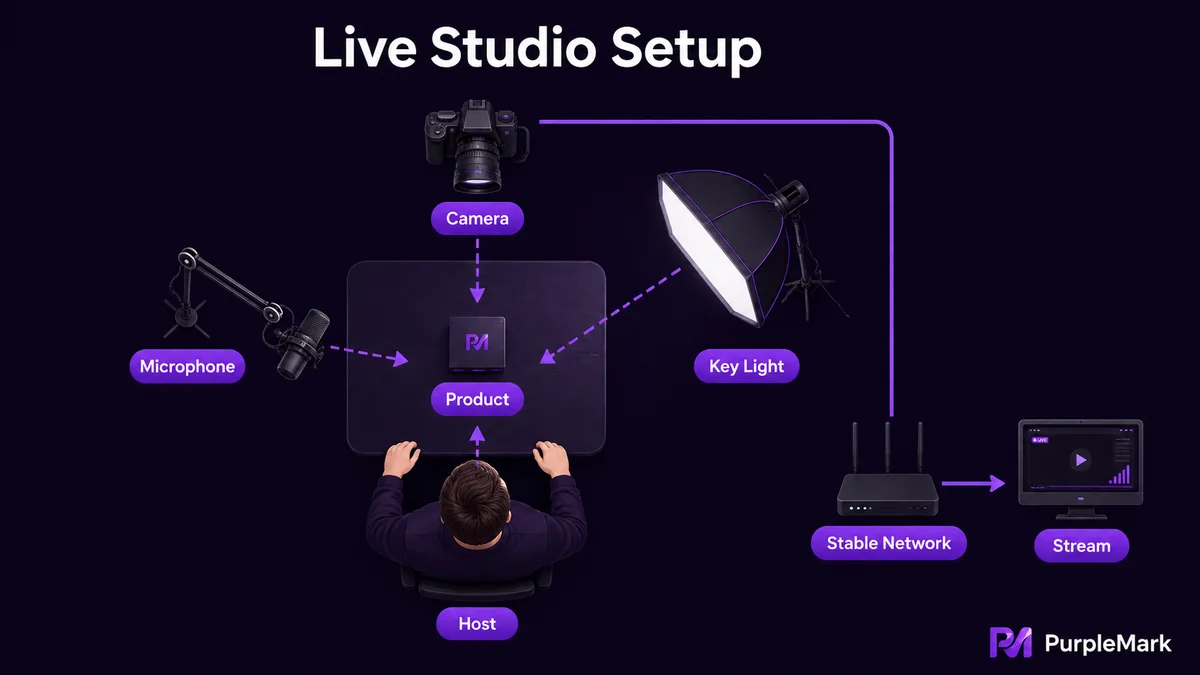
Many live-streaming problems come down to insufficient preparation. Before you start, get the equipment, video quality, and environment in order:
Choose your equipment. Streaming from a phone is the simplest option: install the Facebook app and you can go live. If you want higher image quality, special effects, or multiple camera angles, you can use a computer with streaming software such as OBS Studio or XSplit. Whichever setup you choose, a stable network connection without stuttering is essential.
Video and audio. If possible, use an external HD webcam instead of the built-in camera, and an external microphone for noticeably clearer audio. Adjust focus, angle, and camera distance: use close-ups for product details, medium shots for usage scenarios, and wide shots for the overall environment.
Lighting setup. Make sure the streaming area is evenly and sufficiently lit. Avoid backlighting or overly dark scenes. A ring light or softbox can soften the light, reduce shadows and reflections, and make the product look better on camera.
How to go live from mobile and desktop
Going live on mobile is relatively simple: open the Facebook app, find "Live video" in the post composer, prepare your camera framing and talking points, then tap "Go Live" to start.
Going live on desktop involves a few more setup steps:
- Go to your Facebook Page and click "Live video" to open the live setup interface;
- Configure the video source: choose "Webcam" if you are streaming directly from a camera; if you use OBS or similar software, choose "Streaming software" and enter the stream key provided by the platform into the software;
- Choose to start immediately, or schedule a live stream no more than 24 hours in advance so you can notify viewers beforehand;
- Add a title and description so both viewers and the algorithm can understand what the stream is about;
- Create the live post, optionally add a 16:9 cover image, set the audience, and decide whether to publish it to other Pages as well.
One more point: on Facebook, you can go live from a public Page, a Group, or an Event. Public Pages generally provide more tools, and once the stream starts it can also be shared to Groups or Events. By contrast, a stream started in a Group or Event cannot be shared back to a Page. If you want broader reach, it is usually better to start from a public Page.
Strategies for selling with Facebook Live
Going live is only the beginning. The more important question is how to turn traffic into orders:
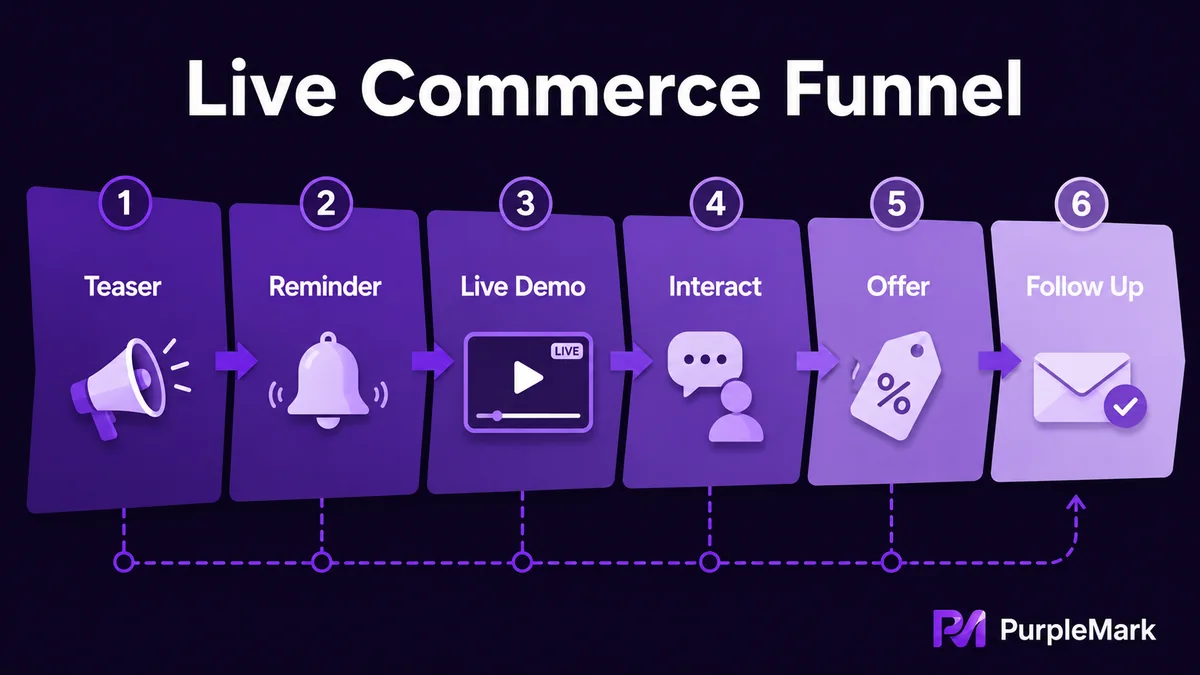
Make the content compelling. Give each stream a clear theme, such as a new-product launch, holiday promotion, or interactive Q&A. Use storytelling to introduce the product's background and selling points, and demonstrate in real time how it works and what makes it different so viewers can immediately see the value.
Encourage audience participation. Ask questions and respond to viewers in real time. Use live polls and feedback features to let viewers influence the direction of the content, and use limited-time discount codes or small gifts to reward active participation.
Design clear conversion actions. Create urgency with limited-time offers; repeatedly provide clear purchasing instructions through on-screen prompts, verbal reminders, or links in the chat; after the stream, follow up through comment replies and private messages to answer questions and encourage purchases.
Let more people know about your live stream
The success of a live stream depends heavily on how many people know about it before it starts. You can begin warming up the audience 3-5 days in advance:
- Create a live Event page: Clearly add the event name, time, description, and category, and use an attractive image so potential viewers can understand and follow the event in advance.
- Use a Boost: Use the paid Boost feature on the Event page to promote it to more potential viewers by setting an audience and budget.
- Post Stories: Publish a Story teaser and use polls or questions to get followers involved early, building a base of engagement before the live stream begins.
- Make a teaser video: Create a short trailer featuring highlights or exclusive information from the upcoming stream to spark curiosity.
- Promote across platforms: Announce the Facebook Live session on accounts such as Instagram and Twitter, include a direct link, and guide users to watch it on Facebook.
A special reminder for sellers promoting across multiple platforms: you probably manage more than one account, with official accounts on Facebook, Instagram, Twitter, and perhaps other platforms. Before and after a live stream, you may need to switch between these accounts to post previews, reply to comments, and follow up on interactions. If all of these accounts repeatedly sign in and out from the same environment, platforms may identify them as related, and in serious cases this can affect the Facebook account as well. A more orderly approach is to keep separate, independent browser environments and login states for accounts belonging to different platforms or business lines, without mixing them. If content needs to be published at scale, automated workflows can also handle routine posting so people can focus on live content and real-time interaction.
Summary
Facebook Live is an underrated live-streaming channel for many cross-border sellers. It offers strong interaction, good exposure, easier trust building, and real-time data that can be used for continuous improvement. Prepare your equipment, lighting, and network, follow the mobile or desktop steps to start smoothly, then use compelling content, active audience engagement, and clear purchase guidance to drive conversions. Add several days of advance promotion and cross-channel outreach, and Facebook Live can become a practical way to support product sales.


