
Facebook does not offer direct video downloads, but there are legitimate reasons to save videos for offline viewing or content analysis. This guide covers practical methods for computers and phones and highlights copyright boundaries.
Facebook itself does not provide a direct “Download Video” button. Still, whether you want to save a favorite video for offline viewing or you work in social media and need to keep material for content planning and reference, there are several ways to do it. This guide covers practical methods for computers and phones. First, keep one rule in mind: downloaded videos should only be used for personal learning or authorized purposes, not for commercial distribution without permission.
How to Download Facebook Videos to a Computer
1. Online Download Services
Online download services require no software installation. You simply paste the video link into a website to generate a download link, making this the most convenient option. A typical process is:
- Find the target video on Facebook and copy its link;
- Open an online video download service;
- Paste the link into the input box and click download;
- Choose the desired quality and save the file.
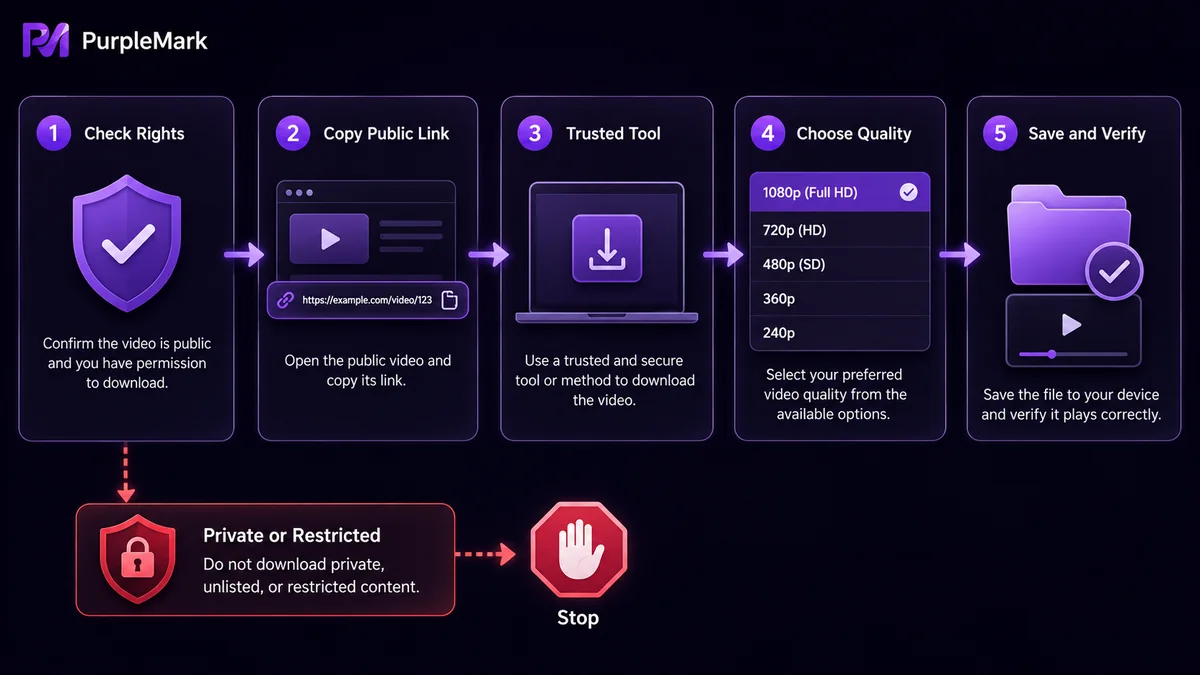
Common online services include SnapSave, SaveFrom.net, and Getfvid (addresses and features may change, so refer to their official websites). The downsides are that some sites offer limited quality options, some display pop-up ads, and a few may pose security risks. Prefer well-known services with a good reputation.
2. Browser Extensions
A browser extension can detect and download videos directly from the current page, so you do not need to copy the link and switch to another site. Using the common Video DownloadHelper extension as an example:
- Visit its official website and install the extension for your browser (Chrome/Firefox);
- Sign in to Facebook and open the target video;
- After the video starts playing, the extension icon in the toolbar will light up, indicating that downloadable media has been detected;
- Click the icon, choose the desired quality, and download the file.
Note: some extensions are not updated promptly and may be incompatible with newer browser versions. Review requested permissions before installation and, where possible, choose extensions with strong ratings in the official extension store.
3. Desktop Download Software
If you download many videos or need batch processing or higher-quality files, desktop software may be more suitable. Using 4K Video Downloader as an example:
- Download and install the software from its official website;
- Copy the Facebook video link;
- Open the software, click “Paste Link,” and wait for it to analyze the video;
- Choose a resolution (such as 720p or 1080p) and format (such as MP4), then click download.
Always download desktop software from official sources to avoid versions bundled with malicious programs.
How to Download Facebook Videos to a Phone
Android: You can use a dedicated downloader app. Search for an app such as “Video Downloader for Facebook.” After installation, either sign in to Facebook within the app and find the video to download, or copy the video link, paste it into the app, select the quality, and save it.
iOS: Apple places stricter limits on download apps, so it is difficult to find a direct Facebook video downloader in the App Store. A common alternative is to combine a downloader/file manager with an online service: use the built-in browser in an app such as Documents by Readdle to open an online download service, paste the video link, complete the download, and then move the saved file from the app to Photos.
Important Considerations
- Copyright and terms: Downloading someone else’s video for personal offline viewing is generally less problematic, but you should not use it commercially or distribute it publicly without the creator’s permission. You must also follow Facebook’s terms of use;
- Quality: Download quality depends on the quality of the original upload. If the source video is not HD, a download tool cannot make it HD;
- Why a download may fail: Privacy settings, copyright restrictions, or incompatibility between a download tool and Facebook’s latest changes can all cause failures. First confirm that the video is publicly viewable, then try updating the tool;
- Security: Online services and software can carry risks. Prefer reputable tools from reliable sources, and never enter your account credentials into an unknown third-party service.
Media Asset Management for Operations Teams
For social media operations teams, downloading videos is often done to study competitors’ content, archive the company’s own promotional materials, or prepare authorized derivative work. Teams managing Facebook Pages and accounts should follow Meta’s platform rules: personal accounts should belong to individual users, while business assets should be organized through business management tools. When saving and reusing media, respect copyright and only create derivative works within the scope of authorization.
If different team members need to collect and organize media from multiple platforms, PurpleMark can be used to create separate browser environments for different roles, keeping each person’s login sessions and frequently used admin consoles separate. This helps prevent account information from becoming mixed when multiple people share one browser. PurpleMark addresses the organization of day-to-day team operations; the copyright boundaries for downloading and using media remain your responsibility.
Frequently Asked Questions
Can I download Facebook videos without installing software? Yes. With an online download service, you only need to copy the video link into the website; no software installation is required.
Why is the downloaded video not HD? The original video may have limited quality, and some online services do not offer HD options. If you need HD, try desktop software and select the corresponding resolution.
Is it legal to download Facebook videos? Personal offline viewing is generally acceptable, but using videos commercially or distributing them publicly without the creator’s permission may infringe copyright. Follow applicable copyright law and platform terms.
Why can’t some videos be downloaded? The video may have privacy restrictions, may be copyright-restricted, or the tool may be incompatible with the platform’s current version. First confirm that the video is publicly viewable and update the tool.


