
A proxy only changes the network exit address. DNS resolution, IPv6, time zone and language, graphics fingerprints, and other browser signals can still expose inconsistencies in the environment.
The proxy is configured and the test page shows the target region, yet the account is still being linked. Most people first assume the proxy is poor and switch providers. If the same problem continues after several changes, the exit address is probably not the cause.
A proxy can change only where network requests exit. To make websites work normally, the browser actively exposes a large amount of information: operating system and browser versions, time zone, language, screen resolution, graphics and audio characteristics, and local network state. When these signals do not line up, a platform sees an inconsistent environment rather than a normal user who simply changed IP.
Most of the channels below do not necessarily travel through the proxy tunnel.
DNS resolution may not follow the proxy
Traffic can go through the proxy while domain-name resolution is still sent by the local network. The target website sees the proxy address, but DNS query records point to the network you are actually using.
Use a DNS leak test to confirm where resolution requests originate. The remediation direction is to route DNS requests through the proxy path or use a resolver that matches the exit region.
IPv6 can bypass the proxy with a direct connection
This is one of the easiest channels to overlook. If the local network supports both IPv4 and IPv6 while the proxy handles only IPv4 traffic, the browser may connect to the target site directly over IPv6.
In that situation, the proxy is effectively bypassed. Check whether the test page returns an IPv6 address. At the environment level, control whether IPv6 is enabled so traffic cannot route around the proxy.
A time-zone and language mismatch can be easier to detect than a leak
Strictly speaking, this is not an IP leak, but the consequences can be more serious because it creates a geographic inconsistency.
An IP in the target region combined with a local time zone, local-language interface, and local time format is a classic inconsistency. Contradictions can trigger risk controls more readily than a single exposed signal: one leak may be an isolated omission, while a contradiction suggests the environment was assembled from mismatched parts.
Check whether the exit IP, time zone, and language match as a set. The remediation direction is to enable automatic synchronization with the exit IP instead of setting them manually.
Graphics and audio fingerprints identify the device
Graphics characteristics produced by Canvas and WebGL rendering, together with differences in audio-processing waveforms, reflect hardware-level traits and are independent of the network.
Move the IP to another country and the graphics card still renders like the same machine. What is exposed at this layer is not the IP but the device identity.
Compare multiple environments and check whether their graphics fingerprints repeat. Each environment should use its own fingerprint rather than sharing one profile across all tasks.
The instant a proxy switches
When a proxy disconnects, changes nodes, or connects for the first time, the browser may send requests before the tunnel is active.
This is difficult to catch with a test page and usually requires checking request-source records in logs. Pause browser activity while the proxy is switching, and resume only after the connection state is stable.
WebRTC is another channel
WebRTC is the most frequently discussed channel. Its details are covered separately, so here it is counted only as one of the exposure paths.
A practical self-check checklist
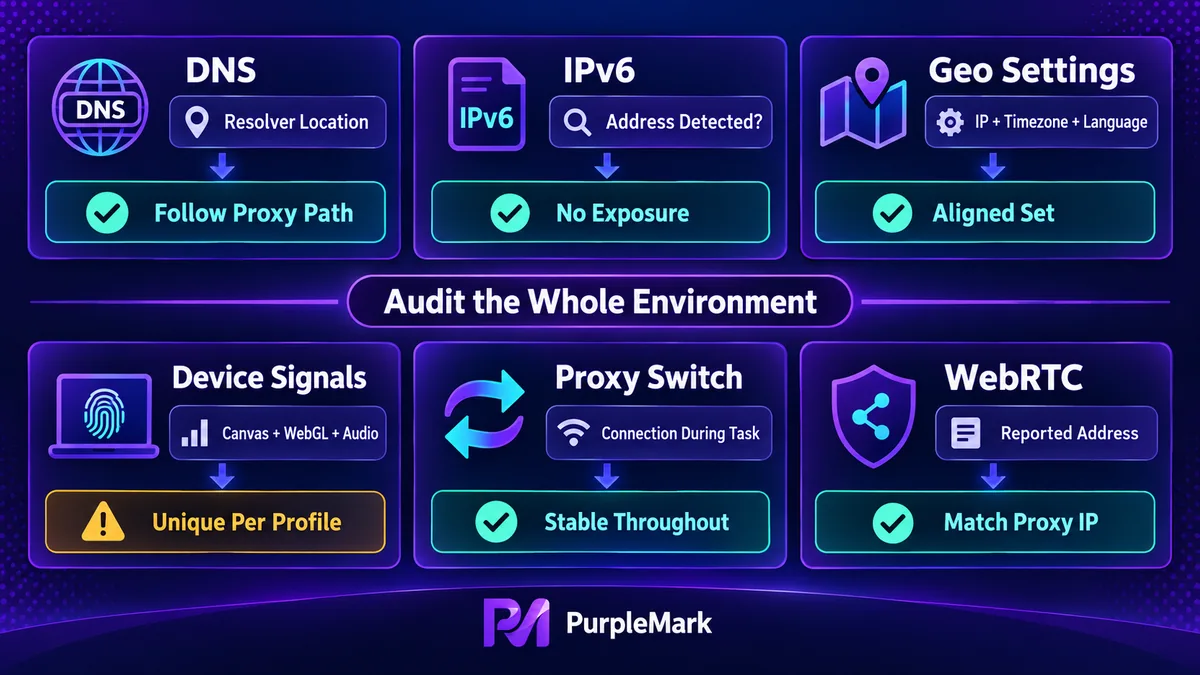
| Channel | What to check | Expected result |
|---|---|---|
| DNS | Where resolution requests originate | Follows the proxy path |
| IPv6 | Whether an IPv6 address is returned | Not exposed |
| Geographic settings | Exit IP, time zone, language | All three match as a set |
| Graphics and audio fingerprints | Whether they repeat across environments | Independent for each environment |
| Proxy stability | Whether a switching window occurs during a task | Stable throughout |
| WebRTC | Returned address | Matches the proxy address |
Configure the environment as a whole
A proxy solves only one channel. The environment is a whole, and exposure through any one channel can be enough for the entire environment to be recognized.
The priority is therefore not to keep replacing proxies, but to configure and inspect the environment as one internally consistent unit: fingerprints remain independent, network exits are bound per environment, and geographic settings match as a set. This is the layer PurpleMark addresses, separating multiple environments on the same device so that exits and parameters follow each environment.
These measures are intended to keep compliant accounts operating stably: follow platform terms of service and robots protocols, do not use false identity information, and do not bypass technical protection measures.
This information is provided only to explain technical principles. Use related tools only in a lawful and compliant manner.


