
Browsers launched by Selenium can differ in debugging ports, page-readable properties, and startup behavior. Some differences are reasonable to configure, while attempts to conceal automation itself are unnecessary, fragile, and often ineffective.
Running automation with Selenium can fail even when the script logic is correct. The first reaction is often to tweak one or two parameters, but what actually exposes the environment is usually not a single switch. It is a combination of differences across several layers. Separating those layers makes it clearer what is worth configuring and what is unlikely to help.
Debugging ports and runtime artifacts
The way Selenium controls a browser leaves two kinds of traces. First, the browser may open a debugging port at startup that lets external software take over the page. Second, the runtime environment may contain extra artifacts, such as driver-injected global variables with a cdc_ prefix, additional driver objects on window, and modified parts of some object prototypes.
These artifacts come from the driver rather than the webpage. When the browser is started in the standard way, they are present regardless of how well the script itself is written.
Properties readable by the page
Another category is not in the driver itself but in the JavaScript environment exposed to the page. The most frequently discussed example is navigator.webdriver.
This property can have three values. true means the browser is being controlled by an automation tool, false means it is not, and undefined means the information is unavailable, usually because the browser does not expose the property or it has been processed in some way. During normal human browsing it is false or undefined, while Selenium launches it as true by default.
A broader set of parameters sits around it: User-Agent, operating system and browser version, screen resolution, time zone, language, Canvas, WebGL, AudioContext, font list, GPU model, and CPU core count. Together, these form what is commonly called a browser fingerprint. Real users naturally have diverse fingerprints because their systems, software, and habits differ. Browsers running with default automation configurations, by contrast, can produce highly similar combinations, making them easier to group into known patterns.
Differences caused by startup mode and rendering timing
The third category is not tied to any single property. It comes from the overall way the browser is started and rendered.
Launching with automation flags, running in headless mode, mismatched window and screen parameters, incompatible combinations of font rendering and graphics drivers, or an unusually uniform timing distribution from page load to interactivity may not prove anything individually. Together, however, they can produce an environment that does not look much like one used by a real person.
Headless mode is a typical example. Newer versions of Chrome in headless mode are much closer to normal browsers than they were a few years ago, but they can still expose automation characteristics more readily than regular mode, especially on sites with strict risk controls.
What can reasonably be configured
Time zone, language, screen resolution, and font lists are not unique to automation. Real devices vary naturally. What matters for these parameters is internal consistency: the time zone should match the region of the network exit, the language should fit the usual region, and the resolution should not conflict with the hardware profile.
In other words, the goal is not to make the environment look unusual, but to make it coherent. If a device appears to access from Germany while the browser reports a U.S. West Coast time zone, the system language is English only, and the screen resolution looks like a typical virtual display, that combination is already conspicuous enough.
This is also why environment settings are best stored in something persistent. Changing the time zone today and forgetting the language tomorrow can create worse inconsistencies than leaving both untouched.
What tries to hide automation itself, and why it is not worth doing
Another class of techniques targets the traces directly: removing navigator.webdriver, deleting variables injected by the driver, hiding driver objects, or otherwise preventing a detector from reading automation status.
The problem is that these techniques change the surface rather than the underlying behavior. Detection has long moved beyond checking a single property, and reading attributes is only the most superficial layer. A driver update, a change in detector execution order, or a detector that skips JavaScript and instead examines low-level rendering results and device-characteristic combinations can make previous patches ineffective. Maintenance costs remain significant while the benefit keeps shrinking.
More practically, these actions often fall directly into the area that platform terms of service describe as bypassing technical protection measures. Clean code does not change the nature of the action just because a few properties were modified.
The network layer is outside the script's control
Even if the browser environment looks consistent, the network layer may still identify the session. It can consider whether the IP belongs to a data center, cloud server, or proxy network; the IP range's historical reputation and ASN; geolocation; request density from the same IP; and whether the IP accesses multiple accounts or pages within a short period. Cookies, sessions, and login state carried in requests can also be correlated.
These issues cannot be solved inside the script. They have to be handled at the environment layer: separate exits for separate tasks, alignment between exit region and environment region, and controllable request pacing. For multi-task isolation, capabilities such as PurpleMark typically operate here by giving each task an independent browser environment and network exit while keeping geographic parameters consistent.
A practical troubleshooting order when access is blocked
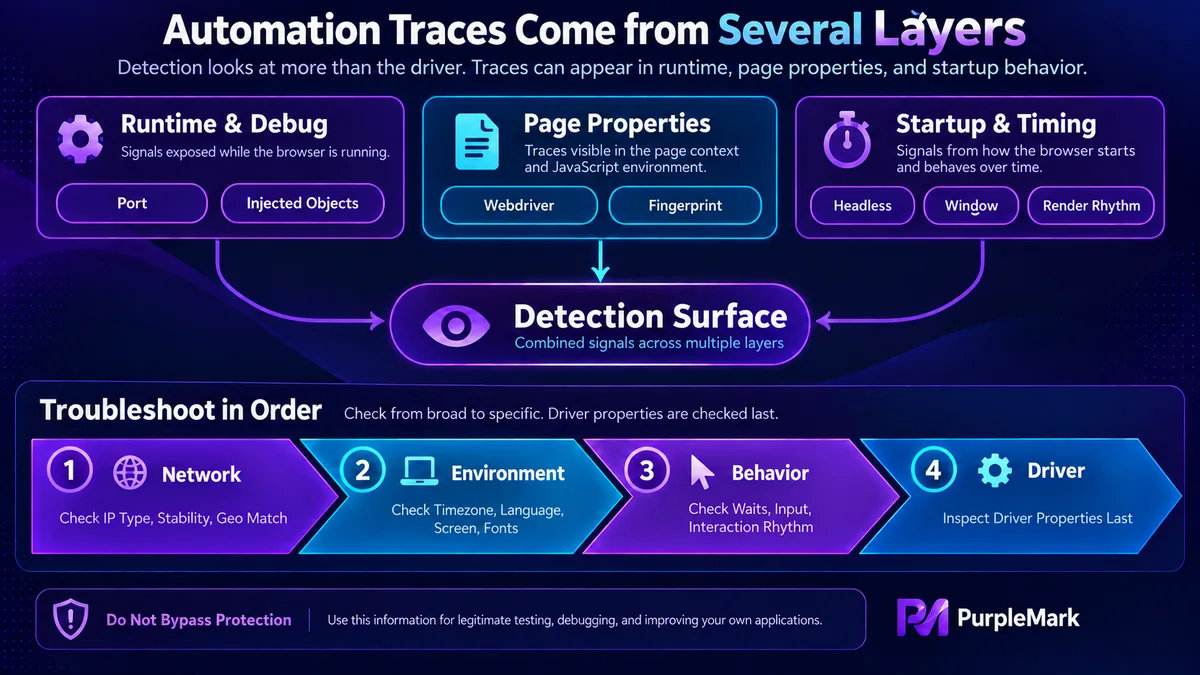
A reasonable order is: first inspect the network layer for IP type, stability, and geographic consistency; then check whether the environment is internally coherent across time zone, language, resolution, and fonts; next inspect behavioral timing, such as fixed waits or instantly completed input; and only after that look at driver-level automation properties.
The reason is simple: driver-level artifacts are no longer the main focus of detection. Putting them first in the troubleshooting process usually wastes time.
Boundaries
Technical measures can reduce the chance of being identified, but some lines should not be crossed: follow the target site's robots rules and terms of service, do not collect personal information, do not bypass technical protection measures, control request frequency, and do not interfere with the normal operation of the service.


