
Multiple Instagram accounts sharing one exit tend to run into trouble together. This article explains why each account needs its own exit, how residential and datacenter proxies differ, how to align region with the account profile, and what to do when an exit fails.
Anyone managing several Instagram accounts eventually hits the same problem: every account posts on schedule and looks normal, yet one of them is suddenly asked for re-verification, or its engagement drops to nearly zero. Most of the time the issue isn't the content — it's that several accounts share a single network exit.
Let's draw a line first. What platform terms prohibit is automated interaction itself — mass liking, mass following, mass commenting, using scripts to imitate human behavior. Those operations break the rules no matter what proxy you use; a proxy cannot fix a compliance problem. The scenario worth discussing is a different one: agencies, brands, or teams that already own several real accounts and need each of them operated stably over the long term.
Why one account needs one exit
Platforms don't judge association from a single login — they piece together long-term signals: the registered location of the exit IP at login, device and browser characteristics, cookies and local storage, and the time windows of routine logins. When several accounts log in from the same exit over a long period, the most direct consequence is that they get grouped under one entity, so trouble with one drags in the rest. Conversely, an exit that jumps across multiple regions within a short time also triggers re-verification.
How residential proxies differ from datacenter proxies
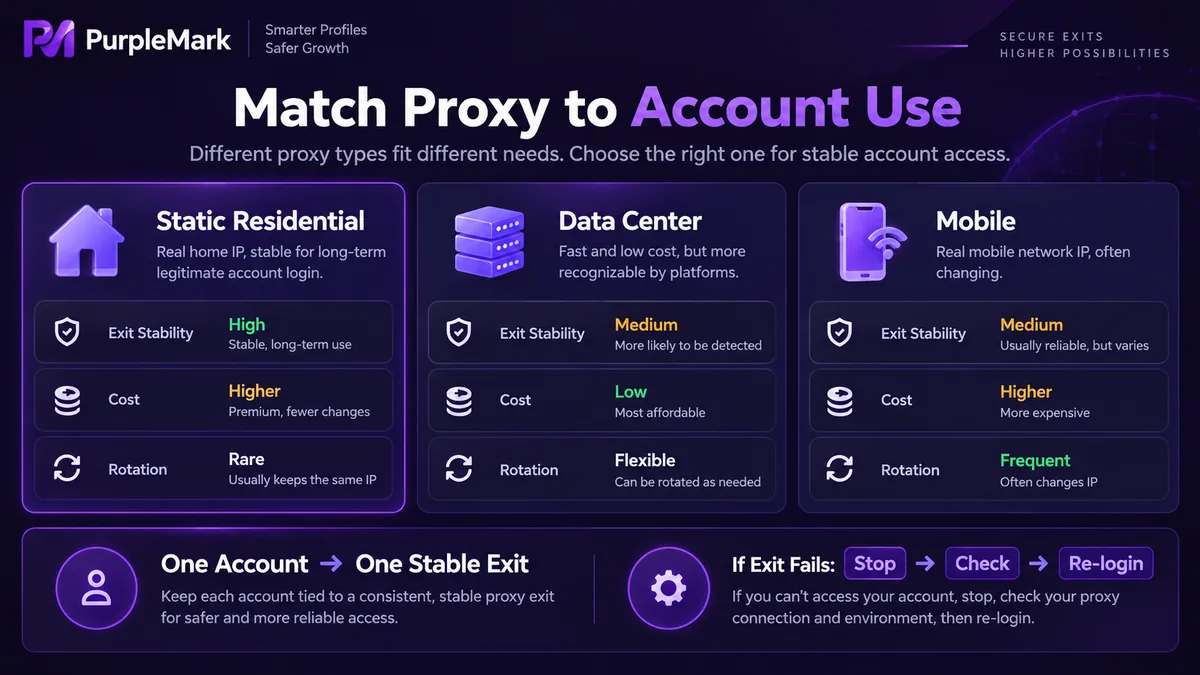
- Residential proxies route through real ISP home broadband addresses, so their location and carrier information matches that of ordinary users. For long-term fixed logins they look more natural, at the cost of a higher unit price, limited bandwidth, and uneven stability.
- Datacenter proxies come from data centers: fast, cheap, and available in bulk, but their IP ranges are clearly identifiable and far more likely to be flagged as proxies.
- Mobile proxies route through carrier networks, where a single IP often sits behind a large number of real users. The attribution looks natural, but the address changes frequently, which makes them unsuitable for accounts that need a fixed long-term exit.
Static residential proxies are the most common choice for long-term account logins: the address never changes, which makes it easy for the platform to bind an account to a stable region. Rotating proxies are better suited to scenarios such as data collection that don't require a persistent login state.
The region must match the account profile
Choosing a proxy region isn't about picking the fastest one — it has to be consistent with the account's other information: the registered location of the phone number used at signup, the region filled in on the profile, the primary language, the market the content targets, and the geographic distribution of audience engagement. A US exit, a profile that says Europe, and content about Southeast Asia — that combination alone is enough to get an account tagged as cross-regional.
When choosing a region, prioritize the market where the business actually operates. If you serve a US audience, use a US exit; if you serve local customers, stay fixed locally. Don't switch frequently just to look more professional.
What to do when an exit fails
An unusable exit is the norm, not an accident. There are three common symptoms: the proxy service itself goes down; the address is blacklisted by the platform and logins repeatedly demand verification; or the exit drifts mid-session and the account is forcibly logged out.
The principle is: never change exits inside an active session. When you spot an anomaly, stop the current activity first, confirm that the new exit is stable and usable, and only then log in again — rather than letting the tool automatically fail over to a backup node when a request fails. The latter makes the same account log in from several regions within minutes, which is more likely to trigger risk controls than simply going offline.
Day to day, record the exit each account is bound to, periodically check whether availability and geolocation have changed, and prepare backup exits in advance while keeping them idle. Once the number of accounts grows, the mapping between exits and accounts needs clear documentation — relying on memory will eventually cause mix-ups.
Where does the environment layer fit
A proxy only handles the network exit. Device characteristics, browser fingerprints, cookies, and login state are a layer the proxy cannot manage. When you are running dozens of real accounts at once, putting each account into its own isolated browser environment — just like fixing an exit for each account — is standard practice for reducing misjudgments. PurpleMark provides exactly this kind of account-level environment isolation, so each account's login state, cookies, and exit configuration can be stored separately.
There is only ever one criterion: do all of this account's long-term signals point to the same stable entity? If they agree, the account stays stable; if they contradict each other, no proxy — however expensive — will hold it.


