
LinkedIn calculates invitation capacity in rolling time windows and pauses invitations when limits are triggered. This guide explains how limits are calculated, the signs you may see when restricted, how recovery works, and why sending many invitations in a short period is very likely to hit a limit.
LinkedIn is one of the few major platforms that turns connection requests into a quantified allowance and adjusts it in real time. The signs of a restriction are straightforward: browsing, posting, and messaging still work, but you cannot send new connection invitations, and the page usually says you are approaching or have reached your weekly limit.
The allowance is not a fixed number
People used to commonly cite 100 invitations per week, but the system now behaves more like an algorithm that varies with account trust. Most accounts are around 100 per week. Accounts with high acceptance rates, a long history, and a strong Social Selling Index may reach 200 or more, while new accounts or accounts that are frequently rejected may be pushed below 50. The same number can mean different things for different accounts.
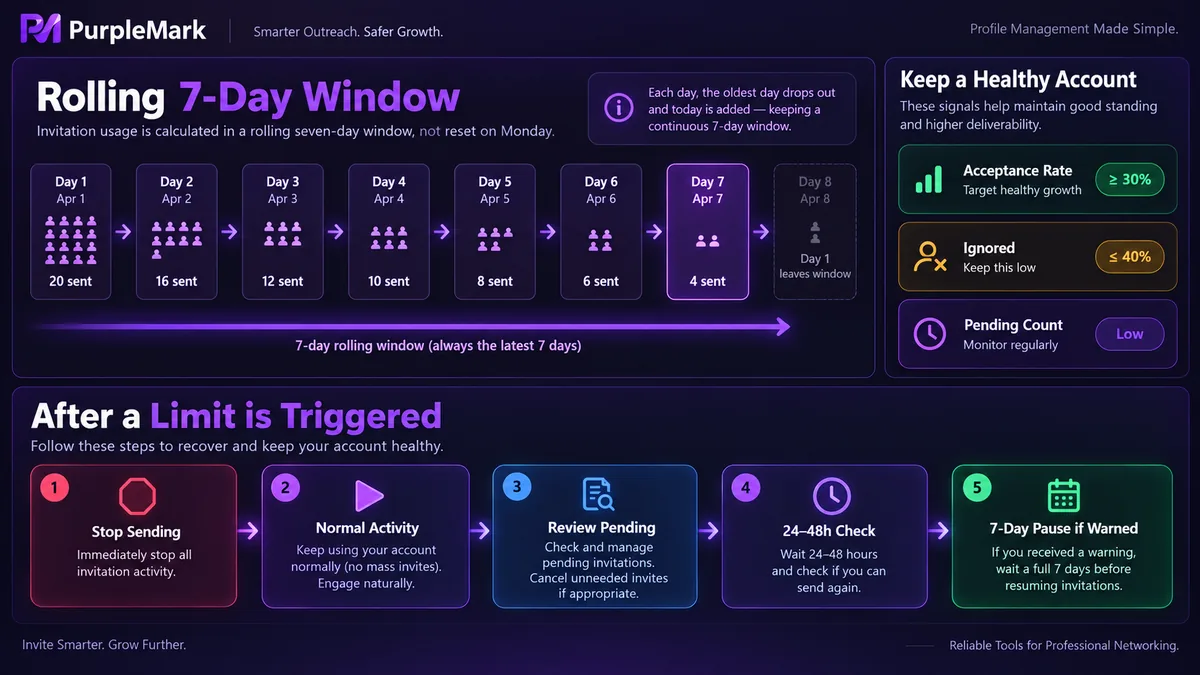
The calculation uses a rolling 7-day window rather than resetting every Monday. The system starts counting from the moment you send your first invitation and continuously looks back over the previous 7 days. That means invitations from yesterday and the day before continue to count until they roll out of the window.
Two other limits are calculated monthly. For invitations with a custom note, free accounts usually have only 5 to 10 slots per month; after using them, they can only send invitations without a note. Paid accounts are much more flexible on this point. There is also a total cap of 30,000 first-degree connections. Once you reach it, you cannot proactively add more people, others cannot add you either, and they can only follow you. To keep adding connections, you first need to remove some inactive older contacts.
Quality metrics determine how high the allowance can go
The acceptance rate comes first. If the share of your invitations that are accepted stays below 20% to 30% for a long period, the system can quickly reduce your weekly allowance because it interprets the pattern as broad outreach to irrelevant people.
The rates of ignored and reported invitations matter as well. If multiple users choose the option indicating they do not know you, the account's trust score can fall and its permissions may shrink. This feedback is delayed, so by the time you notice a smaller allowance, the problem has usually been building for a while.
A backlog of pending invitations is another factor many people overlook. It is advisable to keep unaccepted invitations below 500. Once the backlog reaches 700 to 1,000, the account can easily enter risk controls. Sending invitations without cleaning up old ones continuously feeds the platform negative signals.
Activity also matters. An account that only adds people without posting or interacting can be judged as behaving like an automated account.
Signals you can see when restricted
The clearest sign is a page message saying you have reached or are approaching the weekly invitation limit. Another sign is that the invitation button does nothing, or the request is immediately blocked after submission. Looking at your metrics, you may also see acceptance rates falling, ignore rates rising, and pending invitations piling up. These signals often appear together, although the explicit warning message usually comes last.
Why sending many invitations in a short time almost always triggers a limit
A rolling window means volume accumulates directly. Sending a large batch within tens of minutes compresses what should have been spread across a week into a single point in time, so the number inside the window quickly reaches the cap.
Targeting people who are too similar can accelerate the problem. If you invite dozens of people from the same company in a short period, acceptance rates are hard to raise while ignore rates may increase, and that negative feedback can quickly affect your allowance.
New accounts have no trust history, so launching into large-scale adding immediately is very likely to be blocked. Using automation tools to add people in bulk is the highest-risk approach and also violates the platform's User Agreement.
There is another layer that is easy to miss: the platform never looks only at volume. It can also consider whether behavior appears natural, whether the login environment is stable, whether multiple accounts appear linked, and whether the operating pattern resembles a real person. Multiple accounts sharing one browser, frequent changes in network egress, or repeated environment information can likewise be identified as abnormal.
What to do after a restriction is triggered
There are three things to do. Stop sending invitations immediately, because repeated attempts can extend the restriction period. Return to normal use by browsing content, posting updates, replying to existing messages, and joining discussions so the account maintains a natural activity pattern. Also process invitations you have received, since accepting and replying can both improve interaction quality.
The things not to do are just as clear: repeatedly click the invitation button to test whether access has returned, switch devices or networks and keep trying, register a new account to continue adding people, or use third-party tools to work around the restriction. These actions can worsen the assessment, and creating a new account can also cause the old account to be associated with it.
Recovery follows the rolling window; it is not simply a matter of waiting three days. In most cases, some new capacity becomes available within 24 to 48 hours. If a warning was triggered by overly frequent activity, staying completely quiet for 7 days is the safer approach.
Useful things to do during recovery
Only invitation sending is restricted; the rest of the account remains usable. This period is a good time to work on several things with long-term value.
Review your profile. Your headline, About section, and featured content all directly influence acceptance rates. Publish professional content so people have a reason to follow you. Nurture existing connections through messages and thoughtful comments, because activity among current connections also contributes to account health. At the same time, build a genuinely relevant target list instead of adding people at random.
Clean up the backlog as well. Make it a habit to review pending invitations every two weeks and withdraw those that have been unanswered for more than 14 days. Withdrawing does not restore the allowance already consumed that week; its purpose is to clean up the account profile and reduce the chance of later risk controls.
If you genuinely need to contact someone while invitation sending is paused, there are several routes that do not use the standard weekly allowance: join a group they are in and start a conversation from the member list; follow them and leave high-quality comments on their posts; or, if you have their email address, contact them directly by email.
How to pace everyday activity
Start with a single-digit number of invitations per day, keep that level stable for a period, and only then consider increasing it.
Prioritize people with something in common with you. Shared groups, shared interests, the same industry, attendance at the same event, or previous content interactions all tend to produce clearly higher acceptance rates. Keep invitation notes to 2 to 3 sentences, mention a shared interest or industry, avoid rushing into a sales pitch, do not include external links, and do not immediately ask for contact details. The note limit is 200 characters for free accounts and 300 characters for paid accounts, which is enough to explain why you are reaching out.
Keep the login environment stable. Frequently switching an account between changing environments increases the chance of an abnormality assessment. If you operate multiple accounts, give each one an independent, stable browser environment and a network egress that matches its region. This environment-isolation layer is the kind of capability PurpleMark provides.
One boundary should be clear: LinkedIn's User Agreement prohibits using automation tools to add people in bulk. Environment isolation is about helping multiple legitimate accounts operate stably on their own, not about bypassing invitation limits.
The purpose of invitation limits is to keep connections grounded in real professional relationships. Work with that logic and the available capacity is usually enough; treat the limit as an opponent to defeat and you will keep running into it.


