
When using browser environments to simulate phone logins for social media accounts, realism often depends on many subtle device details. This article explains why mobile-specific fingerprints such as device names, media devices, and sensors matter, and which parameters should be aligned with a real phone.
If you run mobile-focused operations—managing social media accounts that log in from phones, or working in mobile apps and websites—you have probably tried to “simulate a phone environment on a computer.” Yet many people run into the same puzzle: even after setting both the kernel and operating system to Android, why does the environment still look suspicious as soon as it is tested, or why do different accounts fail to resemble the same class of real device?
The answer is often not in the most obvious parameters, but in the many device details that are specific to mobile phones. Whether an environment feels real is never determined by one setting alone. It comes from making every small detail as close to a real device as possible and letting those details add up.
Why mobile environments are easier to expose than desktop ones
When simulating a desktop environment, the set of signals that need attention is relatively stable. Phones are different. In addition to the operating system, resolution, and UA, a real phone continuously exposes a group of signals that are specific to that device, and together they form its device identity:
- Device name and model information: device name, manufacturer, hardware identifiers, and similar fields can help a platform infer which phone model is being used.
- Media device information: the names, quantities, and availability of cameras and microphones. A real phone usually exposes one or more cameras and microphones; a “mobile environment” with no media devices at all, or only desktop-style devices, looks unnatural.
- Screen and interaction characteristics: resolution, aspect ratio, touch support, default orientation, and other traits differ clearly between mobile and desktop devices.
- Sensor capabilities: motion sensors such as gyroscopes and accelerometers detect device rotation and tilt, and websites can read related data through browser interfaces. Such readings can contain tiny calibration differences that are stable and device-specific enough to become identification signals. Empty readings, or multiple environments returning exactly the same values, can attract attention.
The key point is that these signals are collected independently, but still need to be internally consistent as a whole. If the system, language, time zone, and region all point to one country while the media devices and device name still look like a desktop machine, cross-checking can reveal the contradiction.
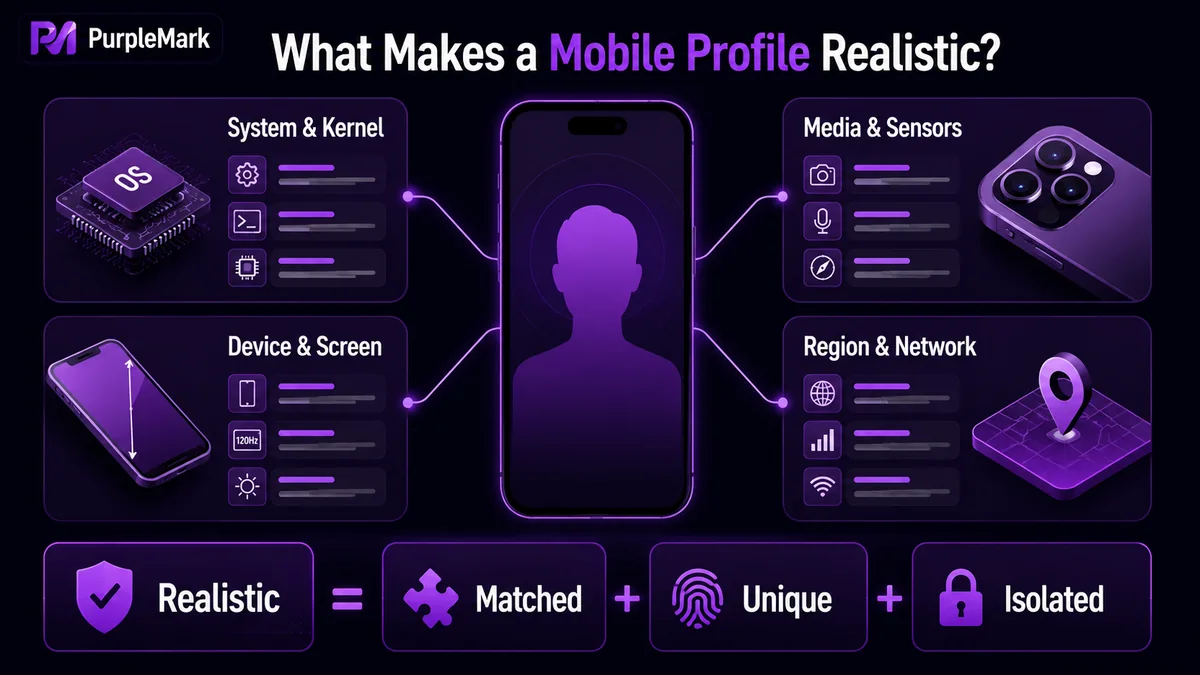
Parameters to align when simulating a mobile environment
To reduce the risk of a “mobile environment” looking unlike a real phone, it helps to check the following categories for consistency when creating the environment:
- The operating system and kernel should match a mobile build. If the system is set to Android or iOS, the kernel version should also correspond to what a mobile browser would use, rather than forcing a desktop kernel behind a mobile UA.
- Keep the UA, language, time zone, and geolocation consistent. These should follow the target market and device region, and ideally align with the region of the IP being used, so you do not end up with obvious contradictions such as “the phone is in Los Angeles but the time zone is Beijing.”
- Device and media signals should “look like a phone.” Device name, resolution, touch support, camera and microphone information, and other media-device signals should resemble a real phone rather than a desktop configuration.
- Different environments should not be identical. If you run several mobile accounts at the same time, avoid giving them the exact same device parameters. Real phones naturally differ from one another, so several environments with perfectly identical device information can itself become a strong account-linking signal.
Use PurpleMark to manage mobile device details consistently
PurpleMark can directly handle these mobile-specific parameters when you create a browser environment. In its environment settings, you can choose the operating system and kernel version, so when creating an account environment you can specify Android or iOS together with a corresponding mobile browser kernel instead of pretending to be a phone by changing only the UA string.
At the device and media layer, PurpleMark lets you configure the device name, media devices such as cameras and microphones, resolution, and hardware-related information such as CPU, memory, and MAC address. For example, if you need to simulate “a certain Android model in the United States being used to log in to social media,” you can configure the system, kernel, regional language, time zone, and device/media parameters as one coherent whole inside the same environment instead of changing one field here and leaving another at its desktop default.
If you operate multiple mobile accounts, you can also create separate environments by platform, store, or business region. Each environment can use its own combination of device and media parameters, independent Cookie and local data, and then be located quickly through groups and bound-account labels. This helps avoid multiple mobile accounts sharing the same “device shadow.”
For new users, open the PurpleMark web app and create a mobile-system environment. Configure the device name, media devices, time zone, language, and other parameters that most affect consistency, and the difference between an internally coherent mobile environment and a desktop configuration disguised as a phone becomes much easier to see. If you need local-browser capabilities, visit the download page to install the client and then return to the workspace.
Frequently asked questions
When simulating a phone environment, is changing only the UA to a phone model enough? No. The UA is only one of many signals a platform can observe. If the operating system, kernel, device name, media devices, resolution, time zone, and other dimensions still look like a desktop machine, cross-checking is more likely to expose the mismatch. A mobile environment should start with the system and kernel and keep the device-related parameters coherent as a whole.
Can multiple mobile accounts use the same set of device parameters? It is not recommended. If different accounts share exactly the same device, media, and sensor signals, that can itself become a typical account-linking pattern. Real devices naturally differ, so it is safer for each account environment to maintain its own independent yet internally consistent parameter combination.
How much impact do poorly configured device details have? These details affect whether the environment looks like a real device from the platform’s perspective. One missing detail may not be enough to determine anything by itself, but several abnormal or contradictory device signals can significantly increase the chance of identification. Managing these parameters centrally and consistently is a basic step in reducing that risk.


