
Snapchat has a young, highly engaged audience, making it worth testing for brands targeting Europe and North America. This guide walks through Snapchat advertising from account setup and campaign creation to choosing among single image/video, Story, Collection, Dynamic, Commercial, and AR ad formats.
Snapchat has a very young user base, concentrated among people aged 13–34, with Gen Z and younger millennials making up a large share. Its interaction formats—Stories, Spotlight, and AR Lenses—are also distinctive. For cross-border sellers, brands, and app developers targeting Europe and North America, it is a channel worth serious consideration. But running Snapchat ads involves more than uploading a creative: account setup and ad-format selection both matter.
Why choose Snapchat ads?
- Immersive experience: Ads are often full-screen and vertical, fitting naturally into how people browse. Video, Stories, and AR Lenses also let users swipe, tap, and try experiences, creating more opportunities for interaction.
- Relatively lower competition: Compared with Meta and TikTok, Snapchat has fewer advertisers. In some categories and regions, competition can be less intense, giving newer brands more chances to gain visibility. Costs still vary by industry, geography, and auction conditions.
- Mature AR ecosystem: Brands that want interactive experiences have an advantage. Beauty products can offer virtual try-ons, eyewear can be previewed online, and home furnishings can be visualized in real spaces—experiences that can hold attention better than traditional image-and-text ads.
Four key points when setting up an account
- Prepare your information: Use a commonly accessed email address, basic company information, and an international credit card that can be charged.
- Register at ads.snapchat.com: Enter your business email, password, and date of birth.
- Complete business information: Add your company name, phone number, country, currency, and time zone. ⚠️ Currency and time zone cannot be changed after creation. If you use a USD card, choosing USD is generally appropriate; select the target market's or your local time zone carefully, because a wrong choice requires opening a new account.
- Create a Public Profile and add payment: Ads need a public profile to receive user clicks. Then add a payment method in Billing Center so ads can be reviewed and go live.
Create your first campaign
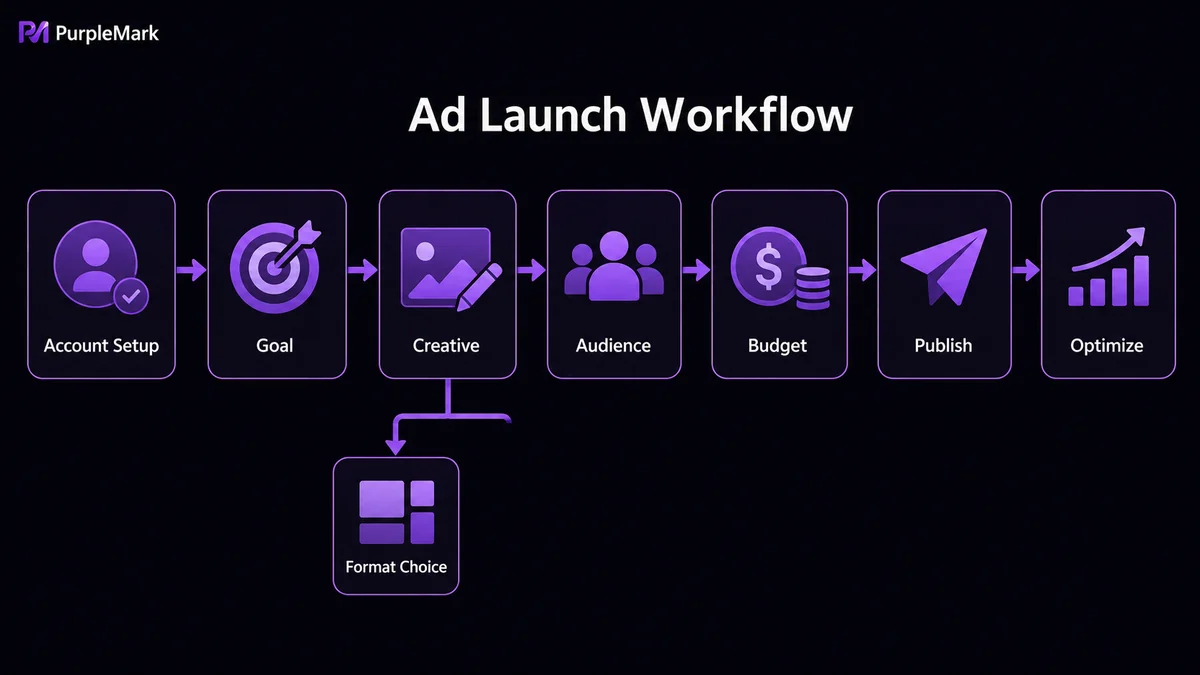
Beginners can start with Instant Create and follow four steps:
- Choose an objective: Use Website Traffic for cross-border site visits, App Install for app downloads, or Awareness for reach.
- Build the creative: Add your brand name and headline, upload a vertical (9:16) image or video, choose a CTA (such as Shop Now for sales or More/Sign Up for traffic), and enter the destination URL.
- Define the audience: Select countries or regions, age ranges—Snapchat's core audience skews young—and interest categories.
- Set budget and publish: You can start from as little as USD 5 per day. Set the daily budget and schedule, then click Publish. Once approved, which often takes a few hours, delivery can begin.
What Snapchat ad formats are available?
- Single Image or Video Ads: The most classic and versatile format, shown full-screen across Stories, Spotlight, and Discover. For a first campaign, it is a good format for testing creatives.
- Story Ads: Create a branded entry point with a logo in Discover. Users can tap through 3–20 consecutive cards, making this format suitable for new-product collections, ingredient education, and sale previews that benefit from storytelling.
- Collection Ads: A main creative appears at the top with a row of product thumbnails below. Users can tap directly to purchase pages, shortening the conversion path and making the format a strong fit for cross-border independent stores.
- Dynamic Ads: Sync a product Catalog with Snapchat Pixel, and the system can automatically generate personalized ads based on browsing behavior. Retargeting is supported, making this useful for merchants with many SKUs.
- Commercials: Full-screen vertical video with the first six seconds unskippable and a maximum length of up to three minutes. These placements appear in premium programming and suit brands with larger budgets that want broader brand impact.
- AR Lens Ads: A signature Snapchat format that lets users try on products, test makeup, or interact through the camera. Users may also share what they create, helping generate secondary organic reach.
How can multi-account advertising be managed more reliably?
As a business grows—testing multiple product categories, scaling in several regions, or collaborating across a team—it often needs more than one ad account. Repeatedly signing in and out of all accounts in the same browser is inefficient, and browser fingerprints and cookies can become mixed, increasing account-management risk.
Teams that need to manage multiple Snapchat ad accounts at scale can consider using an anti-detect browser to create isolated environments for different accounts, keeping fingerprints, cookies, and caches separate. When paired with proxies, teams can keep network origin, time zone, and language settings aligned for each account. Cross-device synchronization and automation can also reduce repetitive work.
It is important to emphasize again: the value of isolated environments is to make compliant operations more standardized and reduce accidental conflicts—not to bypass platform rules or conduct prohibited advertising. Operate within the rules and build accounts and creatives carefully so campaigns can remain sustainable.
Summary
Snapchat ads have a relatively accessible entry point and low starting budget, making them suitable as an incremental channel to test. A practical sequence is “set up the account → test single-image creatives → scale,” then choose formats based on performance data: use Collection or Dynamic Ads for conversion-oriented goals, and Commercials or AR for brand reach. Keep creatives vertical, simple, and youth-oriented, and use Pixel tracking to improve performance step by step.


