
AI tools are becoming part of everyday workflows for writing, coding, design, search and more. This article groups popular and accessible tools such as ChatGPT, Claude, Gemini, Cursor, Midjourney and Perplexity by use case so you can quickly choose the right assistant for your needs.
AI tools have become popular very quickly in recent years, and you can now find helpers for almost every step of writing, coding, design and search. The problem is that there are so many tools that it can be hard to know where to start. This article groups some of the more popular and easy-to-use AI tools by category so you can quickly find the ones that fit your needs.
General-purpose chat and text assistants
ChatGPT: A general-purpose AI assistant from OpenAI. It is strong at text conversations, writing and analysis, has a relatively mature ecosystem and powerful models, and many new features often appear here first. It suits most users who need broad Q&A, writing, translation and brainstorming support.
Claude: Known for long-context understanding and generation, with strong performance in writing and long-form analysis. It is good at working with lengthy documents, polishing text and producing structured output, making it suitable for content creators and users with high expectations for writing quality.
Gemini: Google's native multimodal model, deeply integrated with Google services such as Gmail, Docs and Drive. It can access your email, calendar and files from a sidebar, making it a good fit for people who rely heavily on the Google ecosystem.
Coding assistance
Cursor: An AI code editor built for development. It can provide context-aware suggestions while you write code, fix bugs and refactor, making it useful for programmers and teams that want to improve development efficiency with AI. Paid plans generally require a subscription; features and pricing should be checked on the official site.
Image generation and design
Midjourney: An AI image-generation tool known for its artistic style and image quality. It is suitable for concept art, illustrations and brand visuals. It is often used through Discord; specific access methods and permissions should be confirmed with the official service.
Nano Banana 2 (example image model): Models in this category focus on image generation and editing and are suitable for tasks such as image modification and style conversion. There are many similar tools on the market, so compare generation quality, controllability and ease of use when choosing one.
Gamma: An AI tool for presentations and content creation that can quickly generate well-structured presentations and polished layouts. It is useful for people who need to produce slides or proposals quickly.
Smart search and productivity
Perplexity: Known for conversational search with cited sources. It can answer questions directly while indicating where the information comes from, making it useful for research, fact-checking and deeper searches while reducing the time spent opening many webpages.
Notion AI: AI integrated into the Notion notes and collaboration platform. It can help summarize, continue writing and organize notes, making it suitable for individuals or teams that do a lot of knowledge management and document writing.
How to choose the right AI tool for you
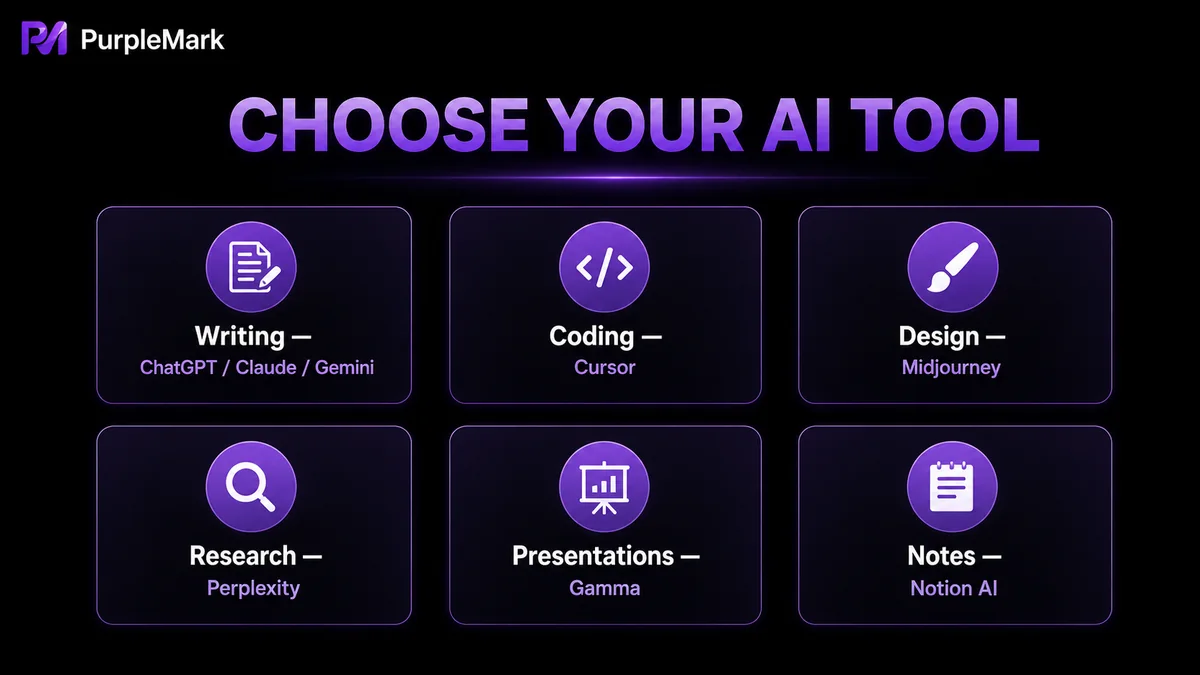
Start by asking yourself what problem you want to solve: choose a conversational assistant for everyday Q&A and writing, Cursor for coding, Midjourney-type tools for images, Perplexity for verifying information, and Notion AI for office documents. Many tools offer free plans or trial allowances, so it is worth trying them first and deciding whether to pay based on your actual experience. Features and pricing can change quickly, so always check the latest official information.
Summary
With AI tools, more is not necessarily better. What matters is finding a few that fit naturally into your everyday workflow. A general assistant (ChatGPT/Claude/Gemini) plus one specialist tool (coding/design/search) is usually enough to cover most needs. Try them for free first, confirm their real value, and then decide whether they are worth paying for.
Frequently asked questions
Which AI tool is the best? There is no single answer. For general writing and Q&A, start with ChatGPT or Claude; for coding, try Cursor; for image generation, consider Midjourney; and for fact-checking, use Perplexity. Choose one or two tools that match your main use cases and learn them well.
Is the free version enough? The free versions of many tools are sufficient for light everyday use, although access to advanced models or certain features may be limited. First make sure your basic workflow works, then consider a paid subscription if you truly have frequent needs.
What should I watch out for when using AI-generated content? AI can produce inaccurate information (hallucinations), so important facts should be checked by a person. Be cautious with copyright, privacy and platform rules as well, and do not treat AI output as automatically correct.


