
Public Wi-Fi, corporate internet access, and personal proxy use often rely on different types of proxies. This article explains transparent and non-transparent (anonymous) proxies, how they work, and where they are used so you can choose the right option for your networking needs.
A proxy acts as a “middleman” between your device and the destination website, but different proxy types expose your identity to very different degrees. Transparent proxies and non-transparent (anonymous) proxies are two common examples. Understanding their differences helps you choose the right one for your needs.
What Is a Transparent Proxy?
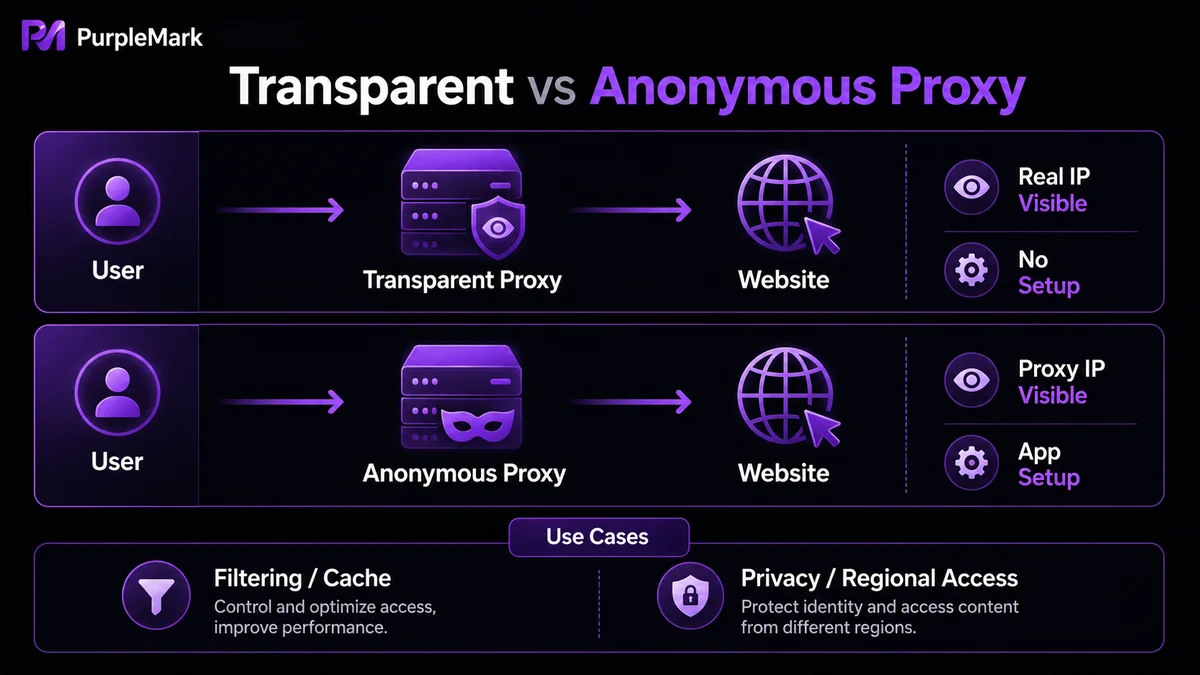
A transparent proxy (also called an inline proxy or intercepting proxy) sits between users and the internet and is almost invisible to the user. It requires no client-side configuration and automatically intercepts and forwards requests. To improve efficiency, it often caches web pages and other resources.
The key point is that a transparent proxy does not change or hide your real IP address. When you access a website through it, the destination server can still see your real IP—hence the name “transparent.” Common uses include:
- Content filtering: blocking access to specific websites, common on school, corporate, and parental-control networks;
- User activity monitoring: allowing organizations to monitor employee browsing activity;
- Data caching: caching frequently requested content to reduce server load and speed up delivery;
- Security measures: scanning and filtering malware or attacks before data enters an internal network.
What Is a Non-Transparent (Anonymous) Proxy?
The core function of a non-transparent proxy (also called an anonymous proxy) is to hide the user's real IP address and provide anonymity. It communicates with the destination server on behalf of your device, so the destination sees only the proxy server's IP rather than your original IP. It does this by modifying or replacing source information in the request. Its main uses include:
- Improving privacy and security: preventing websites from tracking your real location and usage behavior;
- Accessing region-restricted content: reaching content or services limited by geographic location;
- Protecting your real IP: in workflows such as multi-account operations or web data collection that require different outbound sources, using different proxies can distribute traffic and avoid concentrating tracking on one real IP.
It is important to note that a non-transparent proxy is only a network-egress tool. Healthy multi-account and data-collection operations still need to be based on compliance with platform rules and on legitimate entities and content.
Key Differences Between the Two
- Configuration: a transparent proxy is configured at the network level and works across environments, platforms, applications, and browsers without separate setup; a non-transparent proxy usually needs to be configured on each device or application, such as by entering a proxy address and port or changing browser proxy settings.
- IP visibility: a transparent proxy does not hide your IP, so the destination server can see your real address; a non-transparent proxy hides the real IP, and the destination sees only the proxy server's address.
- Best use cases: transparent proxies suit networks that need centralized management, content filtering, and caching; non-transparent proxies are better when stronger privacy or hiding the real IP is required.
Combining Proxies in Multi-Environment Workflows
If a business needs different accounts or destination sites to use different network exits, one type of proxy alone may not be enough—you also need a tool that can centrally manage browser environments and proxies. PurpleMark, for example, can:
- Create mutually isolated browser environments for different accounts or workflows, with separate cookies, cache, and history;
- Bind a different proxy to each environment, centrally maintaining proxies on the proxy-management page and mapping them one-to-one to environments;
- Customize language, time zone, resolution, and other parameters for each environment so they better match the actual network exit.
Managing “accounts, environments, and proxies” in one workspace reduces repetitive configuration and helps avoid problems caused by mismatches between an environment and its network exit. PurpleMark's value is in standardizing how networks and accounts are organized, not in creating false identities to evade platform rules.
Frequently Asked Questions
Does a transparent proxy affect my privacy? It generally neither improves nor meaningfully changes privacy—it does not hide your real IP, so both the destination server and network monitoring parties can see it.
Can my ISP see what I do through a non-transparent proxy? Your ISP can see that you are connecting to a proxy server, but because the traffic is encrypted and the IP is hidden, it usually cannot see the specific content you access through the proxy.
Should I choose a transparent or non-transparent proxy? It depends on your needs: choose a transparent proxy if you want simple caching and content filtering and do not mind transparency; choose a non-transparent proxy if you need stronger privacy or access to region-restricted content.


