
Web scraping is widely used for market research, product research, SEO, and academic work. This guide compares BeautifulSoup, Scrapy, Octoparse, ParseHub, Selenium, Playwright, Diffbot, and WebHarvy by technical requirements and use case, with practical guidance for compliant data collection.
Whether you work in cross-border e-commerce, market research, product analysis, SEO, or academic research, “web data collection” is hard to avoid: extracting structured data such as prices, reviews, product information, and news from public web pages to support decisions.
There are countless tools online, but the real challenge for beginners is: which one should you actually use? They belong to different categories. Some focus only on parsing, some are complete crawling frameworks, some are no-code point-and-click tools, and others use AI to structure pages automatically. This guide groups eight mainstream tools by capability and ends with a practical way to choose based on your situation.
1. Parsing and Core Libraries (if you can code a little)
BeautifulSoup. A Python library for parsing web pages and extracting data from HTML/XML. It is commonly paired with Requests to fetch page source before parsing. Free and open source (MIT).
- Advantages: quick to learn, simple syntax, tolerant of malformed HTML, and well suited to small-scale or highly customized parsing.
- Limitations: it parses content but is not a complete crawler, does not render JavaScript, and is less suitable for very large-scale collection.
Scrapy. A complete Python crawling framework with built-in request scheduling, parsing, deduplication, and storage workflows. It uses Twisted for asynchronous concurrency and can crawl efficiently. Free and open source (BSD).
- Advantages: an all-in-one, high-performance framework for large-scale projects that need to run reliably over time.
- Limitations: its framework-oriented design takes time to learn; dynamic JavaScript pages still require tools such as Selenium or Playwright.
2. No-Code Visual Tools (no programming required)
Octoparse. A visual scraping tool for non-technical users. You click page elements to create extraction rules. Its built-in browser can handle dynamically loaded pages, run tasks in the cloud, and export to Excel/CSV/API.
- Pricing: limited free plan; Standard is about $69/month and Professional about $249/month.
- Best for: people without a programming background who want to create scraping tasks quickly.
ParseHub. Another no-code visual scraper supporting static and dynamic pages, cloud jobs, scheduled scraping, and API output.
- Pricing: free plan is limited to about 200 pages; Standard is about $189/month and Professional starts around $599/month.
- Best for: non-technical teams that need scheduled cloud-based jobs.
WebHarvy. A visual scraper for non-technical users that can automatically recognize lists, tables, and pagination, then extract and export data in batches and run scheduled jobs.
- Pricing: one-time license (about $129 for one user), with no subscription renewal required.
- Best for: individual users who prefer a perpetual license instead of a monthly subscription.
3. Browser Automation (for dynamic pages)
Selenium. A long-established browser automation tool that can programmatically load pages, click, scroll, and fill forms. It is suitable for scraping content rendered dynamically with JavaScript and supports multiple browsers and programming languages. Free and open source (Apache-2.0).
- Advantages: can interact with almost any web page.
- Limitations: requires launching a real browser, so it is slower and more resource-intensive and is not ideal for extremely large-scale collection.
Playwright. A modern browser automation framework from Microsoft that supports Chromium, Firefox, and WebKit, with headless mode and smart waiting. It is often more reliable for SPAs and complex dynamic pages. Free and open source (Apache-2.0).
- Best for: modern websites that rely heavily on JavaScript rendering.
4. AI-Structured APIs (enterprise use without crawler maintenance)
Diffbot. An AI-based web data structuring service that does not rely on fixed selectors. It automatically identifies page types such as articles, products, and reviews and returns structured JSON through a REST API. When page layouts change, rules usually do not need constant manual updates.
- Pricing: 10k credits/month free; Startup $299/month; Plus $899/month; custom enterprise plans.
- Best for: organizations that need stable, high-quality structured data over time without maintaining their own crawler stack.
So Which One Should You Choose?
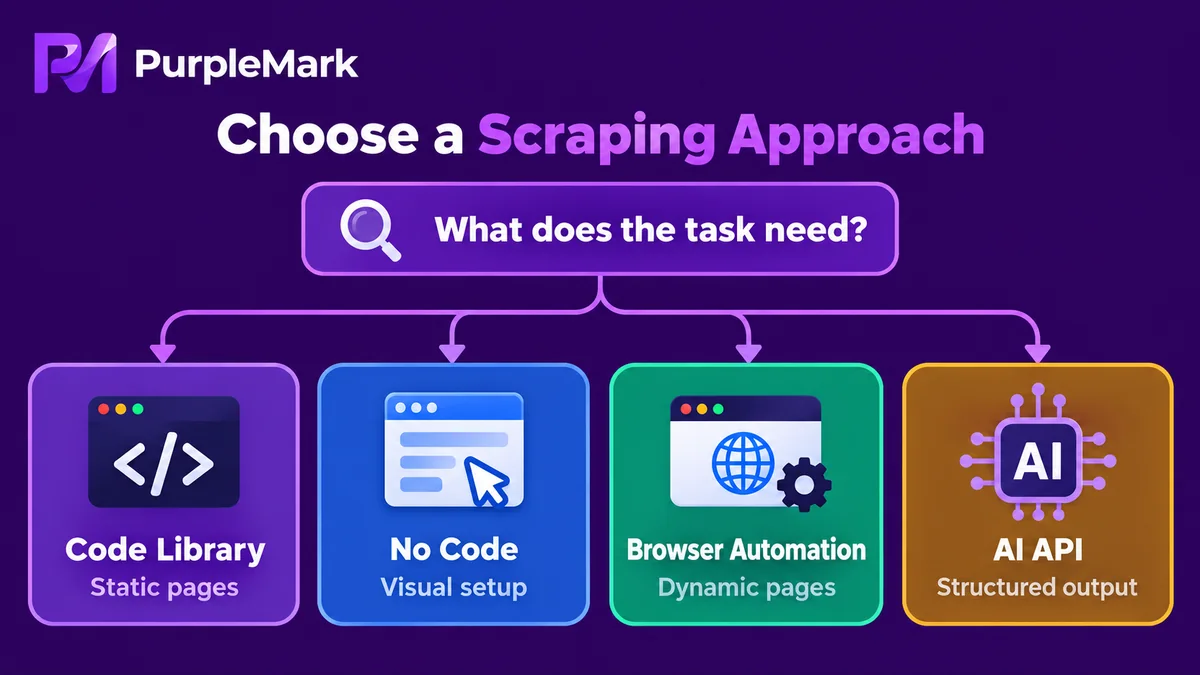
Match your situation to these dimensions:
- You can code and need high-volume collection: use Scrapy as the main framework and BeautifulSoup for detailed parsing.
- The page loads content dynamically with JavaScript: add Selenium or Playwright for browser rendering and extraction.
- You do not code and want to start quickly: choose among Octoparse, ParseHub, and WebHarvy depending on whether you prefer a free plan, subscription, or one-time license.
- You need enterprise-grade clean structured data: use an AI API such as Diffbot to reduce maintenance overhead.
- You only scrape small amounts occasionally: BeautifulSoup + Requests is usually enough; do not start with a heavyweight framework unless you need it.
Three Basic Principles for Compliance and Stability
Choosing the right tool is only half the job. The following principles directly affect whether your collection workflow can remain stable and compliant over time:
1. Collect only public data you are authorized to access. Respect the target site's robots rules and terms of service. Do not try to bypass login walls, CAPTCHAs, or access controls to obtain data that is not meant to be public. Whether a collection activity is appropriate depends on whether the information is public and whether you are entitled to use it.
2. Control request frequency and avoid overloading sites. High-frequency or highly concurrent requests can disrupt normal service and are more likely to trigger restrictions. A better approach is to lower the request rate, add reasonable delays, and collect in batches instead of trying to pull everything at once.
3. Isolate environments when accounts and sessions are involved. If a collection task signs in to dashboards or member pages that need persistent sessions, a tool such as PurpleMark can create a separate browser environment for each project or client and keep their Cookies, login sessions, and proxies isolated. This prevents sessions from different tasks from mixing, and a cleanup or failure in one task is less likely to affect another. It also makes project-based archiving and troubleshooting clearer. The tool helps keep execution environments organized; you are still responsible for determining whether the data you collect is public and compliant.
Frequently Asked Questions
Should I use BeautifulSoup or Scrapy? BeautifulSoup is a parsing library, while Scrapy is a full crawling framework. Use BeautifulSoup for small amounts of data; use Scrapy for large-scale, long-running jobs. They are also commonly used together.
Can I collect web data without knowing how to code? Yes. No-code tools such as Octoparse, ParseHub, and WebHarvy let you create scraping tasks through visual clicking and are suitable for non-technical users.
How do I choose between Selenium and Playwright? Both can handle JavaScript-heavy dynamic pages. Playwright is newer, often faster, and has strong cross-browser-engine support, which suits modern sites. Selenium is older, has more learning resources, and has a mature ecosystem. Your preferences and existing code stack should guide the choice.
Do dynamically rendered pages always require browser automation? Not necessarily. First check whether the data already exists in the initial HTML. If it is loaded asynchronously through Ajax, analyzing the underlying API may be more appropriate. Use Selenium/Playwright only when full browser rendering is genuinely required.
Is collecting data with PurpleMark compliant? PurpleMark is a browser environment management tool used to isolate sessions, proxies, and login states for different collection tasks. Whether the data collection itself is compliant depends on whether you are collecting public data you are authorized to access and whether you follow the target site's terms. That is a question of usage; the tool itself is neutral.
Conclusion
Choosing a web data scraping tool is essentially about matching your technical background + data scale + page type: use BeautifulSoup/Scrapy if you code, Octoparse/ParseHub/WebHarvy for no-code workflows, Selenium/Playwright for dynamic pages, and Diffbot for enterprise structured data. Once the tool is chosen, follow the three principles of public data, controlled request rates, and environment isolation so your scraping project can operate steadily and compliantly over the long term.
(Compliance note: collect only public data you are authorized to access, and follow the target site's robots rules and terms of service.)


