
Accounts, proxies, Cookies, team permissions, automation tasks... work that used to be scattered across multiple tools is increasingly being handled in one integrated workspace. This article explains the specific pain points that an integrated multi-account browser workspace solves for cross-border teams.
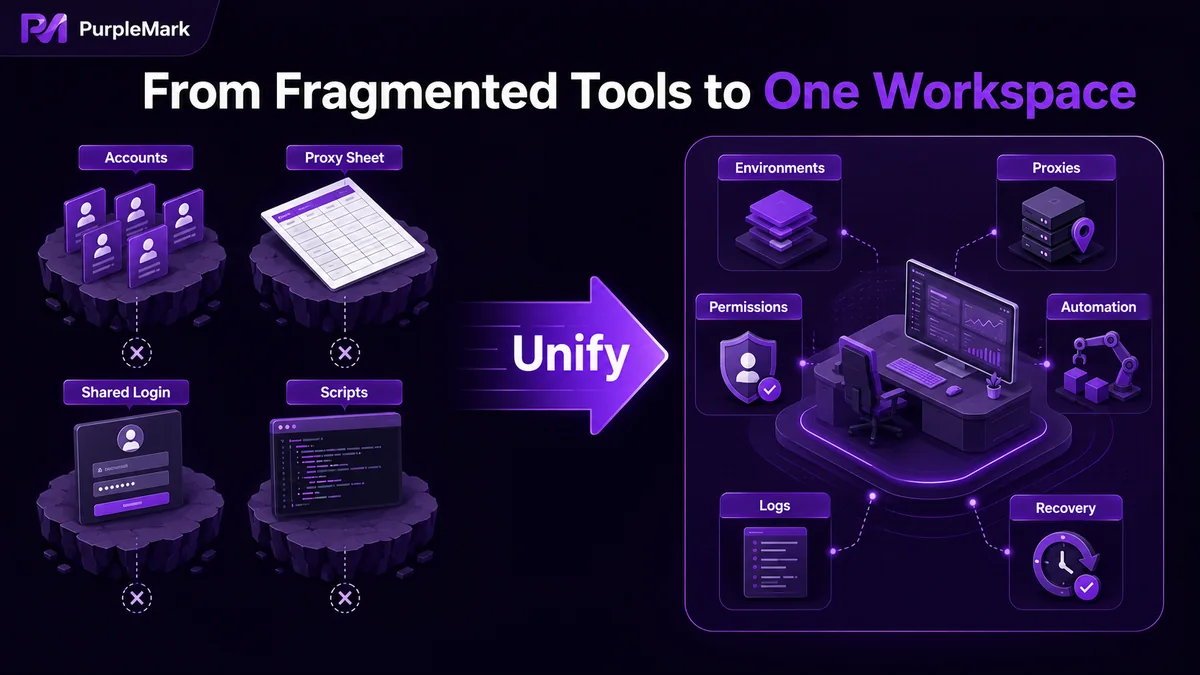
Once a cross-border team operates accounts at a certain scale, it almost always runs into the same problem: accounts are scattered across different browsers and tools, proxies live in Excel sheets, Cookies and local data get mixed together, new team members do not know which environment belongs to whom, and automation scripts lack a unified interface.
None of these issues is fatal on its own, but together they can significantly slow operations. This is why more teams are adopting the idea of "putting everything related into one browser workspace." This article explains the concrete problems an integrated multi-account browser workspace solves for cross-border teams and what a qualified tool should provide.
How cross-border account management becomes fragmented
In the early stage of account operations, one or two people managing a few dozen accounts can get by with simple methods: multiple Chrome instances, several fingerprint browsers, and an Excel account sheet. It is scattered, but manageable. Once the team expands, however, problems quickly compound:
- Accounts, proxies, and Cookies are maintained in three separate places. Account environments are in the fingerprint browser, proxy information is in Excel, and login states are spread across different environments. Every new account requires manually aligning data in all three places, and mistakes cause problems.
- Each operator follows a different routine. Team members configure accounts independently, while grouping, naming, and parameter choices depend on personal habits. When a newcomer takes over, they often do not know what the account's "correct environment" should be.
- Permissions and responsibility are unclear. Several operators may share one admin account, with no record of who did what, making incidents hard to trace.
- No one takes over repetitive workflows. Feed browsing, scheduled posting, batch commenting, and other automatable tasks remain manual because scripts lack a unified interface.
These four problems are not unique to any particular fingerprint browser. They are common challenges once the industry reaches the stage of operating multiple accounts at scale.
What an integrated workspace actually solves
Centralizing account-related work in one browser workspace is mainly about solving fragmentation. In practice, an integrated workspace usually covers several layers:
Centralized visibility of account environments. A list of all account environments—ID, name, group, bound account, proxy, exit IP, last opened time, and creation time—is available on one page. Teams can quickly find an account by group instead of memorizing environment IDs or searching through Excel sheets.
Decoupled proxy and account management. Proxies are maintained separately, including proxy lists, proxy groups, proxy types, host and port, exit IP, and the number of environments currently using each proxy. When a proxy needs to change, the team does not have to edit every environment individually; the target proxy can simply be selected from the workspace.
Team permissions and operation logs. Member, role, authorized group, status, notes, and other member-management capabilities explicitly define "who can access which environments." Operation logs for login, environment management, proxy management, and member management record "who did what." Once multi-account operations reach team scale, this is the key transition from ad hoc individual work to a collaborative process.
A unified entry point for automation tasks. RPA, Local API, window synchronization, and AI tool integration are available in the same workspace instead of each team member piecing together separate scripts.
Recoverable data. A recycle-bin mechanism that separately manages deleted browser environments and proxies provides a recovery window after accidental deletion, so "deleted by mistake" does not immediately become "the account is gone."
What to evaluate when choosing an integrated workspace
Not every tool that claims to support multiple accounts meets the standards above. To judge whether an integrated workspace is sufficient, check the following:
- Can each environment setting be configured individually and kept consistent? Whether the operating system, Chromium kernel version, UA, language, time zone, geolocation, fonts, WebGL, WebGPU, WebRTC, CPU, memory, device name, MAC, Canvas, WebGLImage, AudioContext, and other parameters can be configured one by one on a single page affects whether accounts can run consistently across different regions.
- Are proxies decoupled from accounts? Separate proxy management, exit-IP records, and batch binding of proxies to multiple accounts by business group are essential for medium and larger teams.
- Can team permissions be granular? Authorizing environments by member or group and reviewing operation logs is far safer than sharing one administrator account.
- Does automation support multiple paths? Support for no-code RPA, Local API, and AI tool Skill integration at the same time allows teams at different maturity levels to use the same platform.
- Is there a safety net for data? Recycle bins, configuration history, and operation logs are the everyday safeguards that help teams recover when something goes wrong.
- Can it be used directly on the web? A web-based workspace lets team members get started without everyone installing a client. Installing the client only when local browser capabilities are needed is a more modern collaboration model.
Bringing these capabilities together with PurpleMark
For an integrated workspace, PurpleMark is a SaaS workspace designed around this type of need. It brings the capabilities above into one web console:
- Unified account-environment management. The environment list, running environments, environments shared with me, my shares, environment groups, bound accounts, proxies, exit IP, last opened time, and creation time are all available on one page. Each environment can be grouped and named by business use.
- Independent proxy maintenance. Proxy lists, proxy groups, and resource entry points are available, and the workspace can record how many environments are using a proxy, so changing proxies does not require editing every environment.
- Team collaboration controls. Members, roles, authorized groups, status, and notes are included. Four categories of operation logs—login, environment management, proxy management, and member management—can be viewed directly.
- Multiple automation paths. RPA tasks and workflows are organized by platform, covering common platforms such as TikTok, Twitter/X, Instagram, Facebook, and YouTube. Local API and Skill allow AI tools such as Claude Code, Cursor, and Gemini CLI to call local APIs in a structured way, while window synchronization lets multiple environments perform the same operation together.
- Data-safety safeguards. The recycle bin with 30-day retention and global settings with workspace defaults and historical rollback make it possible to trace and recover from accidental actions or policy changes.
If your team is evaluating a workspace that can handle account management over the long term, you can open the PurpleMark web app and try the full flow of creating an environment, setting a proxy, and binding an account, then compare it against the checklist above. If local browser capabilities are needed, install the client from the download page.
Frequently asked questions
What is the difference between an integrated workspace and a regular fingerprint browser? A regular fingerprint browser usually focuses on preventing account environments from mixing with one another. An integrated workspace goes further by bringing proxy management, team permissions, operation logs, automation tasks, AI tool integration, recycle bins, and related capabilities into the same SaaS console so account-related work can be handled in one place.
Does a small team need to switch to an integrated workspace immediately? If you have a two-digit number of accounts and only one or two operators, the cost of distributed management may still be low, so the current setup can continue to work. But once account numbers exceed one hundred, the team grows beyond three people, or handovers start causing confusion, it is worth evaluating an integrated solution. The cost of switching is often lower than the ongoing labor cost of maintaining scattered tools.


