
AI agents, browser automation, and workflow orchestration are booming. This guide reviews open-source components including Ollama, LiteLLM, n8n, Crawl4AI, and CC Switch, explains how to combine them into an automation toolchain, and shows how PurpleMark can serve as the browser execution layer through its Local API, MCP, and Skill.
In 2026, more developers and operations teams are moving away from relying on a single all-in-one product. Instead, they split capabilities such as AI agents, browser automation, workflow orchestration, and web data processing into separate parts and assemble their own toolchains with open-source components.
Projects like these continue to attract strong interest on GitHub. For people just getting started and wanting to build things themselves, the hard part is often not finding tools, but figuring out which component should handle each job and how the pieces fit together. This article first looks at five third-party open-source projects worth knowing—covering local inference, model gateways, workflows, web crawling, and AI coding-tool management—then explains how to fill the gap that is most often missing: a browser execution layer that software can call reliably.
A Practical Automation Toolchain Usually Needs These Five Pieces
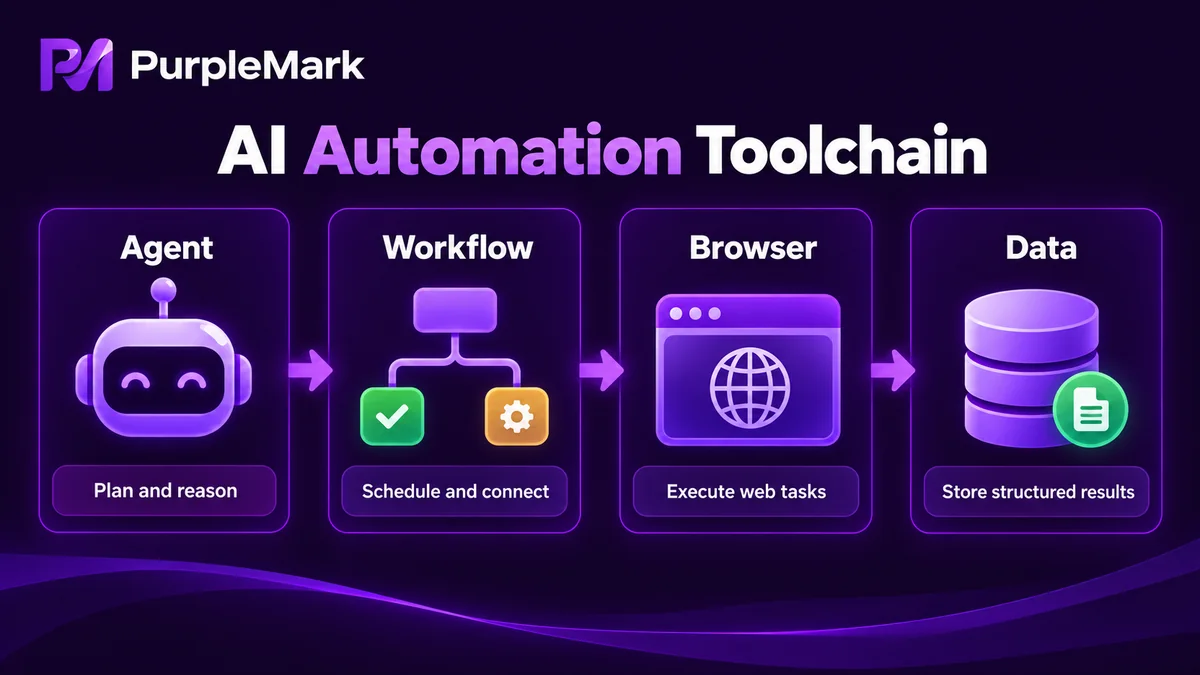
A production-ready AI automation project usually involves several categories of open-source components at the same time. Rather than simply ranking projects by GitHub Stars, the sections below organize them by the role they play in the overall chain.
Run large models locally: Ollama If you want models to run on your own machine instead of sending all data elsewhere, Ollama is a popular framework for running local LLMs. It can quickly deploy open-source models such as DeepSeek, Qwen, Llama, and Gemma, and provides simple command-line and API access. It answers the question: "Where does inference run?"
Unify APIs from multiple model providers: LiteLLM When a project needs to switch between different model providers, LiteLLM wraps mainstream models such as OpenAI, Claude, Gemini, DeepSeek, and Qwen behind a unified interface. You can write one integration and change the backend later. It answers: "How do I avoid being locked into one model vendor?"
Orchestrate automated workflows: n8n n8n is a well-known open-source workflow platform that can connect services such as OpenAI, Slack, Telegram, Gmail, and Webhooks. Its visual nodes let you define what should happen automatically after a given trigger. It answers: "How do I connect processes across multiple services?"
Turn web pages into data models can read: Crawl4AI Crawl4AI is a web-crawling tool designed for AI applications. It can convert pages into structured formats such as Markdown and JSON that are easier for large language models to process, making it popular in RAG and knowledge-base scenarios. It answers: "How do I feed web content to a model?"
Manage AI coding tools in one place: CC Switch If you regularly switch between AI development tools such as Claude Code, Codex CLI, and Gemini CLI, CC Switch can help centralize model switching plus MCP and Skills configuration. It answers: "How do I consolidate the developer-side entry points?"
These five pieces address the algorithm, model, workflow, and data layers. But many automation tasks ultimately need to actually operate a website—log in to a dashboard, publish content, collect a page, fill in a form, or submit data. At that point, one more layer is needed: execution.
The Often-Missed Piece: a Stable Browser Execution Layer
Why call this out separately? Because the most troublesome part of web automation is often not the logic, but an unstable execution environment:
- Sessions, cookies, and login state can expire halfway through automation or contaminate one another;
- Different jobs for different sites or clients may share the same browser characteristics, causing false positives or interference;
- Scripts repeatedly need to "open the right environment," and manually opening windows does not scale to dozens or hundreds of jobs;
- When multiple team scripts run at once, it can be unclear which environment each script used and whether the task succeeded.
These are exactly the kinds of problems a browser-environment management platform is meant to solve. PurpleMark, for example, can serve as the execution layer in this automation chain:
Turn a "browser environment" into a resource that software can call. In the PurpleMark web workspace, you can create isolated browser environments in batches for different tasks, clients, or platforms, and configure a proxy, cookies, startup pages, and fingerprint parameters for each one. Every environment becomes a stable, independent "browser execution unit."
Let AI and scripts control environments directly through the Local API / MCP. PurpleMark provides a local service endpoint with optional API Key authentication. Developers can write scripts to start or stop a specified environment and read environment information, connecting their automation logic to a real browser window. PurpleMark also provides a PurpleMark Skill installation entry point for AI or command-line tools such as Claude Code, Codex, Cursor, OpenCode, Gemini CLI, OpenClaw, and Hermes. In practice, this means an AI assistant can call the PurpleMark API in a structured way, hand browser-environment management to the tool, and let you focus on the business workflow.
Connect the environments to the open-source stack you assembled. For example, suppose your project uses Ollama/LiteLLM for models, n8n for workflow orchestration, and Crawl4AI to turn web pages into structured data. When the workflow needs to "actually do something in a dashboard," n8n or your AI Agent can open the corresponding browser environment through PurpleMark's Local API, perform the action, retrieve the result, and continue the workflow. Each open-source component handles its own section, while PurpleMark fills the "stable browser execution" section.
A Few Suggestions for Team Deployment
- Define the compliance boundary first. When automation involves accounts, follow each platform's terms. Use genuine, self-controlled, compliant accounts, and prefer official platform APIs for bot-style use cases. The tool is only the execution layer; you remain responsible for keeping the business process compliant.
- Use one environment for one purpose. Create and name separate environments for each automation task by project/client/platform. This makes troubleshooting easier and handoffs clearer.
- Make the process auditable. PurpleMark's member permissions and operation logs can show who created an environment, who is allowed to open it, and which environment a task ran in. That is useful for team collaboration and for explaining compliant operations to clients or platforms.
- Get one small workflow working first. Do not start by trying to build an end-to-end all-in-one system. First complete one real task with "one open-source component + one PurpleMark environment," then connect more stages gradually.
Frequently Asked Questions
Do I have to use these open-source projects? No. Open source offers self-hosting, control, and the ability to choose only what you need. If you do not need local inference or strict in-network data handling, you can also build the stack with existing SaaS products. The key is to decide which parts of the chain you actually need.
How is PurpleMark related to these open-source projects? It complements them rather than replacing them. Ollama/LiteLLM handle models, n8n handles workflows, Crawl4AI handles web data processing, and PurpleMark provides a browser execution layer that software can call reliably (environment isolation + Local API / MCP / AI Skill) for the part that actually operates web pages.
Do I need programming skills to use PurpleMark's Local API? The barrier is relatively low when using an existing Skill to connect an AI tool. Writing custom batch-scheduling scripts usually requires some development ability. PurpleMark provides online documentation and examples to help developers get started.
Can this kind of automation get an account banned? The tool itself is neutral. Compliance depends on how it is used. Automation that follows the target platform's terms and uses genuine, compliant accounts can be legitimate; operations intended for fraud or to bypass platform rules are not supported. Always follow the platform's official guidance.
How do I get started? Try the open-source components you need from GitHub, then open the PurpleMark web workspace to create a few isolated environments and become familiar with proxies and grouping. When you need programmatic control, go to the download page to install the client, enable the local endpoint and API Key on the API page, and then connect your scripts or AI tools.
Conclusion
When building your own AI automation toolchain, the key is to separate responsibilities clearly: open-source components such as Ollama, LiteLLM, n8n, Crawl4AI, and CC Switch handle models, workflows, and data, while actually operating web pages requires a stable browser execution layer that software can call. PurpleMark fills that role through isolated environments plus its Local API / MCP / AI Skill. Once the execution layer is in place, the toolchain you assembled can truly "finish a task on its own."
(Compliance note: Always carry out automation in accordance with the target platform's terms of service and with genuine, compliant accounts.)


