
AI tools such as ChatGPT and Claude can dramatically improve the efficiency of content creation and operational workflows for cross-border businesses, but letting AI operate accounts directly introduces new risk-control concerns. This article explains how to connect AI tools to a local multi-account workspace so productivity and account security can work together.
Over the past two years, large language models such as ChatGPT, Claude, and Gemini have raised the bar for content efficiency in cross-border operations. Product descriptions, SEO keywords, EDM emails, social media copy, and campaign ideas can all get a first draft within seconds. But there is another side to this: once AI tools start operating accounts directly, account security and environment stability may be affected.
So the question is: how can you bring in the efficiency of AI tools without letting them undermine account security? This article explains the key idea behind this integration and how PurpleMark lets AI tools perform actions inside predefined browser environments.
What AI tools can solve in cross-border operations
The content capabilities of large language models have already become a stable part of many teams' workflows. Common and practical use cases include:
- Product descriptions and Listing writing: Ask AI to summarize product highlights, rewrite them for a target market, and generate Amazon bullet points, which is much faster than writing everything from scratch.
- Multilingual SEO keywords: AI can generate business-related keyword ideas and often surface unexpected, cost-effective long-tail terms.
- EDM emails and appeal emails: AI can draft cold outreach, follow-up emails, and appeal letters, then help refine tone and wording.
- Social media content and campaign planning: Generate copy, poster headlines, and campaign ideas based on each platform's style.
These scenarios barely require access to the account itself—AI is "writing," not "operating the account." As long as no account automation is involved, using AI does not inherently reduce account security.
The real risk is when AI directly "operates the account"
Risk becomes more concentrated when AI tools need to operate accounts directly, such as automatic login, bulk publishing, automated comments, or automated interactions. The main issues are:
- AI-driven behavior patterns can be easier to identify. Model-generated content, timing, and action intervals may have recognizable patterns. If AI directly drives a browser with scripts and lacks human-like timing, risk-control systems may identify the behavior more easily.
- The runtime environment of AI tools may be difficult to control. Many AI automation tools run by default in cloud browsers or script environments without an independent fingerprint, dedicated proxy, or stable session. If one AI task fails, the account may be affected along with it.
So "AI efficiency" and "account security" are not automatically compatible. The key is to let AI tools call a local browser environment that is already configured as an independent environment and execute actions at a reasonable pace, instead of letting AI run directly without those controls.
Connecting AI tools to PurpleMark: capability map
PurpleMark provides a clear set of interfaces and capabilities for this type of integration:
- Local API: PurpleMark exposes a local service endpoint with optional API Key authentication. AI tools and team scripts call PurpleMark's environment-management capabilities through this API instead of bypassing PurpleMark and driving the browser directly.
- PurpleMark Skill: PurpleMark provides installation entry points for AI and command-line tools such as Claude Code, Codex, Cursor, OpenCode, Gemini CLI, OpenClaw, and Hermes Agent, allowing these AI clients to call the local PurpleMark API in a structured way.
Together, these two layers mean that an AI tool's "control" over account environments is initiated through PurpleMark's unified interface rather than each tool trying to reach through the browser on its own. This brings several direct benefits:
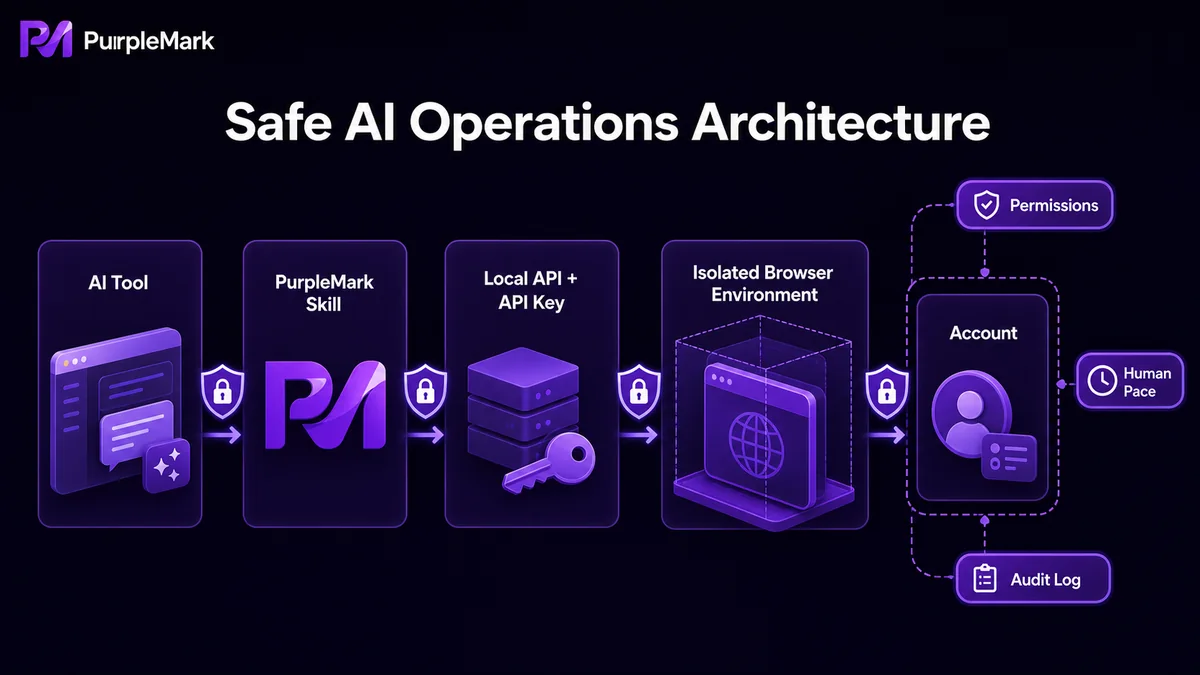
- Every AI task runs inside a predefined environment. When an AI tool needs to operate an account, the PurpleMark environment it calls already has the operating system, kernel, UA, time zone, geolocation, proxy, Cookie, and other parameters configured, so the AI does not need to assemble its own fingerprint.
- Operational responsibility is easier to trace. PurpleMark's operation logs record actions under login logs, environment management, proxy management, and member management, and actions executed by AI can also be found in the logs.
- Tasks can be distributed according to team permissions. Through PurpleMark members and authorization groups, AI automation tasks can be assigned by member role, while accessible environments remain limited to authorized scopes, reducing the chance that an AI task opens an environment with excessive permissions.
How to connect AI tools to PurpleMark: approach and steps
Connecting AI tools to PurpleMark can be summarized in four steps:
1. Set up the basic environments in PurpleMark Web first. Open PurpleMark Web, create an independent environment for each target account, bind a proxy, configure the time zone and geolocation, and import login states such as Cookie so the environment is ready to open at any time.
2. Grant team members permissions as needed. Configure members, roles, and authorization groups on the PurpleMark member page. Restrict the environments available to AI automation tasks to specific groups so a task does not accidentally open an account it should not access.
3. Start the Local API and configure an API Key. Open the API page in PurpleMark, enable the local service endpoint, and turn on API Key authentication. AI tools must then provide valid credentials when calling the PurpleMark API, preventing unauthorized scripts from making calls.
4. Install PurpleMark Skill in the AI client. Follow the instructions for the relevant tool to install PurpleMark Skill (Claude Code/Codex/Cursor, etc.). These AI tools can then operate PurpleMark environments through structured instructions.
If you need the local browser component, install the client from the download page.
Add a few "safety valves" to AI automation
After connecting AI tools to PurpleMark, it is worth adding several safeguards:
- Keep task scope small. Let AI handle one account and one action at a time instead of sweeping through a batch of accounts in one run.
- Use human-like pacing. Leave reasonable intervals between actions rather than triggering them continuously at a fixed frequency.
- Run tasks on a test account first. Validate an AI automation task on a non-primary or backup account before moving it to a production account.
- Keep a quick way to pause. PurpleMark operation logs let you see how an AI task is executing; if an abnormal pattern appears, promptly disable the corresponding task authorization.
With this setup, AI tools can keep improving cross-border operational efficiency without making account security and operational compliance the price you pay.
Frequently asked questions
Can't AI tools call the browser directly? Why go through PurpleMark? They can, but then the AI tool has to handle fingerprinting, proxies, Cookie, behavior pacing, and related concerns itself, while responsibility for actions is harder to trace. Calling local environment-management capabilities through PurpleMark's API lets PurpleMark handle "account security and environment consistency," while the AI tool focuses on "what to do according to instructions."
Can tools such as Claude Code and Cursor be connected? According to the Skill entry points currently provided by PurpleMark, AI/command-line tools including Claude Code, Codex, Cursor, OpenCode, Gemini CLI, OpenClaw, and Hermes Agent support installation. Follow the latest documentation for each tool for installation details.
Can platforms identify AI-based automatic publishing? Any AI-driven behavior may be more recognizable than manual behavior. The key is to keep timing, frequency, and content diversity close to normal human operation while running each account in an independent environment. Combining AI tasks with different accounts, different time windows, and human review is a common approach.


