
ChatGPT or Claude may stop loading, repeatedly show verification checks, or cut off responses. The cause is not always your account or IP. This guide explains practical networking basics—from DNS/CDN and security filtering to browser fingerprints, streaming, and API errors—to help you troubleshoot overseas AI tools.
When using ChatGPT, Claude, Gemini, or various AI coding tools for the first time, many people run into websites that will not open, repeated verification prompts, responses that stop halfway, or even account restrictions. The first reaction is often to “switch to another proxy node.” But access to overseas AI tools depends on more than just the IP address—DNS, network routing, platform security checks, the browser environment, and server status can all be involved. This article avoids complicated protocols and instead explains a few practical concepts through common symptoms.
DNS and CDN: Why Can Others Open the Site While You Cannot?
After you enter a website address, the browser first uses DNS to find the corresponding network address. DNS is like the internet’s “navigation system”: you remember a domain name, while the computer actually connects to an IP address, and DNS tells the browser where to go.
One easily overlooked detail is that a single domain name usually points to more than one IP address. Large AI platforms deploy servers and edge nodes worldwide, so the entry point you actually connect to may vary by region, ISP, and query time. Everyone may be opening the same website, but their network paths are not necessarily the same. DNS also caches previous results. After a site switches nodes, you may already be using the new address while someone else is still using an old cached result, or vice versa, which is why one person may recover while another still cannot connect.
After the address is resolved, you usually do not connect directly to the origin server. Instead, you first reach a CDN, a set of globally distributed edge nodes. A site that will not open may therefore be affected by DNS cache, a regional CDN node, or the route between your device and that node; it does not necessarily mean the account has been blocked. Also remember: changing DNS is not the same as changing your IP—DNS determines where to find the website, while a proxy affects the outbound IP the website sees.
WAF and DDoS: Why Are Legitimate Users Blocked Too?
Large platforms deal every day with malicious crawlers, mass registrations, automated abuse, and DDoS attacks, in which attackers use many devices to send huge volumes of traffic and exhaust server resources. Platforms therefore place DDoS protection, WAFs (Web Application Firewalls), and rate-limiting systems in front of their servers.
When you see 403, Access Denied, or a human-verification page, the request may have been blocked by an outer security layer before it ever reached the account or model server. These systems are stricter with high request rates, unusual concurrency, and shared outbound addresses. If many users share one proxy IP and generate a large number of requests in a short time, you may see CAPTCHAs or temporary restrictions even if your own activity is not frequent. Still, these symptoms do not automatically mean your account is banned; you need to consider the page message, account status, and outbound network environment together.
Browser Fingerprints: Why Are You Still Recognized After Changing IP?
An IP address is an important network signal, but it is not the only one. Even after the IP changes, a platform may still evaluate your browser environment, account status, and usage behavior. Websites can read characteristics such as language, time zone, operating system, screen resolution, fonts, Canvas, and WebGL and combine them into a “browser fingerprint.” Cookies and local storage also keep login state. If you continue using the same browser and local data, a different IP can still look like the same environment.
Platforms usually evaluate a combination of signals rather than a single parameter. What matters is environment continuity. If an account has logged in from one region for a long time and then suddenly changes countries, devices, and languages within a short period, extra verification is more likely to be triggered. Frequently changing IP addresses or devices may therefore be ineffective and can make environmental changes more obvious.
How Is Login State Maintained for an AI Agent?
Many people now use more than one AI tool and may also run automated agents. If all accounts repeatedly log in and out of the same ordinary browser, cookies, extensions, and data can easily become mixed. Note that a Chrome Incognito window is not the same as a browser environment that can independently preserve login state over the long term.
When an AI Agent needs to log into websites through a browser and perform tasks, it needs stable account state, cookies, extensions, network egress, and browser configuration. In that case, it is useful to prepare isolated browser environments for different accounts or agents and let each environment retain its login state over time. One account can correspond to one fixed environment, reducing repeated logins and data mixing. Teams can also hand environments over through access authorization instead of repeatedly sharing login credentials.
GPU and Streaming: Why Is AI Slow or Why Does a Response Stop?
AI response speed is not determined only by your network. The model runs inference on the platform’s GPUs, and queue length, GPU load, model size, and response length all affect speed. One common misunderstanding is worth correcting: having hundreds of gigabytes of disk space does not mean a computer can run a large local model. Disk space only determines whether the model files can be stored; system memory and GPU memory determine whether the model can actually be loaded and run. Being able to store it does not mean being able to run it.
ChatGPT and Claude responses are also delivered through “streaming”: the server sends small pieces as they are generated, which is why text appears progressively like typing. Opening a webpage is a short request, while generating a long answer requires a longer-lived connection. If a proxy route becomes unstable, a node times out, or the network drops, the response can stop midway. So an interrupted answer does not necessarily mean the model has “stopped working”; the transmission path may simply have been disconnected.
Clients and APIs: Why Does the Web Page Work While the AI Tool Errors?
The ChatGPT and Claude web apps run in a browser, while tools such as Claude Code and Codex may run in a terminal, IDE, or cloud environment. They do not necessarily share the same network settings. Some proxies only handle browser traffic, so the website can work while the terminal cannot connect. In this situation, first confirm where the program is running, whether it reads the system proxy, and whether the runtime is allowed to access the public internet before deciding whether the problem is network-related or account-related.
If the model API is reachable, error codes can help: 401 means the API key is wrong or authentication failed; 403 means access is not permitted; 429 means requests are too frequent and may also indicate a balance or quota limit; 5xx means the server is temporarily experiencing an error. Timeouts also need to be distinguished: a connection timeout means the client could not establish a connection to the server, while a read timeout means it connected but did not receive a response in time. Retrying is not a universal solution—temporary network instability or rate limiting may justify limited retries, but repeated retries will not fix authentication or quota problems.
Final Thoughts
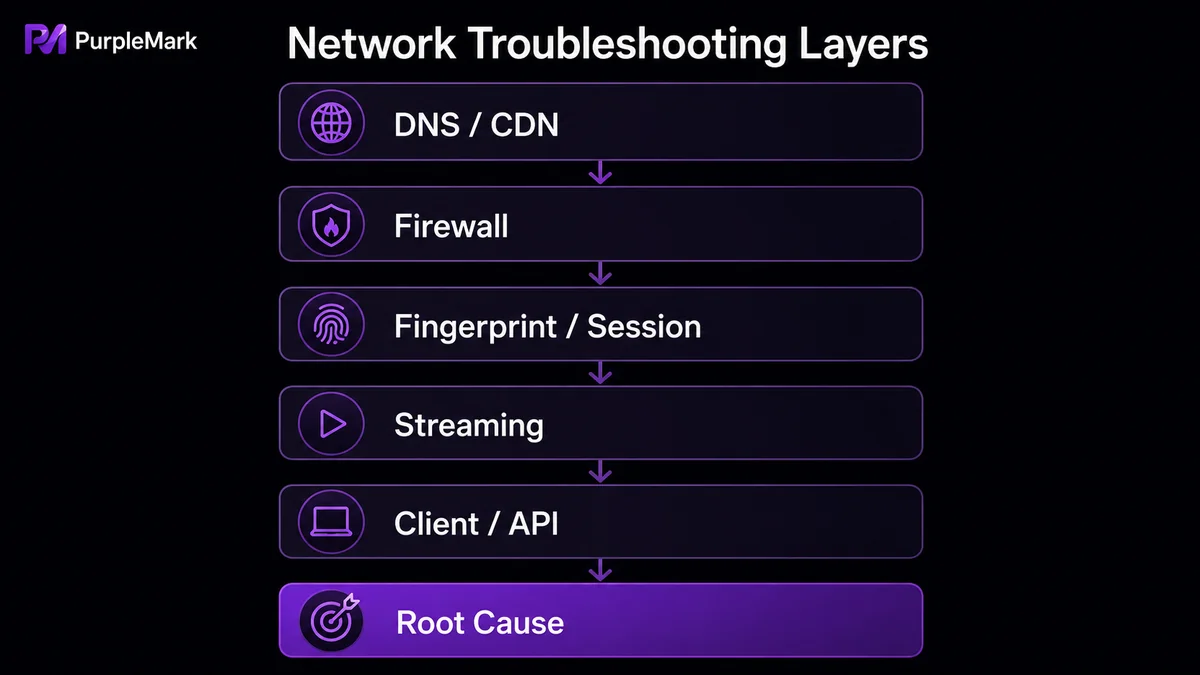
When using overseas AI tools, similar-looking symptoms can originate at very different layers. Failure to open a site is often related to DNS, CDN, or routing; repeated verification and 403 errors are more often related to outbound network conditions and the browser environment; slow or interrupted responses can involve server load and streaming connections; and when a web page works but a tool reports an error, network permissions and error codes should be checked.
You do not need to become a network engineer. Just remember: different users can reach the same website through different entry points; platforms evaluate more than your IP address; AI responses are generated and transmitted incrementally, so unstable routes can interrupt them; and web apps, desktop or terminal clients, and APIs may operate in different network environments. With these basics in mind, troubleshooting no longer has to be limited to “switch nodes” and “keep refreshing.”


