
More and more cross-border sellers are building independent stores instead of relying only on third-party marketplaces. This guide explains what an independent store is and its advantages, compares Shopify, Shoplazza, BigCommerce, WooCommerce, Wix, Squarespace, and other popular website-building platforms, and offers practical advice on platform selection and traffic acquisition.
More and more cross-border sellers are starting to build independent stores instead of relying only on third-party platforms such as Amazon and eBay. The reason is easy to understand: an independent store has its own domain and branded pages, has no marketplace commission, and largely avoids the risk of a marketplace shutting down the store.
But the very first step in building an independent store—choosing a website-building platform—leaves many sellers unsure. This article first explains what an independent store is, then compares mainstream website-building platforms to help you find a suitable starting point.
What Is an Independent Store? What Are Its Advantages?
An independent store is an online shop built and operated by the merchant, without relying on a third-party marketplace for sales, such as the official website of a brand like Allbirds. Its main advantages include:
- Independent branding: Website layout, design, and features can all follow your own brand positioning;
- Easy setup: Ready-made website builders provide templates, so you can launch quickly even without a technical background;
- Lower commissions: Apart from payment processing fees, there are no third-party marketplace commissions;
- Lower risk of store suspension: Your own sales channel generally does not face the problem of a marketplace “closing your store”;
- Direct customer feedback: Reviews and data belong to you, making it easier to improve products and customer experience.
What Is an Independent-Store Website Builder?
A website-building platform is an online product that provides tools and services for creating, managing, and maintaining an e-commerce website. It typically includes site building and design, product management, shopping cart and checkout, payment processing, mobile optimization, SEO tools, analytics, multilingual and multi-currency support, order management, and logistics integrations.
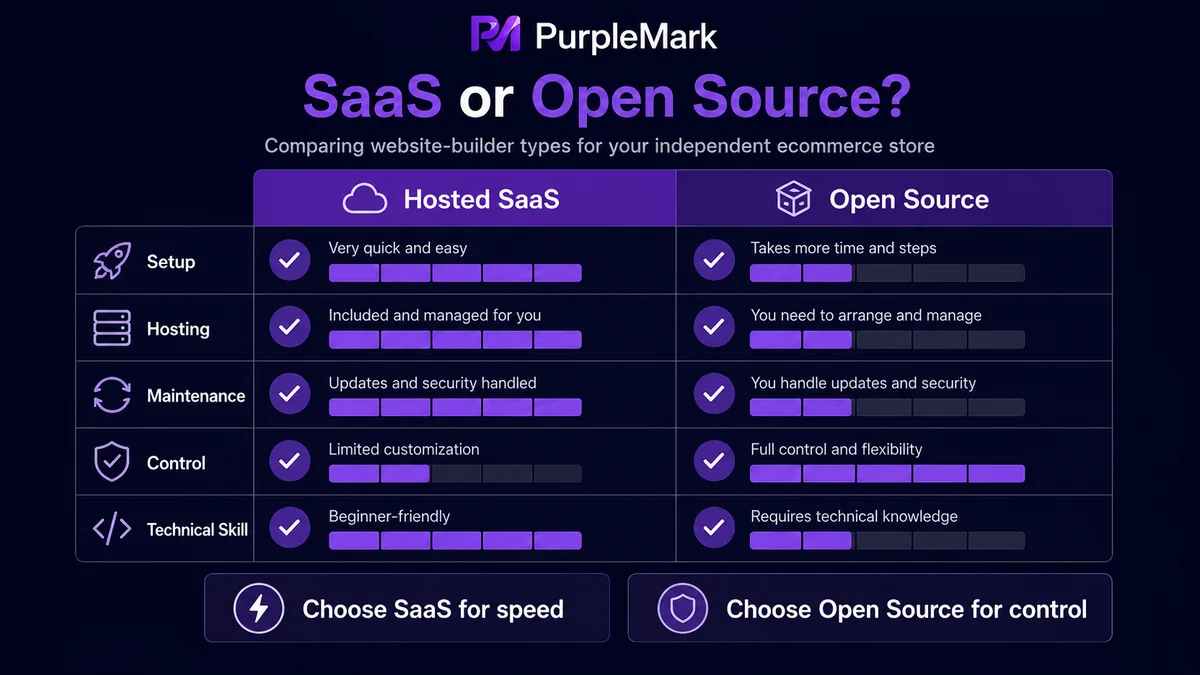
Website-building solutions generally fall into two categories: hosted SaaS platforms (such as Shopify and BigCommerce, which are ready to use and easy to maintain) and open-source solutions (such as WooCommerce, PrestaShop, and Adobe Commerce, which offer more control but require more technical investment).
Overview of Popular Independent-Store Website Builders
Shopify
One of the world’s most popular SaaS website-building platforms, Shopify offers drag-and-drop site building, a mature ecosystem, and a huge selection of apps and plugins. It supports synchronized multi-channel selling across Facebook, Instagram, Amazon, and more. It suits sellers of all sizes, from beginners to large brands, and offers monthly subscription plans and a free trial. Transaction fees vary depending on the payment method used; refer to the official website for current details.
Shoplazza
A SaaS website-building system originating in China and tailored to cross-border sellers. It offers strong Chinese-language support, an interface familiar to China-based operators, good value for money, and support for many markets and payment methods. It is suitable for Chinese brands expanding overseas and DTC brands, with plans such as Basic and Pro/Flagship tiers; annual billing often includes discounts.
BigCommerce
A comprehensive SaaS platform with strong built-in features, support for large SKU catalogs, no platform transaction fees, enterprise-grade product management, and multi-channel sales capabilities. It is well suited to medium and large businesses and B2B sellers.
Adobe Commerce (formerly Magento)
A highly customizable and powerful open-source/cloud e-commerce solution that supports complex business logic and large-scale sites. It requires a technical team or development capability, and pricing is based on custom quotes. It is suitable for multinational enterprises and very large e-commerce sites.
WooCommerce
An open-source e-commerce plugin based on WordPress. The core software is free, so the main costs are hosting and a domain. It provides strong SEO control and a rich plugin ecosystem. It is a good fit for users familiar with WordPress who want greater control, but you are responsible for the server and ongoing maintenance.
Wix
A drag-and-drop website builder with almost no technical barrier, fast feature integration, and a wide range of templates. It suits small startups, individual sellers, and scenarios where rapid launch is important.
Squarespace
A full-featured website builder known for design quality and polished templates. It works well for visually driven brands, artists, and sellers of higher-priced products.
PrestaShop
An open-source e-commerce solution with broad adoption in Europe. It is modular, flexible, and suitable for multilingual operations. The software itself is free, but you need to purchase hosting and handle maintenance yourself.
Shift4Shop
A SaaS platform with many built-in features and strong SEO tools. A free plan may be available when you use its payment processing and meet certain monthly sales requirements; otherwise, monthly fees apply. It suits sellers looking for strong value.
Ecwid
A cloud e-commerce solution that can quickly add shopping functionality to an existing WordPress or static website and can also sell through channels such as Facebook and Instagram. It is suitable for merchants who already have a website and want to add an online storefront.
Volusion
A SaaS platform known for data analytics and reporting, with clear back-end workflows and a stable system. It is suitable for sellers who place a high priority on sales data analysis.
How Do You Choose the Right Website-Building Platform?
There is no single “best” platform—only the one that best fits your needs. Consider these factors:
- Costs and scaling expenses: Calculate subscription fees and transaction fees both at launch and as the business grows;
- Ease of use: If you do not have a technical background, prioritize SaaS; if you are willing to invest in technical resources, open source may be suitable;
- Customization and design: Premium brands may prefer platforms with stronger design templates, while complex functions may require greater customizability;
- Hosting model: Choose a hosted platform for convenience, or an open-source self-hosted solution if you want control over the server;
- Multi-channel selling: Check whether it supports synchronization with Amazon, eBay, and social media;
- Payments and security: Make sure payment methods cover your target markets and that the solution complies with security standards such as PCI DSS;
- Technical support: Check whether 24/7 support and comprehensive documentation/tutorials are available.
How Do You Drive Traffic After Building an Independent Store?
Building the site is only the beginning; traffic is what matters. Common methods include:
- SEO: Optimize page titles, keywords, and content, and build high-quality content to attract organic search traffic;
- Paid advertising: Use Google Ads or social-media advertising to reach target audiences precisely;
- Social media marketing: Publish content and engage with users on TikTok, Instagram, and Facebook;
- Affiliate and influencer marketing: Work with bloggers and creators to promote your brand and products.
When marketing across multiple platforms, teams often operate social-media accounts and advertising accounts for several brands at the same time. In this situation, using separate browser environments for different accounts can make management clearer. For example, with the web version of PurpleMark, you can create and group isolated environments for accounts on different platforms, let team members access the appropriate environments according to their permissions, and retain operation logs to reduce account mix-ups and accidental actions. Isolated environments are intended to support compliant management of your own accounts; whether multiple accounts are permitted depends on each platform’s terms.
Frequently Asked Questions
What Is the Difference Between a Self-Built Website and an Independent Store?
A self-built website usually refers to a site developed entirely in-house, where you handle design, coding, and servers yourself. An independent store more often refers to a website created with a third-party website-building platform, where the platform provides tools and hosting to simplify setup and maintenance.
What Is an Overseas Independent Store?
It is an e-commerce website aimed at foreign markets and international customers, typically requiring support for multiple currencies, multiple languages, and international logistics.
What Types of Independent-Store Website Builders Are There?
There are mainly two types: open-source platforms (such as WordPress + WooCommerce), which offer greater control but require technical investment; and hosted SaaS platforms (such as Shopify and BigCommerce), which are ready to use and well suited to users without a technical background.
Should a Beginner Choose Shopify or WooCommerce for an Independent Store?
Choose Shopify if you want to launch quickly and do not want to manage servers. Choose WooCommerce if you are familiar with WordPress, want more SEO control, and are willing to handle maintenance yourself.
Can an Independent Store Be Shut Down?
An independent store uses your own domain and website, so it does not face the same “store shutdown” issue imposed by a marketplace. However, you still need to comply with the laws and regulations of the countries where you operate, as well as the rules of payment and advertising platforms.


