
When multinational companies expand into Japan, South Korea, and Southeast Asia, LINE WORKS is a common enterprise communication and collaboration tool. But branches, client teams, and agency projects often need multiple accounts in parallel. How can teams avoid login conflicts, abnormal environments, and mixed data? This article explains the management approach and supporting tools.
As cross-border operations expand into Japan, South Korea, and Southeast Asia, more companies are using LINE WORKS as a primary tool for team communication and collaboration. Built around the LINE ecosystem, it fits usage habits in Asian markets, but it also creates a practical challenge: multinational teams often need to maintain multiple LINE WORKS accounts at the same time. How can they do that efficiently and safely? This guide lays out the approach.
What is LINE WORKS?
LINE WORKS is an enterprise collaboration and communication platform developed by Works Mobile under the Naver group. It offers functions similar to WeCom or Slack, but is built on the LINE social ecosystem and is therefore especially suitable for Asian markets. Its core capabilities include:
- Instant messaging and group communication: one-to-one or group chats for fast message delivery;
- Announcements and calendar management: synchronize progress and publish notices;
- File sharing and collaboration: transfer files and use online storage to reduce communication barriers;
- Cross-platform support: available on PC, iOS, and Android.
For cross-border companies, its broad user base and stable communication capabilities make it an important tool for connecting teams.
Why do multinational teams need multiple LINE WORKS accounts?
A “one account for everything” approach is rarely workable in a complex organization. There are four common reasons:
1. Independent operations for multiple branches
When a company establishes branches in several countries or regions, each branch has its own HR, sales, and operations teams. Sharing one account can create organizational confusion and make permissions difficult to control. Giving each branch an independent enterprise account makes it possible to define business boundaries and permission levels clearly—the headquarters keeps overall control while each branch manages its own team.
2. Compliance and localization requirements
Some markets require locally registered accounts to meet regulatory or industry compliance requirements. In Japan and South Korea, for example, local companies or agencies may prefer communicating through local accounts, which can help build customer trust. Industries such as finance, healthcare, and education may also have strict rules for data transmission. As a result, companies operating in different countries often need multiple enterprise accounts.
3. Client operations and multi-project management
Agencies and service providers often need to manage multiple clients’ LINE WORKS accounts at the same time—for example, a marketing agency may serve Brand A and Brand B simultaneously. To keep client data separate and secure, different clients should use separate accounts. This is not only an operational need but also an important way to protect client privacy and maintain trust.
4. Time-zone and language differences
Working hours in Europe, the Americas, and Asia may barely overlap. Sharing one account can lead to message overload and missed priorities. Separating accounts by region supports more efficient collaboration in local time zones and makes multilingual content easier to manage, reducing confusion caused by constant cross-time-zone switching.
Common challenges in multi-account management
- Login conflicts: ordinary browsers make it difficult to stay signed in to multiple accounts at once, forcing frequent switching;
- Environment anomalies: cross-border logins may be flagged as risky because of unusual IP addresses or device fingerprints;
- Data security risks: without environment isolation, multiple accounts can be associated with one another by the platform;
- Low operational efficiency: repeatedly switching between accounts consumes significant time and manpower.
A more efficient and compliant management approach
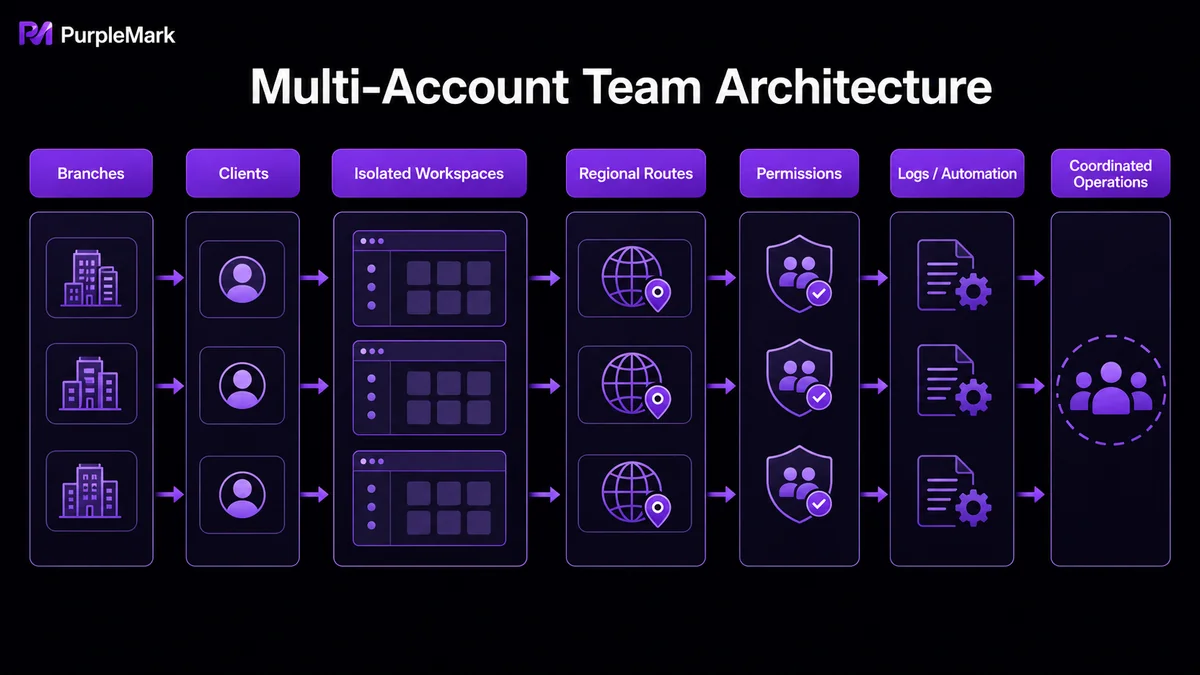
To manage multiple accounts well, teams need both “isolation” and “collaboration”—exactly the areas where multi-account environment management platforms such as PurpleMark excel. PurpleMark brings accounts, browser environments, network configurations, and team responsibilities into one workspace. It can be used with LINE WORKS as follows:
1. One independent environment for each account
Create a separate browser environment for each regional LINE WORKS account, with independent device parameters, language, and time-zone settings. Cookies and local data remain separate. When teams in different regions sign in to their local accounts, shared-environment conflicts or false risk detections are less likely, and multiple regions can work online at the same time.
2. Bind a regional proxy to match the local network exit
Bind the environment to a proxy in the target region so login requests appear to come from a local network. Keeping the proxy region aligned with the time zone and language can reduce the risk of cross-border access being mistakenly classified as abnormal. PurpleMark’s proxy management page lets teams centrally maintain proxies and map them one-to-one with environments, making it easier to check exit IPs and usage relationships.
3. Clarify responsibility with groups and team permissions
Place accounts for the same client or branch in the same group, then configure member roles and authorized groups to determine who can access each environment. Sharing and transfer functions make account handoffs within the team more standardized. Operation logs record who did what and when, making ownership and activity clear—especially useful for agencies managing multiple clients.
4. Use RPA / window synchronization for repetitive actions
If teams need to publish the same announcements or update calendars across multiple client accounts every day, window synchronization can mirror actions from the primary environment to other environments, or RPA can turn repetitive workflows into tasks, reducing the workload of manually signing in and switching one account at a time.
It is important to note that the value of multi-account management lies in helping you serve multiple real branches, clients, and project entities in a compliant way. PurpleMark provides tools that keep these legitimate account environments clean and responsibilities clear; it is not intended to bypass platform rules or create fake accounts at scale. Always operate with genuine business identities and compliance as the foundation.
Summary
LINE WORKS can help multinational companies communicate efficiently, but when an organization has multiple branches, clients, and regions, having “many and messy” accounts can become a bottleneck. Instead of repeatedly switching in an ordinary browser, PurpleMark can place each account in an independent, collaborative workspace—environment isolation avoids conflicts, while group permissions and operation logs keep collaboration clear and controllable. To improve cross-region, multi-account teamwork, start by creating an independent browser environment.


