
If you want to build an independent website or run a cross-border business, the first step is often registering a suitable domain name. This guide walks you through creating a NameSilo account, choosing a domain, paying for it, and configuring domain connections, DNS, privacy protection, and other post-purchase settings so your domain is both easy to use and secure.
Building an independent website, running e-commerce, or doing affiliate marketing often starts with choosing the right domain name. Many people working across borders choose platforms such as NameSilo because of their affordable pricing and flexible payment options. But registering a domain is more than just “buying a name”; the connection and security settings afterward are just as important. This guide walks you through the process from NameSilo registration to putting your domain into normal use.
What is NameSilo?
NameSilo is a global domain registrar founded in 2009 and officially accredited by ICANN. It is known for low prices and privacy protection. Some of its more appealing features include:
- Free WHOIS privacy protection enabled by default: You can hide personal information without paying extra, reducing spam and privacy exposure. Many platforms offer a low first-year price but charge more for renewals, while NameSilo's pricing is relatively transparent.
- Convenient payment options: It supports PayPal and credit cards, as well as Alipay, which is convenient for users in China.
- Flexible DNS management: The control panel is straightforward and works well for users who want to manage DNS records themselves.
Registration and Purchase Process
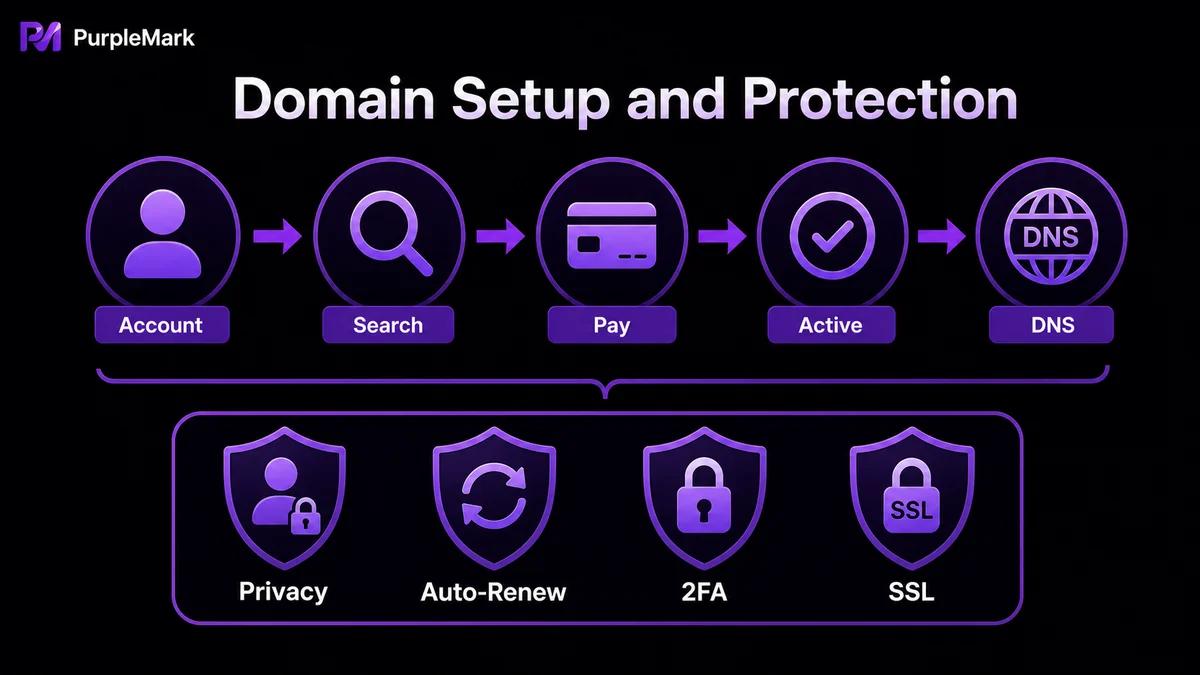
- Create an account: Visit the official NameSilo website and click the option in the upper-right corner to create an account. Enter a username, email address, and strong password, then complete the human verification. After registration, fill in the required information in your account settings to gain full access to the domain control panel.
- Search for a domain: Enter the domain you want in the homepage search box without adding www or .com, then search to see availability across different extensions. It is generally best to prioritize .com because it has the highest global recognition. If you are building a brand, you can also register extensions such as .net and .store for protection.
- Pay: After adding the domain to your cart, proceed to checkout. You can pay by credit card or PayPal; click See more to find Alipay. If you have a promo code, enter it before payment.
- Verify and configure: After payment, confirm in Manage My Domains that the domain status is Active. Then configure DNS: if your hosting provider gives you Nameservers, replace the current Nameservers; if you use your own server, remove the default Parking record and add an A record pointing to your server IP.
After Registering a Domain, Don't Forget These Security Steps
1. Configure Basic Security
- Enable WHOIS privacy protection: Prevent your real identity from being publicly collected and protect personal and business data.
- Enable auto-renewal: Prevent the domain from expiring and being registered by someone else. This is especially important for domains that already receive advertising spend and traffic, because losing one can be costly.
- Use a secure email address and enable 2FA: Add a second layer of verification to your account to reduce the risk of account theft.
- Check DNS regularly: Watch for malicious changes or unusual DNS records, especially if you use a third-party hosting provider.
2. Consider Connecting the Domain to Cloudflare
Cloudflare provides a free CDN and strong DNS management capabilities. Pointing your domain's NS records to Cloudflare can provide global CDN acceleration, basic WAF protection such as protection against SQL injection and abusive scraping, trusted HTTPS certificates with automatic renewal, and DNS security monitoring. These features can improve both website availability and security.
3. Don't Ignore Environment Hygiene
Many beginners focus only on the domain and technical configuration, but overlook one point: advertising platforms and anti-fraud systems may also examine the “visitor environment.” If your browser environment looks suspicious—for example, abnormal fingerprint data, an IP address jumping between countries in a short period, unusual Cookie states, or multiple accounts and sites sharing the same environment—even a correctly configured domain and SSL may still be mistakenly classified as high risk.
A common approach is to use a fingerprint browser to create separate, isolated browser environments for different domains or accounts, so that fingerprints, Cookies, storage, and network settings do not get mixed between them. This can reduce data confusion across multiple accounts and make visits more consistent with ordinary user behavior, reducing false positives. Be sure to use this only in compliance with applicable rules, as an aid to proper operations rather than as a shortcut for bypassing platform policies.
Summary
NameSilo is a domain platform well suited to beginners working across borders, and its registration process is not complicated. But making a domain truly convenient and secure depends on what comes afterward: configure privacy protection, auto-renewal, and 2FA; set up DNS and SSL correctly; and manage your browsing environment responsibly and in compliance with relevant rules. Once these pieces are in place, your independent website has a much stronger foundation.


