
Reddit GIFs often refuse to save, or save without any motion. This guide walks through in-app saving, Save to Files in the share sheet, Shortcuts and screen recording in order, then covers the usual causes of failure: Photos permissions, iCloud storage and subreddit download limits.
Saving one of those moving Reddit posts to your iPhone camera roll usually ends in one of two ways: you tap the button and nothing happens, or it saves and you end up with a tiny image that will not move. Those two problems have different causes, and looking at them separately makes things much clearer.
First, figure out what those animated posts actually are
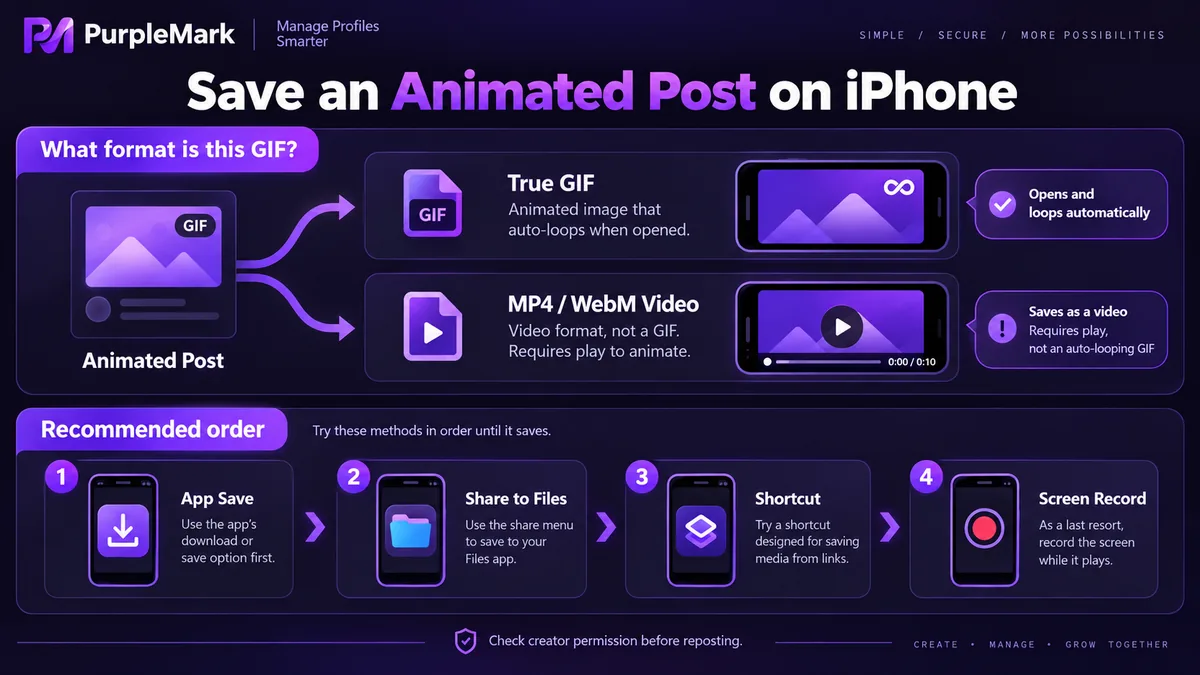
Most posts on Reddit labelled GIF are not GIFs. The platform serves animated media as MP4 or WebM inside its own player and kept the old gifv label on top; some uploads really are GIF-encoded, but that is a minority.
That difference decides what you get. A video format saves as a video, and you have to tap play in the camera roll; only a real GIF loops on its own. Plenty of people assume the save failed when they actually received a video file and simply did not spot it.
Worth adding: gifv comes from an early player implementation. It is not a new file format, just video packaged to look like an animated image. Even within the same subreddit, results can differ from post to post.
Saving directly from the app
Open the post and long-press the image or video area; the menu offers Save Image, Save Video and similar entries, and the three-dot menu at the top right of the post together with the share sheet usually hide the matching download options too. Saved media lands in Recents in your camera roll, mixed in with screenshots and images saved by other apps, so sorting by time is the quickest way to find it.
The first time you do this, iOS asks for Photos permission — choose Allow to Add. If you previously switched off Reddit's Photos access in Settings, the save simply fails and the app may not tell you; go back to the Reddit entry in Settings and turn it on again.
A full iCloud Photos storage will also make saving fail. This one is easy to overlook and the error message is usually subtle.
Save to Files in the share sheet
Some posts have no save entry in the long-press menu, but the share sheet offers Save to Files. That path puts the media in the Downloads folder of the Files app — handy if you want to keep the original file first and decide later what to do with it.
The cost is one extra step: the file sits in the Files app rather than the camera roll, so getting it into Photos means moving it manually or going back to the post and saving again.
Use Shortcuts to skip the repetitive taps
Apple's built-in Shortcuts app can run a short flow: receive the input shared to it, get the file inside, and save it to Photos. Once it is set up, one tap in the share sheet puts the content straight into your camera roll.
The advantage is that it never routes through a third-party site, so page ads and redirects cannot drag you off course. If you save media often, a few minutes of setup pays off.
When nothing works, record the screen
Some posts offer no download option and nothing in the share sheet, and screen recording is the fallback.
Screen recording captures your taps and the interface along with the clip, so put the post in full screen and hide the on-screen elements before you start, then trim the beginning and the end in the camera roll afterwards. Audio gets recorded too, so mute your phone or silence notification sounds first, otherwise other noise ends up in the file. If you only need a short segment, trim it in the Photos editor instead of recording again.
Common reasons a save fails
- Downloads disabled in the subreddit. Moderators can block media downloads in subreddit settings; when that is on, no save button appears in the app at all and no workaround will help.
- The media is an external link. Posts whose animation is hosted on a third-party image host usually only give the app an open-link option, not a save.
- Permissions and storage. Denied Photos access or insufficient iCloud storage will both break a save.
- The network has not finished loading. Tap save while the media is still buffering and you may end up with a partial file.
The order worth trying
Try saving or downloading inside the app first — that is the shortest path. If there is nothing there, open the share sheet and look for Save to Files. If neither works, fall back to Shortcuts or screen recording.
That order reflects success rates: the earlier a method sits, the more complete the file and the closer it is to the original media; the further down you go, the greater the chance of a second-generation loss in quality and audio.
As for what you do with the file afterwards — reposting it elsewhere or using it in an edit — it is best to confirm the original creator's permission and the subreddit's rules on reposting. On Reddit, copyright stays with the person who posted it: being able to save something does not mean you are free to post it anywhere.


