
Not sure which way to register for TikTok? This article compares the advantages and disadvantages of using a phone number, email, or social account, and reminds you to manage and isolate account environments compliantly.
For people doing cross-border e-commerce or taking content overseas, a usable TikTok account is essentially the ticket to get started. Yet many people get stuck at the first step: should they register with a phone number, an email address, or a social account? Each option involves trade-offs, and choosing well can save considerable effort. This article lays out all three methods clearly.
A reminder before registering
One point needs to be clear first: the service-region policies for the international version of TikTok differ from those in mainland China, and mainland Chinese phone numbers cannot be used directly to register for the international version. If you plan to use an international account for cross-border business, first make sure that your network and operating methods comply with applicable local laws and regulations; only then should you discuss registration and operations. This is also the common prerequisite for every cross-border social-media activity.
Method 1: Registering with a phone number
Registering with a non-mainland phone number is relatively straightforward—receive an SMS verification code and complete the process.
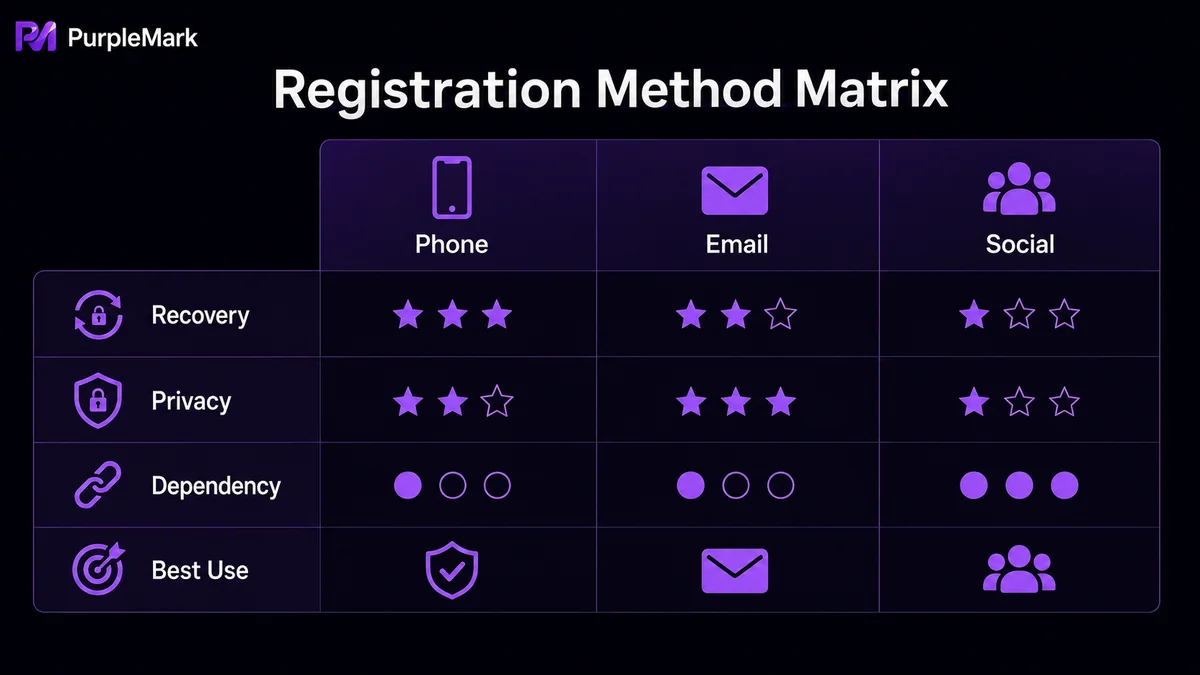
- Advantages: The process is simple and fast. Once a phone number is linked, it is convenient for recovering a password and handling account issues. On TikTok, only users who have linked phone numbers can send one another direct messages, making this option friendlier when you need to communicate directly with customers or followers.
- Disadvantages: Obtaining and maintaining a usable overseas phone number over time can involve extra cost and routine management, so it is not the most hassle-free choice.
Method 2: Registering with an email address
In theory, any email address can be used to register, but Gmail or a self-hosted business email is recommended because of better stability and reliability.
- Advantages: Email addresses are easy and inexpensive to obtain. Because no phone number needs to be linked, this is friendly for users who care more about privacy and do not want to provide a phone number.
- Disadvantages: Without linking a phone number, you cannot exchange direct messages with users you follow. If you need direct messaging, you will still need to link a phone number later. Some domestic email services are less stable, which is not ideal for long-term use.
Method 3: Registering with a social account
TikTok supports authorization-based sign-in through social accounts such as Facebook, Google, and Twitter (X), making registration quick.
- Advantages: If you already have accounts on these platforms, you can skip re-entering your details, which is very fast. Such accounts often come with existing social connections that can help with later sharing and distribution.
- Disadvantages: If you do not yet have overseas social accounts, you must register for them first, making the process longer instead. Also, if a social account runs into a problem (for example, suspension), it may affect the associated TikTok account as well, creating a risk of spillover.
How should you choose among the three?
There is no absolute best or worst choice; it mainly depends on how you will use the account:
- If you value direct messages with customers or followers and need stronger account stability → registering with a phone number is the safer choice;
- If you want a low-cost start and place more importance on privacy → registering with email is more convenient;
- If you already have a mature set of overseas social accounts and want to establish a presence across platforms quickly → registering through social-account authorization is more efficient.
Do not forget account-environment management
Many people operate more than one TikTok or social-media account at the same time. An easily overlooked issue is that if these accounts are switched frequently on the same device and in the same environment, platforms may classify them as “linked accounts.” If one account encounters a problem, the others may be affected as well.
A common approach is to use a multi-account browser tool to provide separate, isolated login environments for different accounts. This keeps each account’s fingerprint, cookies, and network independent, reducing the risk of suspension caused by “association.” For cross-border operators who need to maintain multiple accounts over the long term, this step is often more important than the registration method itself.
Summary
Registering for TikTok is not actually complicated. The key is to decide who will use the account, whether direct messaging matters, and whether you already have social accounts, then choose the matching method. Once you have chosen, remember to manage the account environment compliantly—this is the foundation for keeping an account running steadily over the long term.


