
AI web automation lets systems understand page semantics and autonomously click, fill forms, and navigate. This guide explains the perception → reasoning → action loop, compares Selenium, Playwright, Computer Use, and AI Agent approaches, and covers practical deployment challenges.
As large language models become more capable, the idea of “letting AI operate websites like a person” is moving from concept to real-world use. AI can now understand page content and complete relatively complex tasks such as filling forms, collecting data, maintaining admin panels, and carrying out marketing tasks that require login. This article explains how AI web automation works, the main implementation approaches, and the challenges you may encounter in production, so you can build a sound evaluation framework before choosing a solution.
What Is AI Web Automation?
AI web automation means using artificial intelligence to let a system independently understand page structure, identify page elements, perform actions such as clicking, typing, scrolling, and navigating, and dynamically adjust its execution strategy as the page changes in order to complete automated tasks.
It is very different from traditional rule-based automation, such as native Selenium or Puppeteer scripts without AI integration. Traditional approaches require engineers to analyze the page in advance, hard-code precise element locators such as XPath or CSS Selectors, and define strict linear steps. This works well for systems with stable structures and infrequent updates, but its weaknesses become obvious on public websites that change often.
Why Does Traditional Web Automation Break So Easily?
Rule-based scripts have several hard-to-avoid limitations:
- A page redesign can break everything: E-commerce and social platforms update their front ends frequently. Once the UI changes, the framework is refactored, or dynamic obfuscation is introduced, element IDs, class names, and button positions may all change. If the script cannot find the predefined target, it stops and developers must locate the element again and change the code, creating high maintenance costs.
- It does not understand page semantics: A script can recognize code structures such as
<div>and<button>, but it does not understand what “orders page” or “download data” means. A person can say “after logging in, go to the orders page and download this month’s sales data,” while a traditional script can only follow hard-coded URLs and selectors. One unexpected onboarding popup can be enough to break the flow. - It handles exceptions poorly: Marketing popups, Cookie consent prompts, CAPTCHAs, and loading delays often interrupt workflows. A script may fail when an unexpected overlay blocks a target element, while AI can first infer that “a popup is covering the button,” close the obstruction, and then continue the main task.
The value of AI is that it can understand intent and make dynamic decisions instead of only executing fixed rules mechanically.
The Core Principle Behind AI Web Interaction
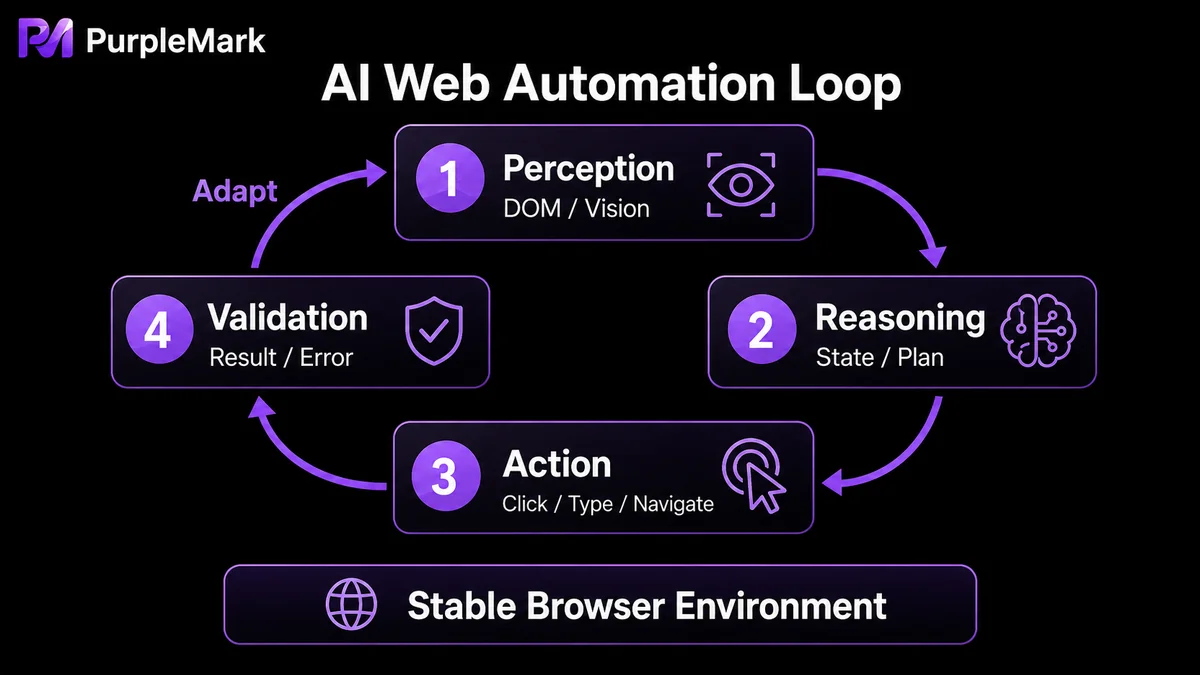
At its core, AI web interaction is a control loop of Perception → Reasoning → Action.
- Perception layer: Turn the web page into data AI can understand. AI does not directly read a web page the way a human visually experiences it, so the page must first be converted into structured input. Two common approaches are used: DOM-tree cleanup and semantic parsing, which captures the DOM, removes redundant CSS/JS, and sends only text and interactive elements to the model; and multimodal visual recognition, which captures the rendered screen and uses a vision model for object detection and interaction-region recognition.
- Decision layer: Reason about steps from context. After an AI Agent receives structured page data and the final goal, it identifies the current state first—whether the user is logged in, whether a CAPTCHA is blocking progress, and whether the current page is the target result page—and then decomposes the goal into an ordered set of atomic actions, such as focusing the search box, entering a keyword, and submitting it.
- Action layer: Drive the browser to perform real operations. The model’s decisions, usually expressed as JSON or text instructions, are parsed into calls to standard browser-control protocols such as Chrome DevTools Protocol (CDP), which then control the browser to click, type, and perform other actions.
How Do You Choose Among the Four Main Approaches?
AI web automation can be implemented in several ways, each with its own trade-offs.
| Approach | Idea | Advantages | Limitations | Best for |
|---|---|---|---|---|
| Selenium + AI enhancement | Use the traditional framework as the skeleton and the LLM as the brain, calling an API when dynamic elements appear | Mature ecosystem, broad browser support | WebDriver can be relatively slow on SPAs | Internal enterprise forms, traditional web data collection |
| Playwright + AI | Use Playwright as the underlying engine with bidirectional CDP communication | Fast, strong concurrency, mature dynamic waiting | Weak compatibility with very old intranet browsers | High-frequency operations automation, concurrent multi-tasking |
| Computer Use visual mode | Read screenshots and click by pixel coordinates | Less dependent on front-end code, strong generalization | High token usage and cost, greater latency | Closed platforms with heavily obfuscated code |
| AI Agent + integration framework | Autonomous “observe-think-act-verify” loop | Can work across software, most complete capability | High engineering complexity | Complex end-to-end business processes |
In practice, projects usually choose based on page stability, whether login is required, budget, and latency tolerance. Selenium enhancement is often enough for simple and stable pages; Playwright is better when speed and concurrency matter; and visual mode or a full AI Agent framework is more appropriate when pages are especially complex and the code cannot be adapted.
Challenges You Will Face in Production
Even if AI is “smarter,” large-scale deployment still faces two hard constraints:
- Dynamic CAPTCHA and human verification: reCAPTCHA, Cloudflare Turnstile, GeeTest, and similar systems inspect device environments, behavioral traces, and network latency. AI may understand that “verification is required,” but complex puzzles or spatial-reasoning challenges can require either significant compute or a specialized decoding service.
- Browser fingerprinting: Risk-control systems do not only judge whether behavior “looks human.” They can also use JavaScript to inspect underlying hardware and environment characteristics such as Canvas rendering, WebGL GPU configuration, AudioContext, installed fonts, UA, system time zone, and language. If AI accesses a target site through the default environment of an automation framework, fingerprints can be highly uniform and tool signatures obvious, making the session easier to classify as automated and potentially triggering sliders or access restrictions.
For Stable Deployment, the Environment Matters Too
Of the two challenges above, CAPTCHAs test recognition ability, while “fingerprint uniformity and unstable environments” are more fundamentally runtime-environment issues. Many teams find that even a very capable model will still struggle to log in and keep tasks running if its scripts execute in a browser with inconsistent parameters and a constantly changing network exit.
A more stable approach is to manage the “execution environment” separately from “AI decision-making.” Prepare browser environments with consistent parameters for different tasks—keeping the operating system, UA, language, time zone, resolution, and network exit stable—and then let AI scripts connect to those environments through an interface. This preserves AI’s semantic understanding and dynamic decision-making while ensuring each run happens in a consistent, controllable environment, reducing failures and repeated verification caused by environmental fluctuations. PurpleMark provides this kind of deployment path: teams can create and maintain browser environments for tasks in the web workspace, then let Puppeteer, Playwright, or AI tools connect to those environments through the Local API. PurpleMark Skill can also expose environment-management capabilities to AI tools such as Claude Code, Codex, Cursor, and OpenClaw, allowing AI to complete tasks in a stable browser environment.
Compliance note: Use AI web automation for compliant data collection, testing, and your own business operations. Follow the target website’s terms and robots rules, and do not use automation for bulk account registration, falsification, or bypassing platform security reviews.
Frequently Asked Questions
Can AI web automation completely replace traditional RPA? No. RPA is simpler and more reliable for stable internal systems, while AI automation has more advantages for public-web tasks that change frequently and require semantic understanding. The two are often complementary.
Is visual mode always the best option? It has the strongest generalization ability, but also the highest cost and latency. Most projects can use a DOM-level approach; visual mode is usually worthwhile only when code is heavily obfuscated or true “what you see is what you operate” interaction is required.
Why does a script still fail even when the code seems correct? A large share of failures come from the runtime environment—uniform fingerprints, unstable network exits, or lost login sessions. Running the script in a browser environment with consistent parameters and a stable exit is often more effective than repeatedly tuning the code.
Is AI automation expensive? It depends on the mode. DOM-level approaches consume fewer tokens and are relatively inexpensive, while pure visual Computer Use repeatedly uploads screenshots for analysis and therefore costs noticeably more. Budget should be part of the selection decision.


