
An HTTP proxy forwards requests between you and a website, so the site sees the proxy IP instead of your real IP. This guide explains how HTTP proxies work, how they differ from VPNs, compliant uses in cross-border operations, and how to choose and configure one.
When running cross-border operations, collecting data, or simply trying to access certain overseas services more reliably, you may often use an "HTTP proxy." Many people confuse it with a VPN, but they are different. This article explains in plain language what an HTTP proxy is, how it works, how it differs from a VPN, what it can be used for in cross-border scenarios, and how to choose and configure one.
What exactly is an HTTP proxy?
An HTTP proxy is a network communication intermediary that sits between your computer and the target website you want to access and forwards information.
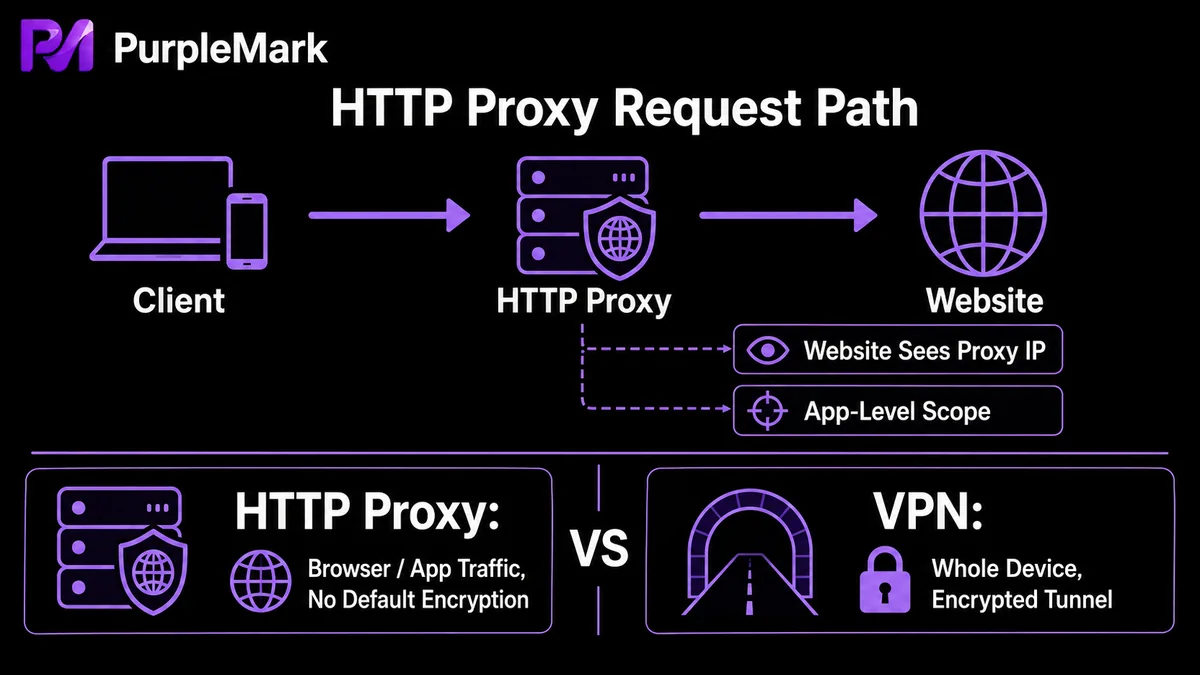
It works like having a "guide": normally, you connect directly to a website and the website sees your real IP. With an HTTP proxy, your request first goes to the proxy server, which then forwards it to the target website. The website's response also goes back to the proxy first and is then passed on to you.
This has two direct effects:
- The target website sees the proxy server's IP, not your real IP;
- If the website you want to access is overseas, choosing a proxy server in that country can let you access it as a local user would, getting around geographic access restrictions.
How is an HTTP proxy different from a VPN / network tunnel?
The two are often confused, but their scope and security are different:
- An HTTP proxy applies only to network requests from a browser or specific application. It is flexible to configure, but it does not encrypt your data;
- A VPN (network tunneling service) encrypts and forwards all network traffic from your device, giving it broader coverage and stronger security.
So an HTTP proxy can provide a degree of anonymity, but unlike a VPN, it generally does not encrypt data. If your task involves sensitive data or financial operations, you need a more secure solution rather than relying only on an ordinary HTTP proxy.
What can an HTTP proxy be used for in cross-border operations?
When used in compliance with applicable rules, HTTP proxies have several main uses in cross-border operations:
- Regional access: Some platforms or services have requirements for the region from which operations originate. Using a proxy IP in a specific country or region can allow the business to access services from the expected regional environment, such as operating the backend for an overseas market;
- Independent IP isolation: Assign different outbound IPs to different business accounts and pair them with separate browser environments to prevent cookies, cache, and network information from crossing between accounts. Multi-account scenarios should be strictly limited to accounts owned and compliantly operated by different real entities, rather than being used by one entity to bypass platform restrictions;
- Privacy protection: Hide the real IP and reduce exposure of business outbound network information.
How do you choose a suitable HTTP proxy?
Focus on a few dimensions when choosing one:
- Stability: Whether it stays reliable over time with few disconnections;
- Speed: Whether it meets the needs of your everyday requests and operations;
- Geographic coverage: Whether it covers the regions where you need to operate or access services;
- Service quality: Whether responses and support are timely.
Free proxies from unknown sources carry higher risks: they may be unstable and may also expose data. For long-term operations, prioritize reputable, stable proxies that can be used over time.
How do you configure an HTTP proxy?
Setting up an HTTP proxy is usually simple: enter the proxy server address and port number in the network settings of your browser or application. For teams that need to maintain multiple business accounts at the same time, with different accounts located in different regions, it is more convenient to bind the proxy to an independent browser environment for each account. This keeps each business's outbound IP consistently matched to its corresponding environment over time and avoids mismatches such as "the environment is in the United States, but the outbound IP is somewhere else." This is also the value of managing proxies centrally in an environment management platform: in PurpleMark's web workspace, you can record and bind the corresponding proxy resource to each browser environment, view outbound IPs and their usage relationships, and avoid having proxy information scattered in different places.
Compliance note: Use proxies for compliant regional access, network management, and operation of your own business. Bulk-registering accounts for the same real entity, bypassing platform rules, or committing fraud is not allowed, whether or not a proxy is used.
Frequently Asked Questions
Can an HTTP proxy guarantee network security? It can improve anonymity to some extent, but unlike a VPN, an HTTP proxy generally does not encrypt data. When handling sensitive information, an encrypted tunnel or another more secure solution is recommended.
Can a proxy and a VPN be used at the same time? Yes, but stacking them is usually unnecessary. In most cases, choose one according to your needs: configure an HTTP proxy if you only want browser requests to go through a proxy, or choose a VPN if you want all device traffic to be encrypted and forwarded.
Does using a proxy automatically make me safe? No. The anonymity provided by a proxy depends on whether the proxy itself is trustworthy, whether it leaks information, and whether you also maintain a clean browser session. Choosing a trusted proxy and using it with an independent, clean environment is a more reliable approach.


