
Do price monitoring, competitor analysis, or SEO monitoring jobs work in small tests but fail at scale? This article explains the real causes of collection failures—repeated environments, resource bottlenecks, task contamination, and more—and the environment design principles needed for compliant, large-scale collection.
Teams doing price monitoring, competitor analysis, SEO monitoring, or ad creative collection often see a strange pattern: scripts run smoothly and data stays stable in small tests, but once workloads are run in batches, success rates fall, abnormal requests increase, and sometimes entire jobs stop. The first reaction is often to keep changing the code—add retries, switch IPs, or tune concurrency. But that usually treats the symptoms rather than the cause. This article explains the real reasons large-scale collection fails: in many cases, the problem is not the code, but the browser environment in which the code runs.
When collection scales up, where do failures usually come from?
If you break data collection down into its components, failures at scale tend to fall into several categories:
1. Highly repetitive environments are identified as "non-human behavior"
Large numbers of collection tasks may share similar fingerprints, identical device configurations, or even the same pool of IPs. At small scale this may not be obvious, but as requests become denser, target websites assess browser characteristics, device information, and behavior patterns together. The traffic no longer looks like it comes from different users; it looks more like "one person operating at high frequency." Once detected, this can trigger CAPTCHAs, lower response quality, or even access blocks. The issue is subtle: what looks like occasional failure may actually mean the environment layer has already been flagged.
2. Browser instances get out of control and resources become the bottleneck
Many teams launch large numbers of browser instances locally or on servers, such as Chrome-based or headless browsers. This is simple at first, but high concurrency quickly causes problems: process counts surge, system load spikes, memory and CPU are heavily consumed, pages slow down, and frozen or crashed instances cause tasks to fail. At that point, even perfectly correct code cannot produce predictable results. The failure is no longer a logic error; the system simply cannot sustain the resource demand.
3. Tasks interfere with one another
When multiple collection tasks reuse the same browser environment or share Cookies, cache, and login information, "environment contamination" can occur: login states overwrite each other, pages may be treated as logged out, and collected results become inconsistent. These problems are often intermittent and difficult to diagnose. They look like random failures, but the underlying cause is conflict between tasks at the environment level.
4. Uniform behavior patterns are detected by risk controls
Even if the environment itself is normal, overly regular execution patterns—visiting at fixed intervals, clicking along the same path, or never pausing randomly—can be identified as automation. Modern risk-control systems analyze not only "who you are" but also "how you operate." A highly consistent, mechanical rhythm is itself a signal.
5. Long-running environments gradually drift from a normal state
Long-running tasks continuously accumulate Cookies, cache, and session data. Without proper management, the environment can gradually deviate from a normal state: success rates decline, loading becomes abnormal, and some data fields start disappearing. The problem is often discovered only after it has already affected a significant amount of data.
Taken together, these issues have one thing in common: they are not code-logic errors, but browser-environment problems. Code determines how a task executes; the environment determines whether those actions look like normal user activity to the target site and whether they can run reliably inside your system.
How should environments be designed for compliant collection at scale?
An environment that can support long-term, stable, large-scale collection should meet at least the following requirements:
- Independence: each collection task should essentially be treated as "an independent user," with its own browser fingerprint, Cookies, cache, and runtime context;
- Schedulability: under high concurrency, browsers should not be "a pile of manually started processes," but resources that can be dynamically allocated and reclaimed like compute capacity;
- Realism and consistency: the environment should not merely "work" but should remain plausible—fingerprints should be reasonably distributed, device characteristics should be realistic, and behavior should be natural;
- Integration capability: collection is no longer just script execution. It also involves task scheduling, data processing, and even collaboration with AI Agents, so environments need to be callable programmatically.
Putting it into practice: treating environments as scalable resources
Once these principles are clear, implementation usually centers on managing browser environments as infrastructure:
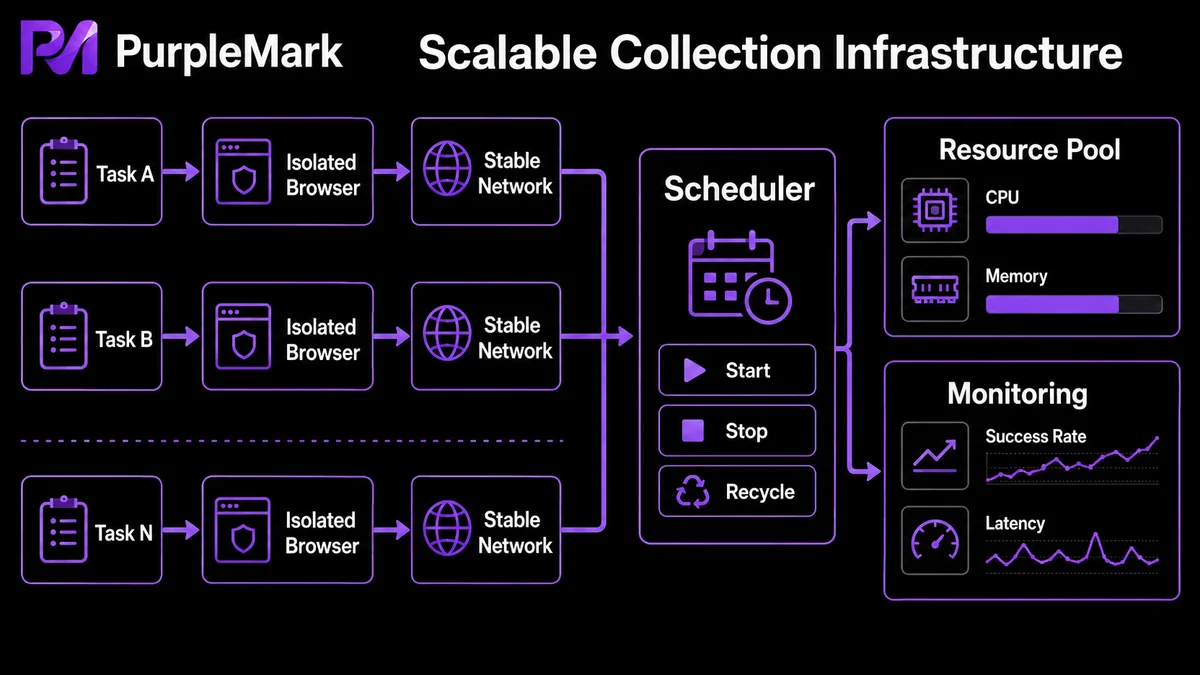
- Create an independent environment for each task: run each collection task in an isolated browser environment so tasks do not contaminate one another and activity is more distributed and closer to normal user behavior. For long-running use cases such as price monitoring and competitor analysis, isolation is a foundation of stability.
- Schedule through interfaces instead of managing manually: use a local interface to create and release environments on demand and schedule multiple tasks centrally. This abstracts "browser execution" into a standard capability, allowing collection to move from a single machine to a scalable architecture instead of relying on stacks of local browser processes.
- Integrate seamlessly with existing automation frameworks: teams already using Playwright or Puppeteer only need to replace "launch a browser" with "connect to an existing browser environment." Most existing collection logic can remain unchanged while the environment layer is upgraded without a major system rewrite.
- Coordinate with AI Agents: allocate an independent environment to each Agent on demand so multiple Agents can run concurrently without interfering with one another or requiring manual upkeep, making the overall system more flexible and scalable.
PurpleMark is designed around the idea of "managing browser environments as reusable resources." In a workspace, you can create and maintain isolated browser environments by task or business need, use the Local API so Playwright, Puppeteer, and other scripts can connect to those environments on demand, and use PurpleMark Skill to connect environment-management capabilities to AI tools such as Claude Code, Cursor, and OpenClaw. This turns large-scale collection from "starting a pile of processes" into "scheduling a set of environments."
Compliance note: use data collection only for compliant scenarios such as price monitoring, analysis of publicly available competitor data, and operation of your own business. Follow the target website's terms of service and robots rules, do not collect personal sensitive information, and do not use collection for bulk account registration or to interfere with others' services.
Frequently Asked Questions
Do collection failures always mean I need better code? Not necessarily. If the code logic itself is correct, failures are more often caused by the runtime environment. First check for repeated environments, cross-task contamination, or insufficient instance resources before deciding whether to keep changing the code.
Why can opening more instances make things less stable? Too many instances create resource contention. Processes may freeze or crash and cause failures. At scale, it is better to schedule environments on demand than to simply keep adding more instances.
If I change proxy IPs frequently, does that make it safe? No. IP is only one factor in risk-control evaluation. If multiple tasks still share the same environment and Cookies, they can still be identified. Environment independence is more important than simply changing IPs.
What does "environment contamination" mean? It means multiple tasks reuse the same environment and their Cookies, cache, login states, or other data overwrite one another or drift from a normal state, leading to inconsistent collection results and intermittent failures. Giving each task its own independent environment usually resolves this issue.


