
Does TikTok open to a black screen or fail to load videos on the Home feed? Is the cause your network, app cache, or account? This guide follows a “software first, then network, then account” order to help you identify and fix TikTok black-screen issues step by step.
When you operate TikTok accounts, the most frustrating problem is not always low traffic—it can be an account that will not load or a Home feed with no content. Your connection may look normal, yet the App opens to a black screen, stops after a few seconds, or repeatedly fails to load videos. This kind of “black screen” issue affects many cross-border sellers. The good news is that most cases can be resolved by troubleshooting in this order: “software first, then network, then account.”
Before you start, one distinction matters: in this article, “black screen” means the App opens, but the Home feed is empty, videos will not load, or playback shows a black screen. If the device cannot connect at all and TikTok constantly reports “No network connection,” check the network itself first. The methods below mainly address abnormal content loading.
Why Does TikTok Show a Black Screen?
A black screen is rarely caused by only one thing. Common causes include:
- Abnormal app cache or local data: Cache can accumulate over time and temporary files can become corrupted, causing video sources to fail to load or the interface to render incorrectly. This is one of the most common and easiest causes to fix;
- App version or software conflicts: After an update, TikTok may conflict with the phone operating system or other software, causing persistent black screens;
- Abnormal network environment or a flagged IP: If the network exit is unstable, or if TikTok identifies the exit—especially a shared IP or data-center IP—as a source of abnormal traffic, content access may be restricted, resulting in an empty feed or black screen;
- Device or system problems: In rare cases, the phone operating system itself may malfunction and prevent TikTok from rendering content correctly;
- Platform risk controls or account restrictions: If an account has repeatedly posted duplicate, low-quality, or policy-violating content, TikTok may restrict some account functions and temporarily limit normal feed access. Note that this is not the same thing as a “black screen”—hidden or removed content usually comes with a clear notice and is tied to Community Guidelines enforcement.
Quickly identifying whether the problem is with your own device/network or with the account itself is the key to solving it efficiently.
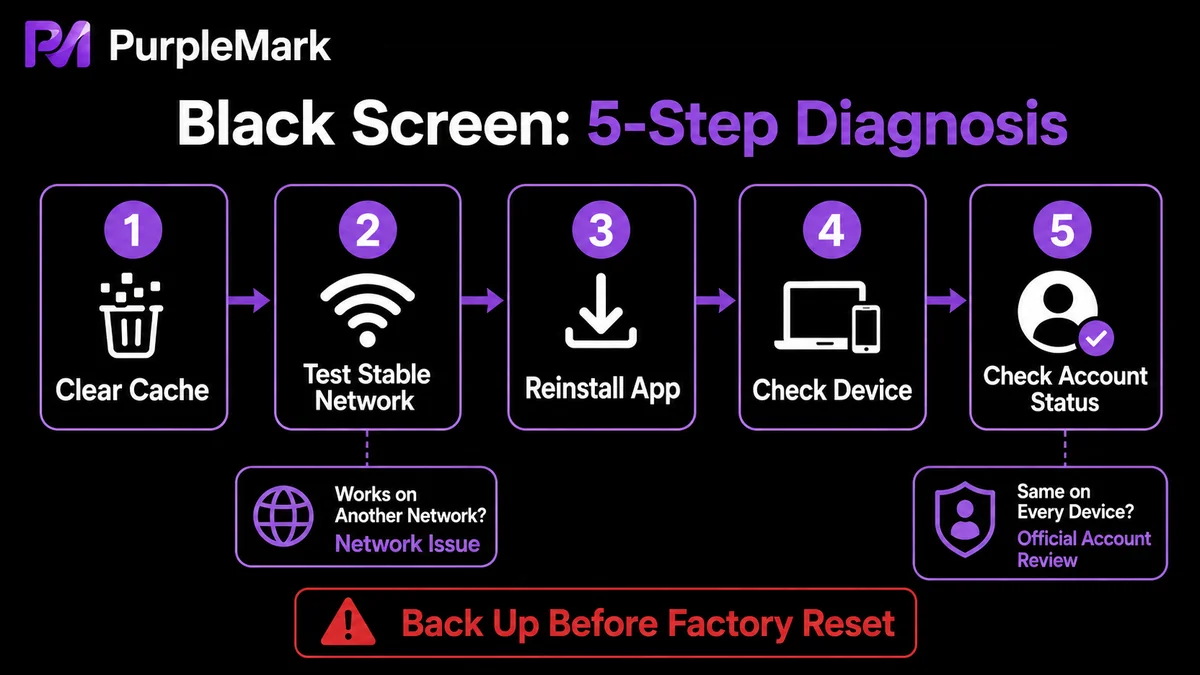
5 Troubleshooting Methods, from Simple to Thorough
Try these steps in order, from “low risk and small changes” to “more thorough.” Most cases are resolved in step 1 or 2.
1. Clear the Cache (Try This First)
If abnormal cache data is causing the black screen, clearing it often works immediately.
- iOS: Open TikTok → go to your profile → tap “…” in the upper-right corner → find “Clear cache” and tap it;
- Android: Go to system “Settings → App management” → find TikTok → “Clear cache.” Then fully close the App and reopen it.
If the screen is still black after clearing the cache, sign out of the account and log in again later before testing once more.
2. Switch to a Stable Network
If clearing the cache does not help, the network exit may be the cause. Switch to a stable, normal network—for example, mobile data or another reputable network exit—then reopen TikTok and check whether content loads. This is useful for determining whether the current IP environment is abnormal: signing in to the same account through another clean network can quickly show whether the root cause is the account or the network.
3. Uninstall and Reinstall TikTok
If clearing the cache and changing networks do not work, the App installation itself may be damaged. Uninstall TikTok, restart the phone, reinstall it from the official app store, and then sign back in. Reinstallation resolves many black-screen problems caused by software conflicts or corrupted files.
4. Factory Reset (Only for System-Level Problems)
Only consider a factory reset if reinstalling still does not work and you can reasonably rule out the network and the account. A factory reset erases all content on the phone, so back up your personal data first. This is a more drastic measure intended for system-level faults and should not be the first response to an ordinary black screen.
5. Check for Account-Level Restrictions
If all four previous steps fail, or the same account cannot load content on other devices and other networks, the problem may be with the account itself. The account could be under platform risk controls or have limited functions. In that case, use TikTok’s official channels to review any account-status notices, bring content into compliance with platform rules, and appeal where appropriate instead of repeatedly switching devices to avoid restrictions. Hidden or removed content is different from a black screen and usually requires checking the Community Guidelines.
Operator Checklist: Prevent Black Screens from Reappearing
If you need to operate TikTok reliably over the long term, reducing potential triggers at the source is better than troubleshooting every time a black screen appears:
- Do not crowd many accounts onto the same network exit: When many people or accounts share the same IP, a flag on that IP can affect more than one account. Assigning separate, stable network exits to different business accounts can greatly reduce the chance that one abnormal environment affects many accounts;
- Keep environments and accounts mapped one-to-one: If you manage multiple TikTok accounts on a computer—for posting videos, managing backends, or replying to messages—use an independent browser environment and a stable proxy for each account. This reduces local-data mixing caused by repeatedly switching accounts in one browser and lowers the risk of abnormal-environment signals;
- Keep content compliant and avoid recycled, repetitive low-quality posts: Repeatedly publishing highly similar or low-quality content can trigger platform risk controls. Focusing on original and compliant content generally supports healthier accounts;
- Prioritize network stability: Cross-border operations require a stable, fast access environment. Avoid frequent network changes.
For operators who need to manage multiple TikTok accounts in a desktop browser, PurpleMark places different accounts in isolated browser environments that can still be managed centrally. Each environment can use its own proxy and network exit, while grouping helps keep track of which account belongs to which environment. This reduces local-data mixing in shared environments and limits the chance that one abnormal network exit affects multiple accounts. If “multiple accounts + network environments” is causing repeated problems, you can first separate accounts by business in PurpleMark Web, create dedicated environments, and configure proxies centrally to make environment management more orderly.
Frequently Asked Questions
Why is TikTok still showing a black screen after an update? Even after updating the App, software conflicts in the phone system or damaged installation files can keep causing a black screen. Try clearing the cache and reinstalling the App; if that still fails, consider a factory reset only after backing up your data.
Can switching to another device fix the black screen? If the issue is specific to one device, changing devices may help. But if the root cause is an account restriction or an abnormal network environment, switching devices usually will not solve it. Test another network first, then determine whether the problem is account-level.
Only TikTok is black while other apps work normally. What does that mean? The problem is most likely with the TikTok App itself or the account. Update the App and clear the cache first. If the problem continues, check for account risk-control notices and use official support channels if necessary.
Is hidden TikTok content the same as a black-screen problem? No. Hidden or removed content is usually related to violations of TikTok’s Community Guidelines or copyright policies and generally comes with a clear notice. A black screen is more often a device, network, or account-function loading issue. Both require compliance with platform rules, but the troubleshooting paths are different.


