
Web crawlers can automatically visit web pages and collect data at scale for price monitoring, market research, brand monitoring, and more. This guide explains the differences between crawlers, crawling, and scraping, how the process works, why websites block crawlers, and how to collect public data safely and compliantly.
When you need to collect information from dozens or hundreds of web pages, copying and pasting manually is tedious and error-prone. Web crawlers exist to solve this problem: they can visit pages like a user and collect data quickly and at scale. This article explains the basic concepts, workflow, common obstacles, and compliant use of web crawlers.
What exactly is a web crawler?
Think of the internet as a huge digital library. Web pages are scattered "books," and a crawler is an automated collector that follows a predefined route through the shelves, finds the information you need, extracts it, and stores it in a database for later use.
Technically, a web crawler is a program or script that automatically retrieves information from web pages according to predefined rules. Developers define where it starts (seed URLs), what it should collect (text, images, links), how fast it should send requests, and where the data should be stored.
In practice, three terms are often used interchangeably, but they emphasize different things:
- Crawler/Spider: the actual program or "bot" that performs the work, such as a Python script you write or a Scrapy project.
- Crawling: the process of following links across websites to discover and download pages.
- Scraping: the extraction of structured information from pages, such as turning product names, prices, and stock levels into a table.
In short: the crawler is the tool, crawling is how it navigates the web, and scraping is how it extracts the data you need.
What can web crawlers be used for?
The value of a crawler is that it turns public information scattered across large numbers of web pages into data that can be analyzed and used for decisions.
- Price monitoring: monitor competitors' prices, inventory, and promotions 24/7, and adjust your own pricing strategy when products go out of stock or prices change.
- Market research and business intelligence: track industry news and reports, analyze social media trends, and aggregate user reviews for sentiment analysis to better understand the market and customer feedback.
- SEO: search engines such as Googlebot and Baidu Spider are essentially large-scale crawlers that fetch and index web pages. Understanding crawling also helps you improve your own site's SEO.
- Academic research: automatically collect public datasets for research on public opinion, finance, linguistics, and other fields.
- Brand monitoring: track mentions of your brand across news sites, forums, and blogs, and identify negative information early.
How does a crawler collect web data?
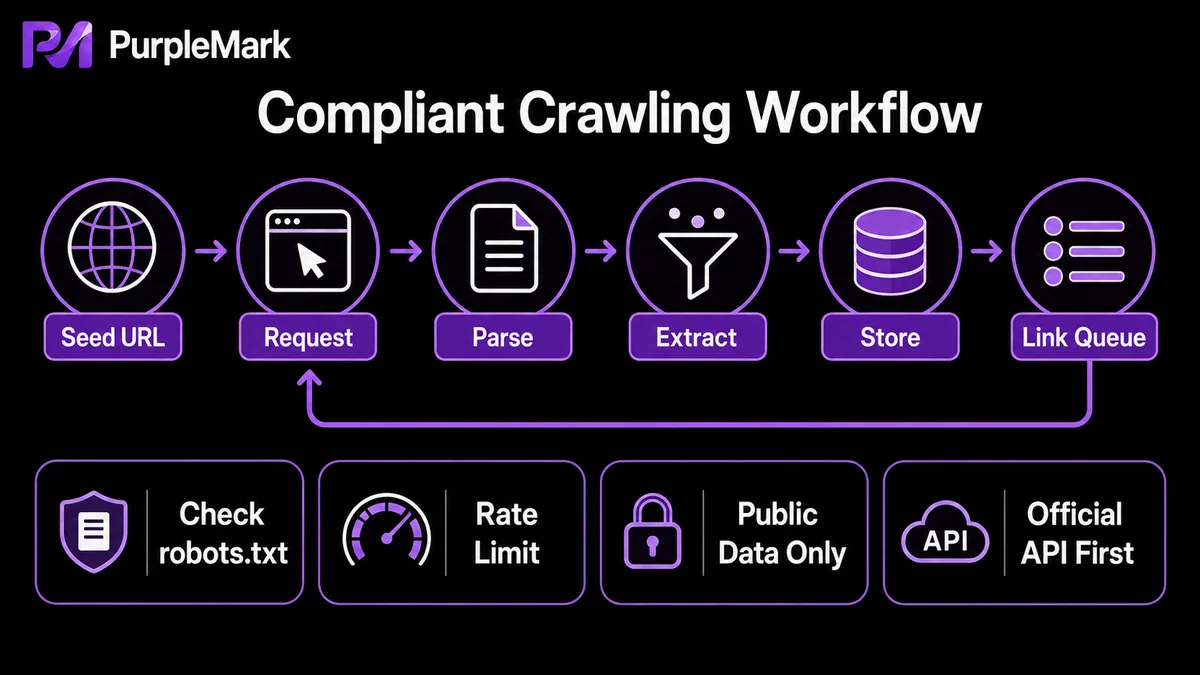
A complete crawling process generally goes through the following cycle:
- Choose seed URLs: start from one or more initial URLs, such as a homepage, category page, or listing page, and define the scope;
- Send HTTP requests: request pages from the server as a browser would and receive the HTML source;
- Parse and extract data: locate and extract useful information according to predefined rules such as CSS selectors or XPath;
- Store the data: write product names, prices, review counts, and other information to CSV/Excel, JSON, or a database;
- Follow links and repeat: identify eligible hyperlinks during parsing, add them to the crawl queue, and repeat the "request-parse-store-discover" cycle until the crawl is complete, the page limit is reached, or an anti-crawling mechanism is triggered.
Why do websites block crawlers?
Many websites actively defend against crawling for several reasons: crawlers can send many requests in a short time and consume server bandwidth and computing resources; website data can be a core asset, and large-scale collection may raise copyright or data-leakage concerns; competitors may use crawlers to obtain sensitive information such as pricing, creating unfair competition; and user privacy must also be protected.
Websites use many methods to detect crawlers:
- IP frequency monitoring: if one IP sends an unusually dense burst of requests, it may be identified as a crawler and blocked;
- User-Agent detection: suspicious or uncommon UAs may be rejected directly;
- Behavior analysis: human behavior is irregular, with varying mouse movements, dwell times, and click intervals, while crawlers tend to behave in repetitive patterns;
- JavaScript challenges: dynamically loaded content can leave basic crawlers that do not execute JS with only an "empty shell";
- CAPTCHA: a verification challenge may appear when suspicious behavior is detected;
- Advanced fingerprinting: websites may combine fonts, resolution, Canvas, WebGL, time zone, language, and other signals into an almost unique "browser fingerprint" that can be tracked even after the IP changes.
How can you collect data compliantly?
Successful and sustainable crawling is a balance between technical capability, compliance, and respect for the target website's resources. The following are widely recognized best practices:
- Respect robots.txt: check
target-site.com/robots.txtbefore you begin and follow the allowed and disallowed crawling rules; - Use a reasonable request rate: add random delays between requests, such as 2–5 seconds, to avoid triggering rate limits or placing unnecessary load on the server;
- Distribute load with a proxy IP pool: for large-scale collection, rotate multiple IPs so the request rate from each IP remains within a normal range;
- Use realistic request headers: set the User-Agent to a common browser identifier and configure fields such as Referer appropriately so requests look more natural;
- Use a stable execution environment when necessary: if the target requires a login session or is sensitive to the access environment, run the collection script in a browser environment with consistent parameters and reusable sessions to reduce failures caused by environmental changes;
- Prefer official channels: if the target site offers an API, open platform, or third-party data service, prefer those more stable and compliant options instead of crawling the site directly.
Compliance boundary: collecting public data is generally not illegal, but you must follow the website's terms of service and robots.txt and respect copyright and privacy laws. Do not collect sensitive personal information or use crawlers for malicious purposes such as bulk account registration, fraud, or disrupting other people's services.
Frequently asked questions
Are web crawlers legal? Collecting public data is generally legal, but you must comply with a website's terms of service and robots.txt and respect copyright and privacy laws. Never collect sensitive personal information or use crawlers for malicious purposes.
What basics do I need to learn web crawling? Python is the most commonly used language, with rich libraries such as Requests, BeautifulSoup, and Scrapy. Basic HTML/CSS knowledge is also very useful for parsing web pages.
What is the difference between a crawler and an API? An API is an official structured-data interface provided by a website and is generally more stable and compliant. A crawler extracts data directly from web pages and is usually used when no API is available or the API is heavily restricted.
How do I crawl content that requires login or loads dynamically? Use tools that can execute JavaScript and handle login sessions, such as Selenium, Playwright, or Puppeteer.


