
Not sure what to do after taking over an Alibaba.com store? This article turns daily tasks and weekly reviews into an actionable checklist—from checking violations, monitoring P4P campaigns and handling orders to weekly data analysis, keyword reviews and product optimization—so your operations follow a steady rhythm.
When you first start operating an Alibaba.com store, it is easy to fall into the trap of opening the dashboard every day and not knowing what to do. The less there seems to be, the more anxious you become, and the more you worry that nothing is working. In reality, store operations can be systematized: fix the things you need to monitor every day and the things you need to review every week, build a routine around them, and account growth becomes much more predictable. This article gives you a checklist you can follow directly.
Seven things to do every day
1. Check for violations first
The first thing to do after opening the dashboard is to check violation records. Treat any violation seriously: appeal when an appeal is possible; otherwise, identify the cause internally. Do not let it drag on until it affects your store's standing.
2. Keep a close eye on P4P data
P4P advertising is one of the core traffic sources for a store, so it should be reviewed almost every day. Focus on impressions, click-through rate, spend, and campaign duration so you know where things stand. Then combine that information with keyword performance to decide which products are worth continuing to promote, whether the budget needs adjustment, and whether keywords need optimization.
3. Watch for new platform rules
Alibaba.com updates its rules from time to time, so pay attention to messages in the backend inbox. When a new rule appears, communicate it to the team promptly to avoid problems caused by rule changes.
4. Handle orders
Check routinely for orders that are close to overdue and remind the sales team to ship on time. Respond promptly to neutral or negative reviews, and check the Transaction Growth Center for orders selected for review or missing logistics records. Order fulfillment is the lifeline of a store and cannot be handled carelessly.
5. Review star-rating growth tasks
Complete growth tasks as soon as they appear. As the store's star rating improves, traffic and trust signals can improve with it.
6. Check Product Radar tasks
Open the product operations workspace and see whether there are any low-scoring products. Low scores can drag down overall performance, so these products should be handled or optimized first.
7. Publish content to the follower feed
The follower feed is a useful way to build a pool of potential customers. Although the platform allows multiple posts per day, keeping it to around three posts daily is a practical target. Focus on new product launches, product upgrades, and store updates, and maintain a consistent publishing rhythm.
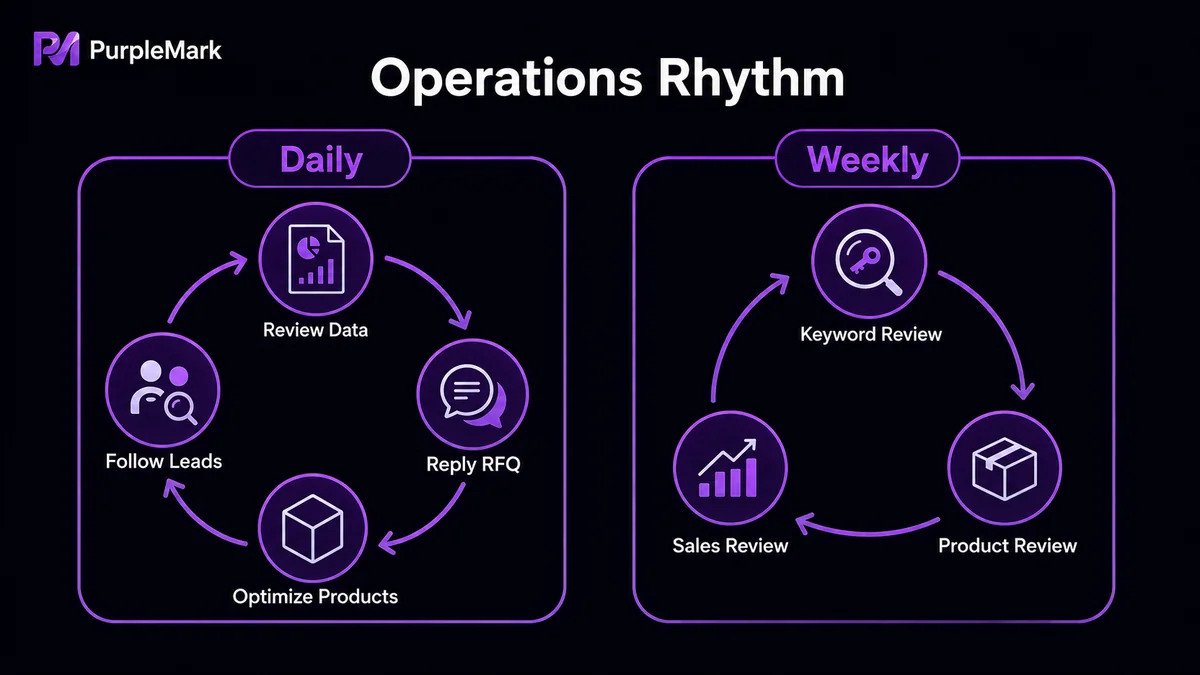
What to review every week
Daily execution is not enough. A systematic weekly review is what helps create a real performance gap over time.
- Overall data analysis: Use weekly traffic-source data to compare your store with leading merchants; review conversion rates for the whole store and each category; analyze the geographic distribution of traffic and cut off unreliable sources that only burn budget. Alibaba.com data is updated roughly every two days, so keep tracking core metrics such as impressions, visitors, and P4P click-through rate.
- P4P strategy review: Generate basic reports and traffic reports to check whether budget is being spent in the right places, how to continue lowering cost per click, and where campaign strategy can still be improved.
- Keyword export and adjustment: Track high-traffic and high-spend keywords separately. Watch for newly emerging popular terms; after they prove stable in testing, add them to P4P plans and increase investment.
- Product optimization: Check whether the strength scores of high-quality products have declined and correct issues quickly. For products that have only just passed the minimum threshold, find ways to improve their strength and move them into the high-quality tier.
- Best-seller tracking: Sort product data by inquiry volume in descending order. Add inquiry-generating terms to your keyword library or P4P campaigns, and decide whether to advertise them or improve organic ranking based on how competitive each term is.
Helpful tools that can improve efficiency
- Ahrefs / Alexa: Analyze off-site traffic composition, rankings, and keyword sources for Alibaba.com and competing sites.
- P4P Assistant: Set a maximum bid and let the tool help balance ranking and cost automatically.
- Fatkun: Batch-download product images and videos, useful for organizing creative assets.
- Instant Data Scraper: Export backend keywords and convert them to Excel for faster spreadsheet work.
- Google Trends: Review time-based trends for industries and products to judge listing and promotion cycles.
- Fingerprint browser tools: If you manage multiple stores or accounts at the same time, these tools provide isolated, independent environments for different accounts, helping reduce the risk that accounts are identified as linked. Installing common extensions through the tool's app center can also make multi-account operations more efficient.
Conclusion
Good operations depend on having actions every day, reviews every week, and a closed loop around data. Once this checklist becomes routine, combine it with continuous industry learning to adapt to changes in the market and customer demand. Your Alibaba.com operations can then move from random busywork to an orderly process. Start tomorrow morning with two basics: check for violations and review your P4P campaigns.


