
When a ChatGPT account is asked to verify or gets restricted, the issue is often not simply heavy usage. Changes in exit location, devices, or browser parameters can break the account’s normal access pattern and trigger additional checks.
When an account is asked to verify or is temporarily restricted, many people first assume they used it too frequently or that their IP address is not clean enough. Usage frequency and IP reputation can matter, but a more common cause is a changing login environment.
The platform tracks a pattern, not just one IP address
Risk controls do not look only at whether a particular address appears clean. They also look at whether the overall login environment stays consistent over time. In addition to IP, signals can include ASN network ownership, geographic location, endpoint device, and fingerprint characteristics at the TLS and HTTP layers. For an account that is used normally over a long period, these signals form a relatively stable access pattern, and the platform can use that pattern to establish baseline trust.
This also leads to an important point: clearing cookies does not mean changing identity. Device recognition relies on a browser fingerprint made up of factors such as Canvas, WebGL, User-Agent, and the operating system. Cookies are only one layer. Clearing the cache whenever something looks unusual often changes very little.
What the platform sees when the same account changes exits or devices
- Exit country changes: If the account uses a domestic network in the morning and an overseas node in the afternoon, the platform sees one account active in two geographic locations. A common response is to require a new login or send a verification code by email or phone; more serious cases can result in temporary access restrictions
- Simultaneous login across devices: The same account is used on several endpoints at once, while requests from different locations overlap in time and create concurrent sessions
- Browser change or system reinstall: Device parameters change as a whole, making it difficult for the platform to establish a consistent profile and often leading to more frequent verification
- Environment and exit do not match: The IP is in the United States, the timezone remains local, and the interface language is still Chinese. This kind of contradiction can be detected without advanced techniques
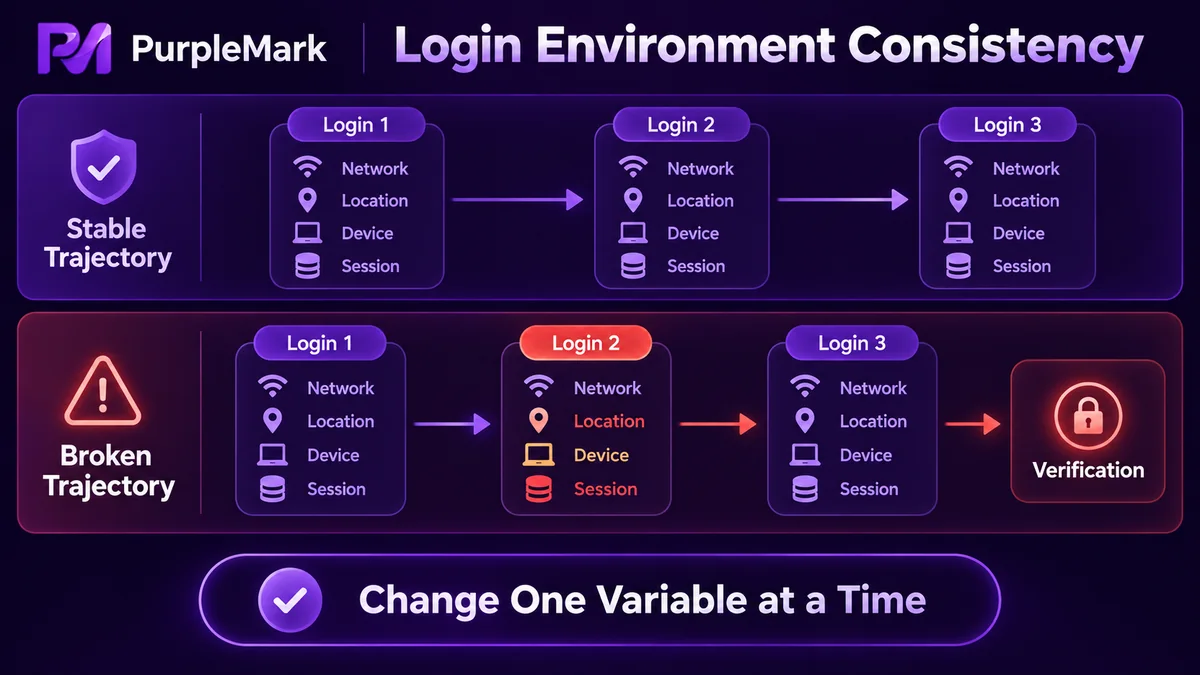
Why these changes can be treated as risk signals
The core question for risk controls is simple: does this look like one normal person using one account in a stable way? Breaks in the environment, overlap between identities, and abnormal usage rhythms make that harder to answer with confidence, so verification or restrictions may follow.
Identity overlap deserves particular attention. When several accounts share the same browser environment over a long period, signing out only ends the account session; it does not isolate the browser environment itself. Fingerprints, cache, and device parameters can remain highly overlapping, creating association signals between accounts. If one account is placed under observation, others may also be asked for additional verification.
Another overlooked case is an account with almost no usage history. A new account carries little weight in a trust model. If it starts generating content continuously, making calls in bulk, and logging in from multiple devices immediately after registration, it can quickly attract scrutiny. Using it at a normal pace for a while and gradually building a history is more useful than any trick.
Account sharing itself also violates the terms of use of most services. Instead of trying to work out how to share an account without being noticed, it is better to give each user an independent subscription.
Ways to keep the environment stable
The goal is not to make the parameters unusually distinctive. It is to keep the same account in the same overall environment over time. A practical order is:
- Keep one browser environment and bind it to the same set of exits so the login path stays within the same network and device structure. When the network must change, change only the exit address rather than changing browser parameters at the same time, which limits the number of variables changed in each step
- Keep timezone, language, screen resolution, WebRTC, and DNS as one consistent parameter set. Match them as a group to the exit region and avoid repeatedly changing them by hand
- Use one isolated environment per account, without sharing Cookies, Cache, or local storage structures. You can also separate containers by purpose so content, advertising, and support accounts follow different paths
- Keep exits in the same region or ASN whenever possible and avoid cross-country jumps. As the number of accounts grows, fix the mapping between accounts, environments, and exits to reduce temporary logins and cross-environment switching
- Move local data together with the environment. When changing devices or handing over an account, migrate the complete environment data. If a problem occurs, roll back to the most recent stable state rather than reinstalling everything
As the number of environments grows, relying on memory to track bindings becomes error-prone. Tools such as PurpleMark are intended to keep each account in an independent environment with its own exit, without sharing data across environments, so the account identity layer remains stable.
After the account has already been restricted
First identify the type of restriction. Temporary restrictions can often be resolved by waiting or completing verification, while a ban requires an appeal. These situations need different handling.
If the environment is the problem, fix it before submitting an appeal. Otherwise, the same issue may return after access is restored. Follow the official appeal instructions, explain the situation clearly, and avoid submitting repeated appeals in a short period. Also avoid registering new accounts in the same environment while the existing account is restricted, because the new accounts can inherit association signals.
Ultimately, risk controls judge stability and consistency. A fixed login environment, a coherent set of regional parameters, and a normal operating rhythm will prevent most of these risk-control problems.


