
Many people assume that using a proxy IP makes them completely anonymous, without realizing that domain-name resolution can still leak information. This guide explains what a DNS leak is, how it happens, the risks involved, and five practical ways to prevent it and better protect your online privacy.
Many people think that once they use a proxy or change their IP address, they become "invisible" online. But security testing often reveals an overlooked weakness: even if your IP has changed, your browsing activity may still be quietly exposed to your internet service provider. This is known as a DNS leak. If you want real control over your online privacy, you first need to understand how it works.
First, what does DNS do?
DNS (Domain Name System) can be thought of as the internet's "phone book." When you enter a domain such as google.com in your browser, your computer does not inherently know where that name points. It asks a DNS server: "What IP address belongs to this domain?" Once the server replies, your device can connect to the website.
What is a DNS leak?
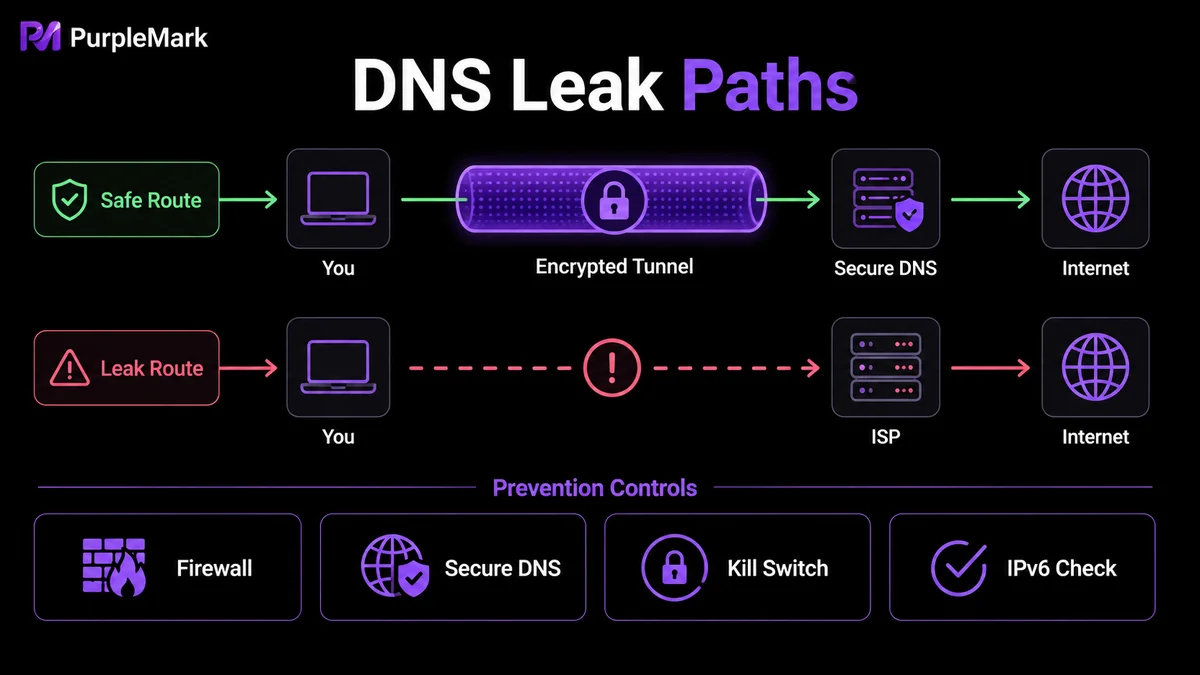
Simply put, a DNS leak occurs when you use an encrypted tool, such as a proxy, but DNS lookup requests that should travel through the encrypted channel are accidentally sent directly over your local network to your internet service provider's (ISP) DNS servers. This can reveal which websites you visit.
Think of it like mailing an encrypted letter while writing the recipient's address in huge letters on the envelope. The contents may be protected, but the carrier can still see where the letter is going. When DNS requests take the wrong route, your privacy can leak through an otherwise invisible part of the connection.
How does it usually happen?
The following situations are common causes of DNS leaks:
- Incorrect system configuration: Some operating systems send queries to multiple DNS servers at the same time to improve speed and use whichever responds first. An ISP's local DNS server may answer faster, causing the query to bypass the encrypted channel.
- Switching network environments: When moving from home Wi-Fi to a mobile hotspot, or from an office to a café, the device has to obtain a new IP address. If the tool lacks a "network lock" or similar protection, the system may connect to the ISP's DNS server during the reconnection gap.
- Software feature conflicts: Some ISPs use a "transparent DNS proxy" to intercept and redirect traffic. Even if you change DNS settings in software, requests may still be forced back to the ISP's servers.
- No IPv6 support: Networks are gradually transitioning from IPv4 to IPv6, while many tools still support only IPv4. When you visit an IPv6-enabled website, IPv6 DNS requests may leave the encrypted tunnel and travel over an unencrypted route.
What are the risks of a leak?
Do not underestimate this "resolution step." Its effects can be very real:
- Your activity can be tracked: DNS query logs can show which websites you have visited and help build a profile of your online behavior.
- Your network environment and location can be exposed: The ownership and location of a DNS server may reveal your real region and ISP, undermining attempts to hide your location.
- Hijacking or phishing becomes possible: If a local ISP's DNS protection is weak, results can potentially be tampered with—for example, a banking domain could be redirected to a fake phishing site that is difficult to spot at a glance.
- Security policies may fail: In enterprise or high-security environments, DNS leaks may bypass access controls and compliance policies.
How to test for a DNS leak
The most direct method is to use an online DNS leak testing tool. If the results show the name of your actual ISP, it means DNS requests are escaping through the wrong path. It is best to run this type of test after connecting to your proxy and make it part of your routine checks.
Five ways to prevent DNS leaks
- Restrict DNS egress with a firewall: Allow DNS requests only to designated servers and block port 53 traffic through the local network interface. This provides a fallback layer of protection if your tool fails or the network changes.
- Choose a reliable encrypted service with network-loss protection: The service should use private encrypted DNS on the server side and force name resolution back through the tunnel. On the client side, a Kill Switch is preferable so data does not leak to the public network when the connection fluctuates.
- Disable IPv6 when necessary: Compatibility problems between IPv4 and IPv6 are a common source of leaks. Temporarily disabling IPv6 in the system network adapter can keep traffic on protected IPv4 when appropriate.
- Enable DNS over HTTPS (DoH) in your browser: Major browsers support secure DNS. With DoH enabled, DNS queries are encapsulated in encrypted HTTPS traffic, making plain-text requests harder for the ISP to identify.
- Use a configurable environment tool in multi-account scenarios: If you operate multiple e-commerce, social media, or advertising accounts, you may need both leak prevention and separate account environments. Browser-environment-level management can help here—PurpleMark supports creating an independent browser environment for each account and configuring network parameters as needed, helping keep DNS resolution, network egress, and fingerprint settings in a relatively consistent and controllable space while reducing leak and association risks caused by environmental crossover between accounts.
Reminder: Preventing DNS and WebRTC leaks is intended for legitimate operations and privacy protection, not for bypassing platform rules or engaging in prohibited activity.
Conclusion
DNS leaks happen in the easily overlooked domain-resolution stage. Even if your traffic is encrypted and your IP is hidden, real browsing behavior may still be logged and used if DNS requests take the wrong route. Understanding the causes, testing regularly, and combining firewall controls, DoH, IPv6 management, and environment tools can help close multiple leak points so that online privacy is more than just surface-level protection.


