
Many people worry that a MAC address can expose privacy like an IP address. This guide explains what a MAC address is, how it differs from an IP address, whether websites can obtain it during normal browsing, and which privacy risks are actually worth watching.
When online privacy comes up, many people worry that their device might be "tracked." A MAC address is one of the concepts that often gets mentioned. What exactly is it, how is it different from an IP address, and can it leak when you browse the web normally? This guide explains it clearly.
What is a MAC address?
A MAC address, short for Media Access Control Address, is a unique identifier assigned to a device's network interface. It is mainly used for communication within physical network segments such as a local area network (LAN).
A simple way to think about it is as the device's "ID number" in the networking world. Every connected device—a laptop, phone, or even your home router—has a MAC address. It is usually assigned by the manufacturer at the factory and consists of six groups of hexadecimal digits, for example 00:1A:2B:3C:4D:5E. The first half generally identifies the manufacturer, while the second half identifies the individual device.
How is a MAC address different from an IP address?
Both are used to identify devices on a network, but they work in very different ways. An analogy makes the distinction easier to remember:
- A MAC address is like an ID number: it is set at the factory, normally changes very little, and helps identify a device on the local network.
- An IP address is like a home address: it tells data where to go and changes depending on the network you connect to—one Wi-Fi network at home, another at a café, and your IP changes.
So, a MAC address is a relatively stable device "identity," while an IP address is a changeable "location." They solve different networking problems.
Can websites get your MAC address during normal browsing?
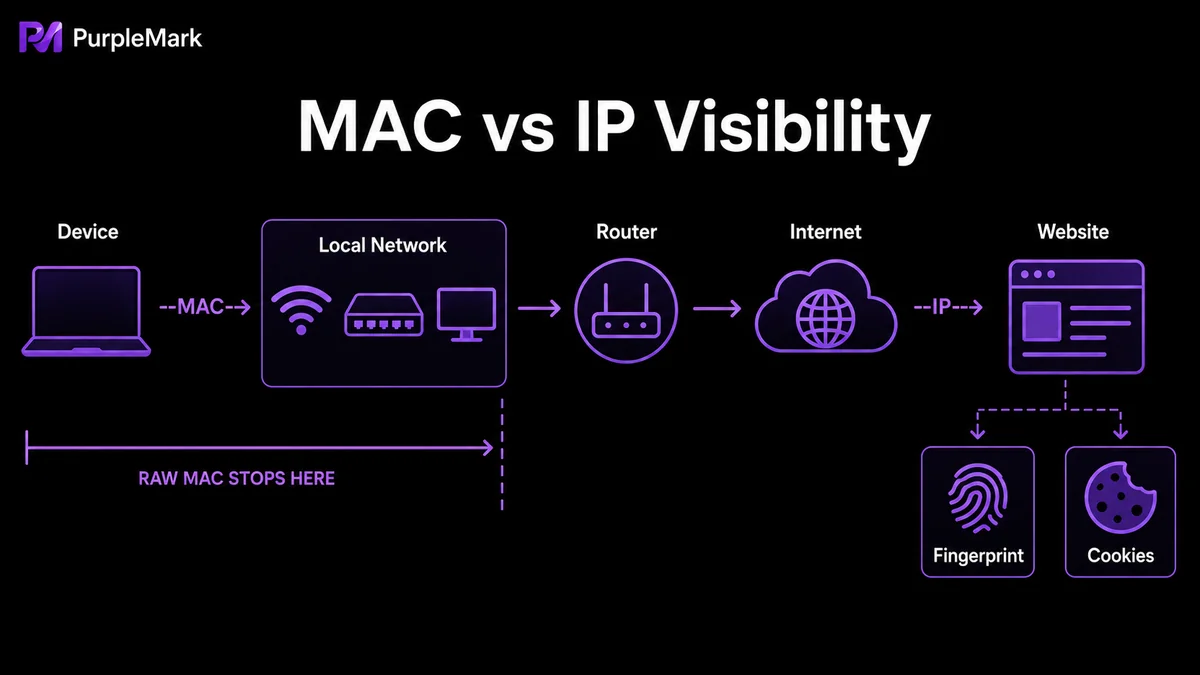
In most cases, no. MAC addresses were designed for use inside local networks and are not carried across the internet. When you open a webpage, the website itself cannot directly read your device's MAC address. For security and privacy reasons, browsers do not expose local hardware MAC information to websites.
That does not mean a MAC address can never be exposed. A few situations deserve attention:
- Public Wi-Fi: when you connect to public Wi-Fi, the network administrator can see the MAC addresses of connected devices; if the network is poorly protected, packet-sniffing tools may also capture them.
- Local-network sniffing: devices on the same local network can see MAC information in network frames, so malicious sniffing may collect it.
- Physical access: someone with access to your unlocked device can look up its MAC address directly.
- Malware: if a device is compromised, an attacker may be able to extract system information such as its MAC address.
The overall conclusion is: for everyday web browsing, your MAC address is not the privacy leak you need to worry about most. The information collected at the web layer below usually matters more.
Privacy risks that matter more when browsing the web
Compared with a MAC address, these types of information are more commonly collected while you browse:
- IP address: websites and advertisers can use it to estimate your general location and internet service provider, and it is often used in behavioral tracking.
- Browser fingerprint: your browser version, operating system, plugins, screen resolution, fonts, language, and other attributes can be combined into a fairly precise device identifier. Unlike a Cookie, a fingerprint may still help a website recognize you even in private browsing mode.
- Cookies and third-party tracking: websites use Cookies to remember browsing activity, while third-party Cookies have also been used for tracking across sites.
- HTTP Referrer header: when you move from one webpage to another, the previous page may be passed along as the referring source.
- Advertising identifiers: these can be used to track activity across websites and apps for targeted advertising.
Combined, these signals can create a detailed profile of your online behavior, and simply clearing Cookies may not prevent that.
How should you manage browser environments for multiple accounts?
If you manage several social media, store, or business accounts at the same time, the main concern usually is not "hiding the MAC address" but keeping browser sessions from different accounts from becoming mixed together. Repeatedly signing in to different accounts on the same device can place browser fingerprints, login states, IP information, and other signals in the same environment, and a platform may use those signals when evaluating whether accounts appear unusually related.
To reduce this kind of overlap, the core idea is to run each account in a separate browser environment with stable settings. PurpleMark is designed for this type of workflow: it can create independent browser environments for different accounts and configure parameters such as User-Agent, resolution, language, time zone, and proxy separately, giving each business account a more distinct workspace. Account grouping and member permissions can also make responsibilities clearer for teams or multi-store operations.
Reminder: Browser environment isolation is intended to help you organize multiple compliant accounts that you legitimately manage and keep their data separated. It is not intended to bypass platform rules or enable bulk abuse. Always follow each platform's policies when operating multiple accounts.
Conclusion
A MAC address is the device's "ID" within a local network. During normal browser-based web access, websites generally cannot obtain it directly, so there is no need to overreact. IP addresses, browser fingerprints, and Cookies are usually more relevant because they can be collected at the web layer. If you operate multiple accounts, keeping browser environments separated by account is often more useful than focusing on a single low-level parameter.


