
Websites can quietly collect WebGL rendering data to recognize a device across sites. Learn how WebGL fingerprinting works, how it differs from Canvas fingerprinting, and practical ways to reduce tracking.
WebGL fingerprints use small differences in graphics rendering to recognize a browser and device. This usually happens in the background, without a visible prompt.
What WebGL fingerprinting does
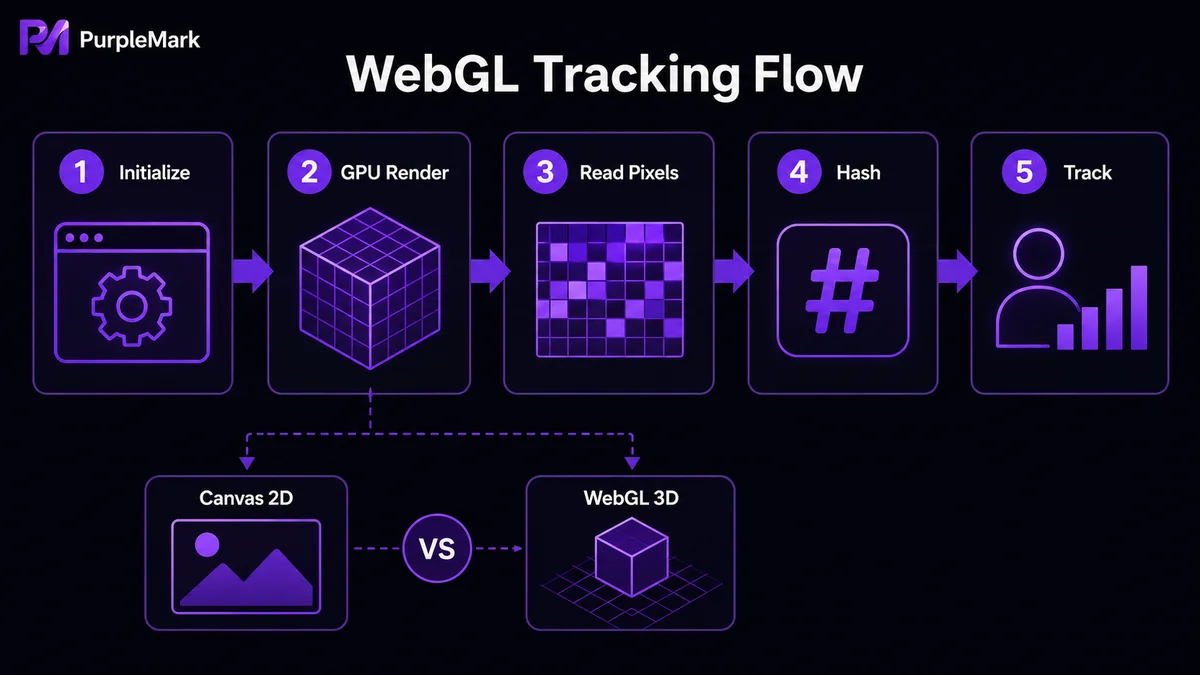
WebGL is a JavaScript API for rendering 2D and 3D graphics with the browser and GPU. Differences in GPUs, drivers, browsers, pixels, and anti-aliasing can produce a distinctive result. A site can hash that result and use it for analytics, fraud detection, personalization, or cross-site advertising.
Canvas fingerprinting focuses on 2D drawing output; WebGL fingerprinting relies on more complex 3D rendering. Clearing cookies or changing an IP address may not remove these device characteristics.
Reducing the risk
You can disable WebGL where appropriate: in Chrome, review WebGL-related options at chrome://flags; in Firefox, set webgl.disabled to true at about:config. This can break some 3D pages. Privacy extensions such as Privacy Badger and NoScript can also limit tracking scripts.
For legitimate, compliant multi-account work, PurpleMark can keep each account in a separate browser environment and allow controlled configuration of fingerprint dimensions such as WebGL metadata. Environment isolation supports privacy and orderly operations; it must not be used to evade platform controls or violate rules.
Conclusion
Understanding WebGL fingerprints makes privacy choices more deliberate. Use browser controls and privacy extensions for everyday browsing, and use isolated, well-managed environments when compliant account operations require them.


