
Google AdSense is an ad monetization platform for website owners and content creators. It has a relatively low barrier to entry and works well for small and mid-sized sites. This guide explains what AdSense is, how it works, and walks you through applying, adding the code, configuring ads, and improving revenue.
If you run a website or publish content regularly, you have probably wondered how to turn traffic into revenue. Google AdSense is often one of the first options to consider. It has a relatively low barrier to entry, fits naturally with content, and is especially suitable for small and mid-sized websites and individual creators. This guide explains what AdSense is, how it makes money, and takes you through the complete process from application to revenue optimization.
What Is Google AdSense?
Google AdSense is an advertising service provided by Google for website owners and content creators. You can embed Google ads on a website, blog, or YouTube video and receive a share of the revenue when visitors view or click those ads.
Its core idea is “smart matching.” You place a piece of ad code on a page, and Google automatically shows ads that are most relevant to the website content and visitors' interests. Compared with some ad platforms that require high traffic, AdSense has a lower entry threshold and is well suited to small and mid-sized websites. At the same time, it emphasizes original, valuable content, so content quality is an important part of the review process.
How Does AdSense Make Money? Two Terms to Know
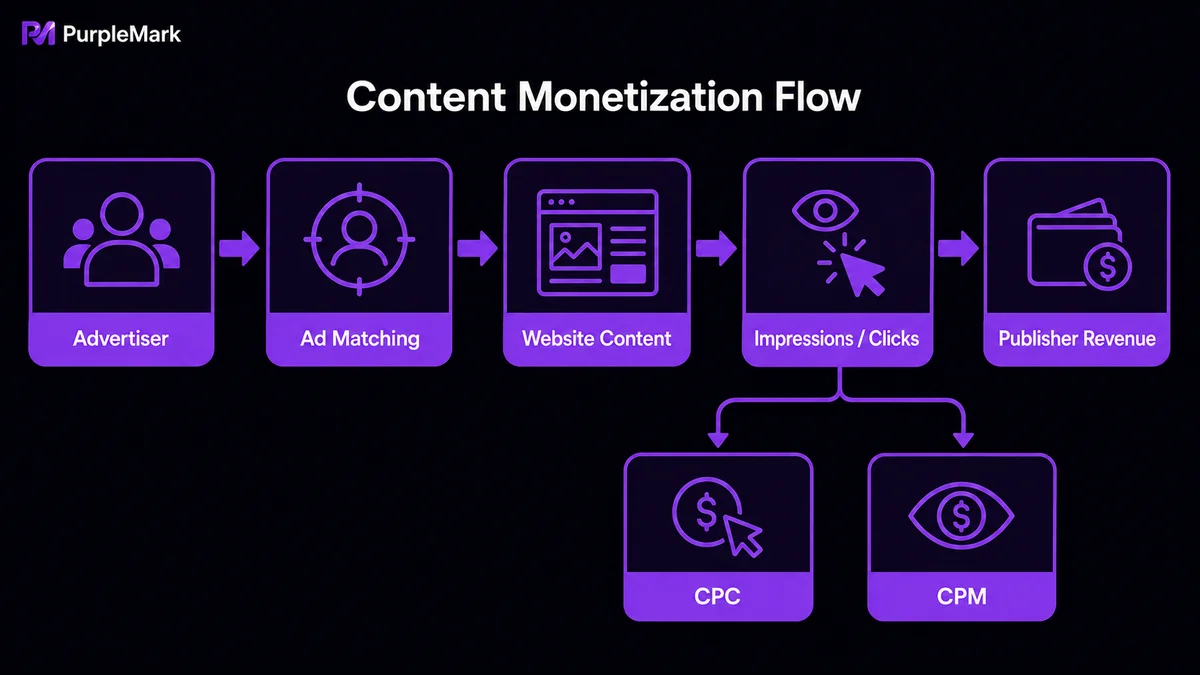
In simple terms, advertisers pay Google, and you receive a share based on ad clicks and impressions. To keep ads relevant, AdSense automatically analyzes your content and matches suitable ads. Revenue mainly comes from two pricing models:
- CPC (cost per click): You earn revenue each time a visitor clicks an ad. The number of ad clicks divided by impressions gives the click-through rate (CTR). A higher CTR usually means the ads are more relevant to readers and can also lead to higher revenue.
- CPM (cost per thousand impressions): You earn a fixed amount for every one thousand ad impressions, regardless of whether visitors click. This is suitable for sites with high traffic but lower click-through rates.
With both models working together, more website traffic and stronger user engagement will generally lead to higher total revenue.
How to Get Started with AdSense
Eligibility requirements
- Your website must contain original content and must not include plagiarized or infringing materials. AdSense policies explicitly prohibit placing ads on sites that violate copyright.
- Your website should have some traffic. There is no strict minimum, but more visitors usually mean more revenue potential.
- You must be at least 18 years old and have a valid Google account.
Create an account
- Go to the AdSense website and click “Get started.”
- Sign in with your Google account and enter information such as your website URL and language.
- After entering the main dashboard, complete the two key areas: payments and website setup.
Set up payment information
Enter the bank account, name, address, and other details used to receive payments, and make sure they match your bank account information. It is best to provide your actual residential address because Google will send a physical verification letter to confirm it.
Connect your website to AdSense
After adding the URL of the website where you want to display ads, Google needs to verify that you own the site. You can do this by embedding a verification/ad code generated by AdSense in the website's HTML. If you use a CMS such as WordPress, you can also complete this step with a compatible plugin. The code is usually placed in the area of the page where ads will appear, for example inside the <header> or <footer> tags.
Once registration and ownership verification are complete, Google will review your site. If it passes, you can begin serving ads.
How to Set Up AdSense Ads
AdSense ads fall into two main categories:
- Auto ads: You only need to add one piece of code to each page. Google automatically optimizes ad positions and quantity based on user behavior and page layout. You can enable this in the dashboard under “Ads → Auto ads.”
- Manual ads: You control the ad type, size, and placement yourself. Under “Ads → Ad units,” create a unit, choose formats such as display ads, in-article ads, or in-feed ads, customize the size, and paste the code exactly where you want the ad to appear.
Ways to Increase AdSense Revenue
1. Keep publishing high-quality content
Traffic is the foundation of revenue. Consistently creating valuable content and doing solid SEO can bring more impressions and clicks. If you operate across multiple platforms or vertical channels and manage several blogs or content accounts, a browser environment management tool can give each account an independent environment with a separate fingerprint and cookies. This reduces repeated login switching and helps prevent unnecessary account-linking risks caused by mixing environments. For example, PurpleMark can give each content project its own clean browser workspace. Expanding a content portfolio while staying compliant can significantly increase audience reach and traffic.
2. Test ad placements repeatedly
Ad placement directly affects clicks. Common effective placements include above the content, within the body, in the sidebar, and at the end of the content. Keep ad sizes visually consistent with the text size and line spacing, and use repeated A/B testing to find the combination with the best click-through rate.
3. Promote content through multiple channels
Driving traffic from social platforms such as Facebook, Twitter/X, and TikTok, as well as email marketing, can increase exposure. Be careful to avoid invalid traffic. Artificially generating clicks or encouraging users to click ads can trigger risk controls or even account suspension. The proper approach is to earn natural traffic with real content and multi-channel distribution so ad impressions and clicks remain legitimate.
Summary
Google AdSense is a relatively accessible way to monetize content. Build strong content and grow traffic first, then complete the application, verification, code placement, and optimization process. Over time, revenue can gradually take shape as your content and audience grow. If you operate multiple content accounts, a tool such as PurpleMark can keep account environments separated and make multi-track content production more organized and manageable.


