
LinkedIn’s professional data is a gold mine for B2B advertising. This guide walks you through creating a LinkedIn ad account, understanding Sponsored Content, Text Ads, and Dynamic Ads, and completing the full campaign process from objectives and audience targeting to bidding, creatives, monitoring, and optimization.
If you want to reach B2B decision-makers precisely on LinkedIn, paid advertising is one of the most efficient routes. Unlike broadly relying on connections, LinkedIn Ads derives its core value from professional-data targeting—you can filter audiences by job title, industry, company size, skills, and more. This guide takes you from account creation through format selection and campaign optimization.
How to Create a LinkedIn Ad Account
1. Open Campaign Manager After signing in to LinkedIn, click "Advertise" under "For Business" in the upper-right corner to enter LinkedIn Campaign Manager.
2. Create an Ad Account In Campaign Manager, fill in the account details:
- Account name: Use your company name if helpful so multiple accounts are easy to manage later;
- Time zone and currency: The time zone determines reporting times and the currency is used for billing. Once selected, they cannot be changed, so confirm them in advance;
- Associated Company Page: Select an existing company page.
3. Add a Payment Method After the account is created, you automatically receive Account Manager and Billing Admin permissions. Go to Account Settings → Billing → Add payment information to bind a payment method, and you can also assign admin or campaign permissions to team members.
What LinkedIn Ad Formats Are Available?
1. Sponsored Content
Sponsored Content appears natively in users’ feeds and looks similar to regular posts, except it carries a “Promoted” label. It is the most widely used type. Seven common subformats fit different use cases:
- Single image ads: One image + headline + description + landing page, suitable for product promotion and white paper downloads;
- Carousel ads: Multiple swipeable images, each of which can have its own headline and link, suitable for storytelling and showcasing multiple features;
- Video ads: Explain complex information quickly, suitable for brand promotion, product introductions, and event recaps;
- Document ads: Users can download PDFs, PPTs, or white papers directly and combine them with Lead Gen Forms, suitable for B2B content marketing;
- Event ads: Display a title, time, location, and registration button, suitable for seminars and launch events;
- Thought leader ads: Amplify content built around expert or executive viewpoints, suitable for executive thought leadership and product interpretation;
- Message ads / Conversation ads: Reach users’ inboxes directly through private messages. Conversation ads support multiple CTA choices and work well for events, trials, and business partnerships.
2. Text Ads
Text Ads are small banners shown on the right side or at the top of desktop pages. They are charged by click (CPC) or impression (CPM) and consist of a short headline, description, image, and CTA. They are suitable for brand awareness and website traffic.
3. Dynamic Ads
Dynamic Ads are personalized display ads that automatically insert public information such as the viewer’s name, profile photo, and job title, making the ad feel “written for me” and often improving engagement. They appear in the right sidebar on desktop and are suitable for follower growth, recruitment promotion, and brand interaction.
How to Create and Run a LinkedIn Ad
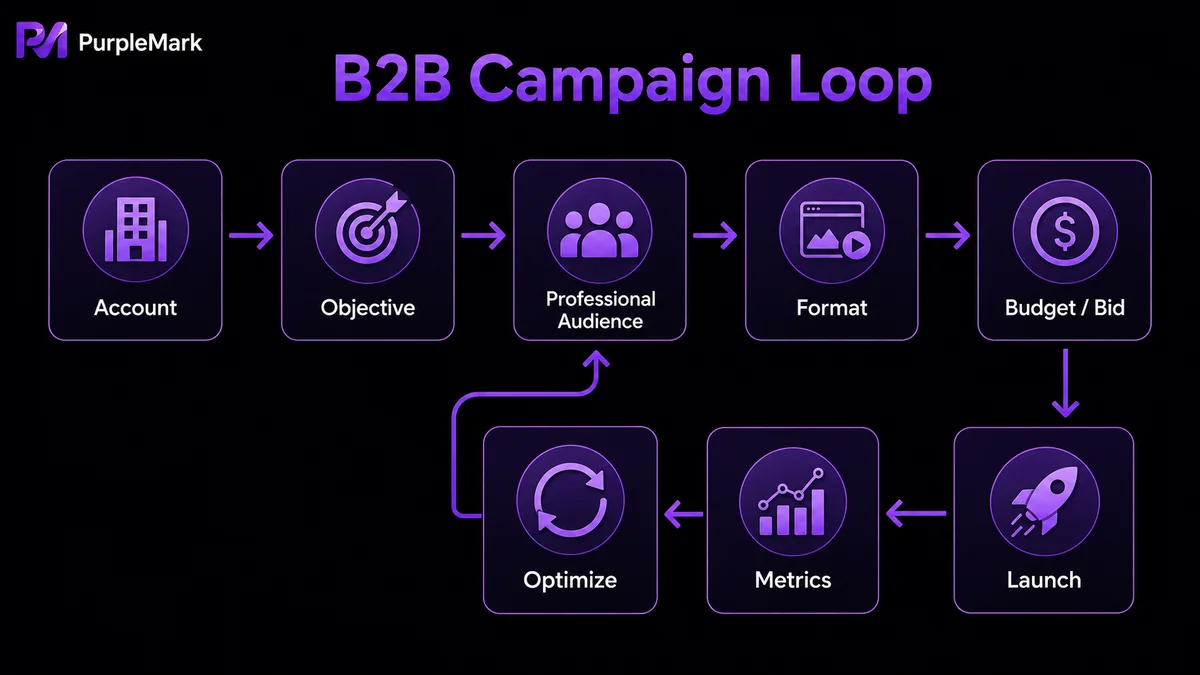
1. Set the Campaign Objective First define what you want to achieve: brand awareness, engagement/website visits, lead generation, or registrations. B2B beginners can start with “Brand Awareness” or “Website Visits.” The clearer the objective, the easier it is to align targeting, bidding, and creatives.
2. Lock in the Target Audience LinkedIn’s advantage is precise professional targeting. You can filter by job title, industry and company size, location, experience and education, skill keywords, company name, or followers.
3. Choose the Ad Format Match the format to the goal: use Sponsored Content for content promotion and Message Ads for lead-generation scenarios. Start by testing 1–2 primary formats.
4. Set Budget, Bid, and Schedule LinkedIn uses an auction system and supports CPC (cost per click), CPM (cost per thousand impressions), or CPL (cost per lead, used for form ads). Set a daily or total budget, define start and end dates, and use the system’s recommended bid range to balance reach and cost.
5. Design the Ad Creative Creative quality drives clicks. Prepare a Headline, Intro Text, image or video, and CTA. LinkedIn users tend to prefer professional, information-dense content, so avoid an overly promotional tone.
6. Launch and Monitor Performance Once approved, launch the campaign and monitor impressions, click-through rate, and conversion rate in Campaign Manager in real time. Review performance every few days and optimize creatives and bids.
Managing Multiple Ad Accounts/Company Pages Compliantly
If a company or agency needs to maintain multiple client ad accounts or Company Pages at the same time, keep one important rule in mind: LinkedIn clearly allows each real person to have only one personal account. Individuals should not mass-register duplicate identities for deceptive purposes. A compliant multi-account scenario is when an agency is authorized by clients to operate multiple clients’ ad accounts and Company Pages. In that case, the key is to fully isolate each client’s account environment to prevent data or actions from crossing between clients.
This is where multi-account environment management tools such as PurpleMark can help:
- Isolated environments: Create a separate browser environment for each client’s ad account/Company Page so cookies, cache, and local storage are not shared, reducing cross-client data contamination;
- Fingerprint and environment customization: Configure fingerprints, time zones, and languages appropriate to each target market to reduce the chance of legitimate cross-region activity being misclassified;
- Proxy/IP management: Bind each account to a proxy in the corresponding region so the login IP matches the account’s location and cross-border campaign operations are more consistent;
- Unified batch management: Manage multiple client accounts in one interface, batch-login with one click, use groups and member permissions to clarify who manages which client, and keep operation logs.
Frequently Asked Questions
What are LinkedIn Ads, and who should use them? They are LinkedIn’s official paid promotion tools, using professional data to reach audiences precisely within a professional social network. They are particularly suitable for B2B companies, cross-border e-commerce, recruitment, and businesses seeking stronger brand awareness and lead conversion.
How do I choose the right ad type? Choose based on objectives and audience behavior: use Sponsored Content or Dynamic Ads for brand awareness, Message Ads/Lead Gen Forms for lead collection, and Thought Leader Ads/content promotion for executive branding.
How much do LinkedIn Ads cost? LinkedIn uses an auction model with bids based on clicks, impressions, or leads, and budgets can be set flexibly. Because audience targeting is highly precise, overall costs are often higher than on other social media platforms.


