
Instagram is a key channel for visual brands expanding overseas. This guide explains which businesses are suited to Instagram ads, how to configure a professional account and Meta Pixel before launch, how to choose among Image, Carousel, Stories and Reels ads, and how to optimize performance using CTR, CPA and ROAS.
Instagram has become an important channel for brands expanding overseas, promoting independent stores, and running cross-border marketing. But beginners often run into problems after they start advertising: they are unsure which objective to choose, budgets are spent without satisfactory results, they do not know how to optimize after launch, or account issues appear when multiple accounts are used. This guide covers the full Instagram Ads workflow—from preparation and ad creation to ongoing optimization and multi-account management—to help you connect the key steps.
Why are more businesses choosing Instagram ads?
The advantage of Instagram ads is that the same platform can handle brand promotion, product showcasing, and advertising. While users browse images, Reels, or Stories, they have already completed the first step of “seeing the product → becoming interested.” That is why businesses that depend heavily on visual presentation—such as cross-border e-commerce, independent stores, fashion, beauty, home furnishing, and travel—often use Instagram to build brand awareness while also driving website visits or order conversions.
Different businesses also pursue different goals. A new product launch may need rapid reach; once growth stabilizes, a brand may focus more on engagement and community operations; an independent store that already has some traffic may prioritize conversion goals such as website visits, purchases, or leads. Many brands follow a “validate first, then scale gradually” approach: prepare several sets of creatives for small-scale tests, then increase the budget step by step and concentrate resources on the better-performing ads.
What should you prepare before launching ads?
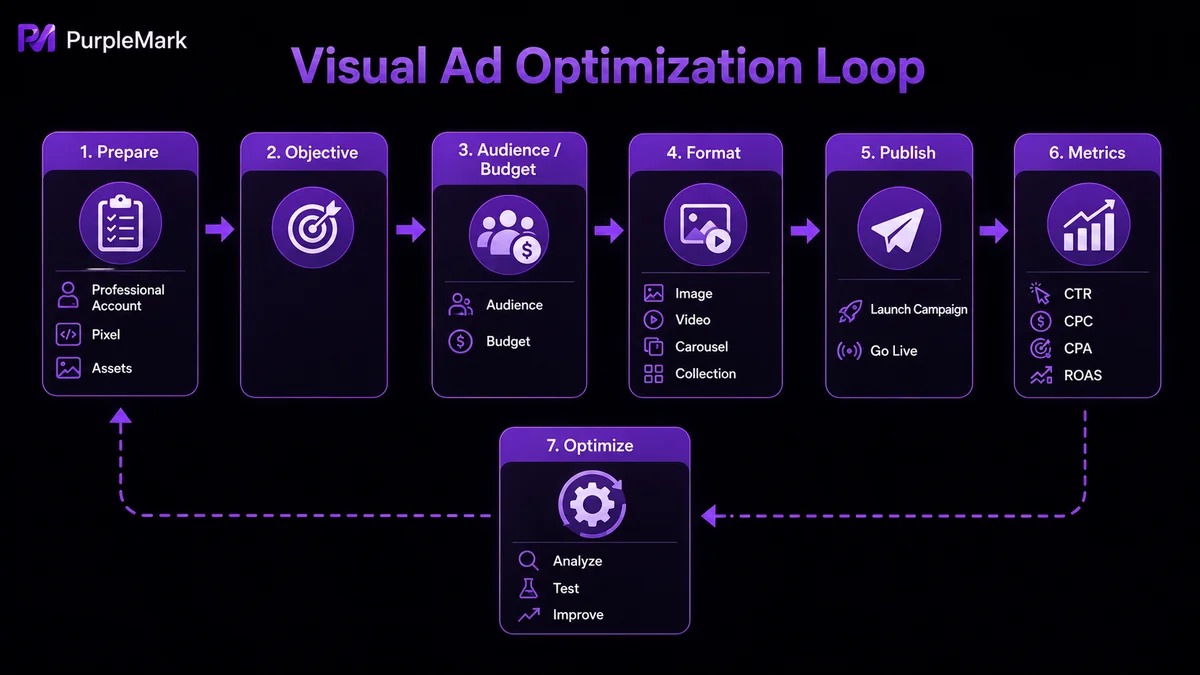
Whether Instagram ads can run smoothly depends on the preparation. The ad account, Instagram profile, and website data are connected, and all are necessary:
- Account setup: Instagram ads are managed through Meta Ads Manager. First switch Instagram to a professional account (business or creator account), connect it to a Meta business account, and configure the ad account and payment method. Business entities may also need to complete information verification as required.
- Data setup: If your objective is website visits, purchases, or leads, deploy Meta Pixel in advance to record actions such as visits, add-to-cart events, purchases, and form submissions, providing data for later optimization.
- Creative preparation: Prepare multiple versions of images, videos, copy, CTAs, and landing pages in advance so you can quickly run creative tests after launch and gradually identify better combinations.
How do you create an effective Instagram ad?
Performance depends not only on completing the setup steps, but also on whether each option matches your business objective.
Set the right advertising objective
The advertising objective determines which users the system prioritizes and what result it optimizes for. Choose “Awareness” when you want exposure, “Traffic” when you want to drive people to an independent store, and “Sales” or “Leads” when the goal is purchases, forms, or customer acquisition. Do not try to “cover everything”; define the direction around the actual business goal.
Define your audience, budget, and placements
Build the audience around your real customer base; increase the budget gradually according to test results; and initially use Automatic Placement so the system can distribute delivery automatically. Once enough data is collected, decide whether to adjust placements manually based on Feed, Stories, and Reels performance.
Choose the right mix of formats
Instagram offers multiple ad formats, and the same content can produce very different engagement when presented differently:
- Image Ads: Suitable when the selling point is clear, such as a new product, promotion, or brand image. They are inexpensive to produce and easy to launch quickly for testing.
- Video Ads: Suitable for demonstrating product functions, use cases, or brand stories, and are common in industries such as beauty, home furnishing, and consumer electronics where demonstrations are useful.
- Carousel Ads: Display multiple images or products in one ad, making them suitable for independent stores, e-commerce, and content with several selling points.
- Stories Ads: Full-screen presentation suited to limited-time promotions, new products, and other activities that emphasize immediate interaction.
- Reels Ads: Closer to Instagram’s native content ecosystem and often better suited to generating viewing time and interaction.
In practice, the same creative set is often adapted to several formats and launched in multiple versions at the same time, with the better combinations retained based on click and conversion data.
How can you continuously optimize Instagram ads?
Launching the ad is not the end. With the same budget, different optimization strategies can produce very different reach, click, and conversion results.
Which metrics should you use to evaluate performance?
CTR (click-through rate), CPC (cost per click), CPM (cost per thousand impressions), CPA (cost per acquisition), and ROAS (return on ad spend) broadly describe how an ad performs from exposure through conversion. A low CTR may mean the creative or audience is not attractive enough. If CTR is high but CPA is also high, check the landing page and conversion flow first. If ROAS keeps falling even while reach and clicks remain stable, ad spend may already be hurting profitability. Use several metrics together to determine whether the problem lies in the creative, audience, or landing page.
How do you find the best ad combination?
Test only one variable at a time. Common approaches include A/B testing two versions; keeping the creative unchanged while adjusting only the audience; changing only the creative or copy while leaving everything else unchanged; and, once the creative and audience are stable, comparing Feed, Stories, and Reels placement performance.
How should you adjust at different stages?
- Learning phase: After a new ad launches, Meta collects data to find an audience. Fluctuations in the first few days are normal. Avoid frequently changing the budget, audience, or content, or the system may re-enter the learning phase.
- Increase budget: After conversions remain stable for a sustained period, increase the budget gradually. Progressive scaling is more conducive to maintaining performance.
- Pause poor ads: Ads that continue spending without clicks or conversions should be paused promptly, and the budget should be shifted to better-performing combinations.
- Duplicate and retest: If an ad performs well but you want to test a new audience or creative, duplicate the original instead of editing it directly. This preserves data and makes comparison easier.
- Rebuild the Campaign: If performance remains weak for a long time or the business objective changes, replanning the objective and strategy is usually more effective than repeatedly modifying the same campaign.
How can teams manage multiple Instagram ad accounts efficiently and compliantly?
A single ad account can cover only a limited range of business needs. As brands expand, markets increase, or client numbers grow, many teams operate multiple Instagram ad accounts—for example, separate accounts for different brands, clients, or markets. Once the number of accounts increases, continuing to use a single-account operating model becomes inefficient for collaboration and can also create multi-account association risks, because cookies, cache, and local storage in a shared browser can continue to cross-influence sessions, while Meta may also use fingerprints, devices, and network configurations when assessing account associations.
For compliant multi-account operations, the key is therefore to run each ad account in an independent and stable environment:
- Independent browser environments: Create a separate environment for each ad account and store its fingerprint, cookies, cache, and proxy configuration separately, so accounts operate in isolated environments and association risks are reduced at the source.
- Organized team collaboration: Group accounts by brand, client, or project and assign access according to each member’s responsibilities, avoiding shared passwords and ad hoc handoffs that can cause repeated logins, mistaken operations, and unclear responsibility.
- Standardize automation: Use window synchronization or RPA for fixed repetitive tasks such as signing in to the backend, opening accounts, and switching environments, allowing the team to focus more on ad testing and strategy optimization.
PurpleMark provides this type of environment management platform. Within a workspace, you can centrally create and maintain browser environments, configure proxy and fingerprint parameters for different accounts, and organize daily operations through grouping, sharing, member permissions, operation logs, window synchronization, and RPA. It is suited to teams running campaigns across multiple brands, markets, and clients.
Compliance reminder: This section refers to brands or agencies operating independent ad accounts compliantly for their respective brands, clients, and markets, which is an enterprise account organization method supported by Meta Business. Advertise under genuine business entities in accordance with Meta policies, and do not use tools to bypass review or mass-create fake accounts.
Frequently Asked Questions
How much should I budget per day for Instagram ads? There is no fixed answer. For a first campaign, start with a small budget that is sufficient for testing and adjust gradually according to your objective and data. The initial priority is not how much you spend, but whether the audience, creative, and objective match.
How long does it take for ads to start producing results? Most ads enter a learning phase after launch, and fluctuations during the first few days are normal. If impressions are already being delivered, observe first instead of frequently changing the budget or audience because of short-term data. Optimize after the system has accumulated enough data.
Why is my ad getting no impressions? First confirm that the ad has passed review and that the budget, audience, and objective are reasonable. If there are still no impressions, consider broadening the audience, replacing the creative, or adjusting the budget and placements, then continue observing.
What are common reasons for ad review failure? They are often related to the creative, copy, or landing page—for example, restricted industries, wording that conflicts with policy, or a landing page that does not match the ad. Review the reason provided by the platform, make targeted changes, and resubmit the ad for review.


